
Use Cases by Role & Industry
Excelmatic is designed to adapt to your specific business context. Below are real-world scenarios showing how different professionals leverage our AI to save hours of manual work.

💰 Finance & Accounting
Precision and auditability are key in finance. Excelmatic ensures your formulas are consistent and your audits are fast.
- Expense Audit: "Highlight all rows where 'Amount' > $500 and the 'Category' is 'Misc'."
- Tax Preparation: "Categorize 'Transactions' by 'Tax Code'; sum 'Amount' for each group."
📈 Marketing & Growth
Turn fragmented campaign data into high-level performance dashboards without touching a Pivot Table.
- Campaign ROI: "Calculate ROI = (Revenue - Spend) / Spend; sort by 'ROI' descending."
- Lead Scoring: "Assign points based on 'Source' and 'Page Views' to score leads."
🤝 Sales & Account Management
Manage your pipeline and track commissions with simple natural language commands.
- Pipeline Health: "Filter deals closing in the next 30 days."
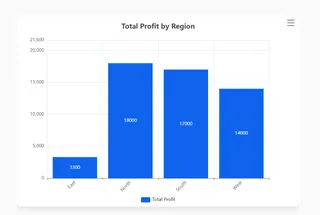
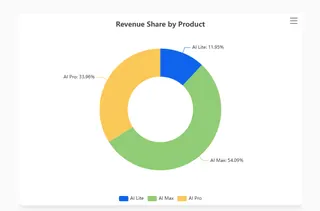
- Regional Analysis: "Show a regional breakdown of profit and revenue share by product."
⚙️ Operations & Supply Chain
Keep your inventory lean and your logistics smooth using predictive analysis.
- Inventory Alerts: "Identify SKUs where 'Current Stock' < 'Reorder Point'."
- Logistics: "Calculate average 'Shipping Duration' by 'Courier'."
🏢 Industry Specific Solutions
| Industry | Common Challenge | Excelmatic Solution |
|---|---|---|
| E-commerce | Messy product exports | "Clean titles and standardize prices." |
| Healthcare | Non-standardized logs | "Format dates and group by department." |
| HR | Filtering candidates | "Score candidates by experience and skills." |
🚀 Creating Your Own Workflow
Try this "Universal Starter" prompt:
Analyze this file: identify the top 3 trends by [Your Column], calculate growth, and create a dashboard.
Next Step: Ready to see these in action? Visit the Prompt Library to copy-paste these templates.