
Image/PDF to Excel
Stop manual data entry. Excelmatic provides dedicated zones for converting static files into dynamic spreadsheets. Our AI automatically detects tables, headers, and data types the moment you upload your file—no complex prompting required.
Locate the Tool
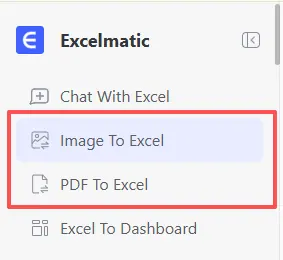
To get started, select the appropriate mode from the Excelmatic Sidebar. This ensures the AI applies the correct specialized logic for either image-based OCR or multi-page PDF reconstruction.
🖼️ Image To Excel
Best for: Instant captures, digital screenshots, and physical whiteboard sessions.
Supported Formats: .png, .jpg, .jpeg
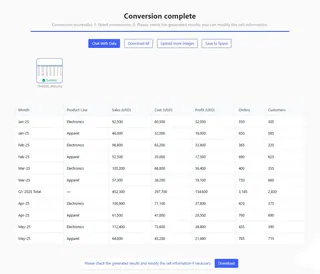
1. Screenshots of Online Tables
The Problem: You captured a screenshot of a web dashboard or a software table because the HTML was uncopyable or broken.
How it Works: Select Image To Excel and upload your file. Excelmatic instantly reconstructs the grid with perfect alignment.
2. Handwritten Notes
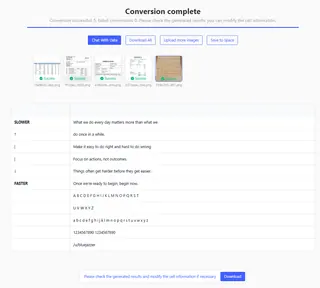
The Problem: You have a photo of a whiteboard or a notebook from a brainstorming session.
How it Works: Upload to Image To Excel. The AI transcribes handwriting into digital cells and highlights ambiguous characters for your review.
📄 PDF To Excel
Best for: Official business documents, bank statements, and multi-page reports.
Supported Formats: .pdf (Scanned or Digital)
Scanned Invoices & Business Reports
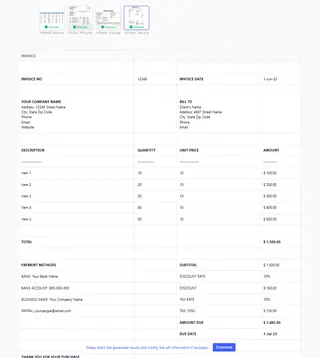
The Problem: You need to extract structured data from a multi-page PDF report or a scanned vendor invoice for analysis.
How it Works: Upload your file to PDF To Excel. The system identifies headers like "Date," "Item," and "Total," while validating the mathematical accuracy of every row.
Key Capabilities
- Instant Extraction: No prompts required; the conversion starts immediately upon upload.
- Structure Preservation: AI recognizes borders and alignments to recreate the original layout perfectly.
- Smart Header Detection: Automatically identifies and freezes header rows for immediate use.
- Error Flagging: Any ambiguous characters are highlighted for your quick manual review.
Next Step: Explore AI commands and workflows in Prompts & Library.