
Account & Subscription
Whether you are a casual user or a data power user, Excelmatic offers flexible plans to match your workflow. This guide explains our membership tiers, how to upgrade, and how to manage your subscription.
1. Membership Tiers (VIP Levels)
We offer three distinct VIP tiers. Choosing the right one depends on your file volume and your need for AI-powered features.
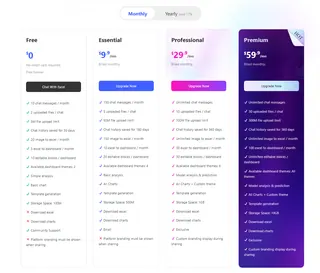
Permissions Comparison
| Feature | Essential | Professional | Premium |
|---|---|---|---|
| Best For | Individuals & Basic Tasks | Professionals & Daily Use | Power Users & Teams |
| AI Chat Messages | 150 / month | Unlimited | Unlimited |
| Image/PDF to Excel | 150 / month | Unlimited | Unlimited |
| Excel to Dashboard | 10 / month | 30 / month | 100 / month |
| File Uploads | 5 files per chat | 10 files per chat | 30 files per chat |
| Max File Size | 50 MB | 100 MB | 300 MB |
| Cloud Storage | 500 MB | 1 GB | 10 GB |
| Processing Speed | Standard | Fast | Priority (Ultra Fast) |
2. Flexible Billing Options
You can subscribe to any tier based on your preferred timeframe. The Lifetime Plan offers the best value for long-term users.
- Monthly: Flexibility to cancel anytime.
- Yearly: Discounted rate (Save up to 17% vs. Monthly).
- 3-Year Bundle: "Buy 2 Years, Get 1 Free" promotion.
- Lifetime: One-time payment for permanent access. No recurring fees, ever.
Note: For current pricing in your local currency, please visit our Pricing Page.
3. How to Upgrade Your Plan
Ready for more power? Upgrading is simple:
- Visit Pricing: Go to the Pricing Page.
- Select Tier: Click on the Professional or Premium tab.
- Choose Cycle: Select Monthly, Yearly, or Lifetime.
- Checkout: Complete the payment. Your account permissions will be updated instantly.
Pro-rated Upgrades: If you upgrade a current monthly or yearly subscription, our system automatically calculates the remaining value of your old plan and applies it as a discount toward your new tier.
4. Account Management FAQ
How do I cancel my subscription?
To cancel your plan, click the “Manage Subscription” button on your profile popup menu, you'll be taken to Stripe, where you can cancel your billing, you can also change your plan or payment method there.
Can I upgrade from "Essential Lifetime" to "Professional Lifetime"?
Yes. If you have already purchased a Lifetime plan and wish to move to a higher tier, please contact [email protected]. We will provide a custom link that deducts your previous payment from the new price.
Is my data safe if my subscription expires?
If your subscription ends, your account reverts to the Free tier. Your existing files remain in our cloud until they exceed the Free tier storage limit (50MB). We recommend downloading important files before your VIP status expires.
Still have questions? Check our Troubleshooting & FAQ or contact us directly at [email protected].
Ready for VIP Performance?
Upgrade your plan to unlock unlimited chat, high-volume file processing, and advanced dashboard features today.
💎 Upgrade to VIP