Key Takeaways:
- AI makes predictive analytics accessible to everyone. Modern tools like Excelmatic allow anyone to generate reliable, data-driven forecasts in minutes, eliminating the need for coding or advanced statistics skills.
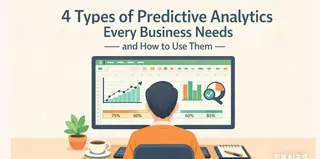
- Predictive analytics follows a clear four-step process. Start by defining your goal, prepare clean data, choose the right modeling approach, and finally interpret the results to drive strategic decisions.
- There are three main approaches to predictive analytics. You can use traditional coding, integrate with existing BI tools, or choose the fastest path through conversational AI platforms like Excelmatic.
- AI-powered platforms offer distinct advantages. Tools like Excelmatic provide instant forecasts with plain-English explanations, automate data cleaning, and allow natural language interaction, making predictive insights both fast and actionable.
It's that time of year again. The holidays are approaching, but before you can relax, there's the looming deadline for the annual report — and your boss is already leaning in with the question: "So, what's the sales forecast for next year?"
This simple ask can turn a seasoned manager's blood cold. Guess too high, and you've just set an impossible target for your team. Guess too low, and you look out of touch. This isn't just about sales — it's about marketing budgets, inventory levels, staffing plans, and financial projections. In every department, forecasting core metrics is how we prepare, plan, and set realistic goals.
You know the answer lies in your data, not in your gut. But the thought of wrestling with complex statistics or learning to code in Python feels like a mountain to climb. What if you could get a reliable, data-driven forecast without becoming a data scientist?
Here's the good news: you can. Modern tools have transformed predictive analytics from an expert-only skill into an accessible business superpower. This guide will show you the clear, step-by-step path from your question to your first forecast — in about half an hour.
Step 1: Define Your Predictive Analytics Goal
Before we touch a single tool, let's shift our mindset. A forecast isn't a mystical revelation; it's a logical conclusion waiting in your historical data. Your job isn't to invent the future, but to uncover the pattern that's already there.
Think of the most important number you track. Is it weekly revenue? Monthly active users? Daily support tickets? That's your starting point. For your first project, choose one metric where you have at least a few months of past data. This becomes your mission: to see where that line on the graph is headed next.
Pause here. Actually write this down: "I will forecast Your Metric for the next Timeframe." This simple act transforms an abstract worry into a concrete task.
Step 2: Prepare Your Data for Predictive Modeling
Imagine asking a brilliant analyst to make a prediction, but handing them a pile of crumpled, coffee-stained notes. That's what messy data looks like to any analysis tool. The good news? "Clean" data isn't about perfection; it's about consistency.
A clean dataset is a simple table. One column for dates, another for your metric. Your job is to scan for blanks, correct obvious typos, and make sure everything is formatted the same way. This is the least glamorous but most crucial step.
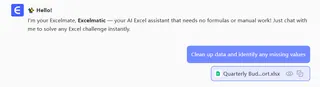
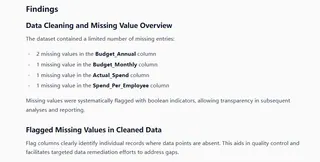
If the thought of manually scrubbing rows sounds tedious, you're in luck. Modern platforms like Excelmatic can do this heavy lifting for you. Upload your spreadsheet, and the AI will instantly spotlight missing values or odd entries, guiding you to fix them in clicks. It turns a hours-long chore into a five-minute task, ensuring your foundation is solid before you build anything on top of it.
Step 3: Choose Your Predictive Modeling
Here's where your journey forks. The path you choose defines your entire experience. Let's be honest about what each one really involves.
| Path | Coding | BI Tools | AI Platform |
|---|---|---|---|
| How it works | Write code in Python/R | Use forecast button in BI tool | Ask questions in plain English |
| Best for | Full control & custom models | Existing dashboard users | Fast, no-code forecasting |
| Time to first forecast | Weeks to months | Hours to days | Minutes |
| Skills needed | Programming & statistics | BI tool knowledge | Business questions |
| Output | Custom model | Chart in dashboard | Chart + explanation |
1. The Coding Path: For Maximum Control & Custom Models
This is the path of the craftsperson. Using Python or R, you write every single instruction — from importing data to testing complex statistical models. The upside is ultimate control. The downside? You're essentially learning a new language and its entire grammar before you can speak your first sentence. For a quick, first forecast, this is like building a watch to tell the time.
2. The BI Tool Path: Forecasting Within Your Dashboard Ecosystem
Maybe you already live in tools like Tableau or Power BI. They have forecast buttons hidden in their advanced menus. If you're already a dashboard wizard, this can feel like a natural extension. But often, it requires wrestling with data models and configuration settings. It's powerful, but it asks you to meet the tool on its own technical terms.
3. The AI Platform Path: Conversational Predictive Analytics
This is the new way. Platforms like Excelmatic, Akkio, or Obviously AI are designed with one goal: to answer your "what will happen?" question as directly as possible. There are no complex menus to master. You have a conversation. You upload your tidy data and literally ask, "Predict our revenue for the next quarter."
The platform handles the model selection, the math, and the statistics in the background. What you get is the answer, presented in a clear chart with a plain-language explanation. It's built for the person who owns the business problem, not the technical toolkit.
Step 4: Interpret Forecast Results & Drive Decisions
A forecast delivered as just a number is half the story. The real value is in understanding the why and the what if.
A traditional tool might give you a trend line and a confusing statistical readout. A modern AI platform explains it to you. It will show the forecast with a confidence interval — a shaded band that tells you, "We're 90% sure the actual result will land in this range."

This is where it gets powerful. Since you're in a conversation, you can ask the natural next question. See a dip in the forecast for July? Ask, "What's driving the predicted slowdown?" The AI can analyze patterns and point out, "Historically, sales have dipped in July when marketing spend decreased in May." Suddenly, your forecast isn't just a number; it's an insight that tells you where to focus your energy now.
Start Your First Predictive Analytics Project
Let's be practical. Your choice depends entirely on your goal for the next hour.
- Choose Code if you're on a long-term journey to become a data expert.
- Choose BI Tools if your forecast is a small piece of a much larger reporting ecosystem you already manage.
- Choose an AI Platform if you want to go from question to actionable insight in one sitting, focusing all your brainpower on the business logic, not the software manual.
If the last option sounds right, your next steps are simple:
- Take the metric you wrote down earlier.
- Get your historical data for it into a clean table (even a simple CSV file).
- In a platform like Excelmatic, you'd create a new project, upload that file, and type your question into the chat.
- In minutes, you're reviewing a visual forecast and asking the follow-up questions that matter to your business.
Conclusion: The New Era of Predictive Analytics
The era of forecasting as an exclusive, technical skill is over. The tools have evolved. Today, the most important skill is knowing how to ask the right question of your data.
Your first forecast, even a simple one, changes your perspective. It moves you from reacting to the past to actively planning for a range of possible futures. It turns anxiety into strategy.
Why not start that shift today? Ditch the complexity and start with a conversation.
See how a tool like Excelmatic can help you transform the data you already have into the clarity you need — in about the time it takes to finish your coffee.
Frequently Asked Questions (FAQ)
Q: How much historical data do I actually need to make a useful forecast?
A: As a rule of thumb, you should have at least 12—24 months of consistent historical data for reliable annual forecasting. For shorter horizons (e.g., weekly or monthly), a few months of data may suffice — though more data generally improves accuracy.
Q: Can I trust a forecast made by an AI platform compared to one built by a data scientist?
A: For most common business forecasting needs — such as sales, demand, or web traffic — AI platforms can deliver highly reliable results. They use proven statistical and machine learning models automatically. The key advantage is speed and accessibility, allowing you to iterate and ask "what-if" questions in real time.
Q: Can I use predictive analytics for metrics beyond sales, like customer churn or inventory needs?
A: Yes. Predictive analytics can be applied to any time-based metric: customer churn, support ticket volume, inventory demand, employee turnover, etc. The process is the same — clean historical data + a clear question.