Key Takeaways:
- The Right Tool Lowers the Barrier: For beginners, the main hurdle is choosing an accessible tool, not mastering complex theory. A free, beginner-friendly platform simplifies the process so you can focus on solving problems.
- Know What to Look For: An ideal starter platform has a clear visual interface, provides guided workflows, automates complex tasks, works with familiar data (like Excel), and offers good learning resources.
- Three Distinct Free Paths: This guide compares three excellent free starting points: Excelmatic for conversational ease, RapidMiner Studio for visual learning of the full process, and Azure Machine Learning Studio for automated, powerful modeling.
- Start with a Simple, Actionable Plan: Begin with a specific question, use the platform's tutorial first, then apply the steps to your own data. Always combine the platform's output with your own business understanding for true insight.
Starting with predictive analytics can feel overwhelming. Terms like "machine learning," "algorithms," and "data modeling" sound complex. The real challenge for most beginners isn't understanding the concepts, but choosing the right tool to start with. The right platform acts like a helpful guide, simplifying the complex steps so you can focus on solving problems and finding insights.
This guide cuts through the noise. We will focus only on predictive analytics platforms made for beginners. We'll look at what makes them easy to use and compare a few great options to help you start your journey confidently.
What Makes a Platform "Beginner-Friendly"?
A good beginner platform removes technical barriers. It should help you learn the process without needing to be a coding expert. Here are the key things to look for:
- Clear, Visual Interface: You should be able to navigate and build projects using menus, buttons, or drag-and-drop features, not just lines of code.
- Guided Process: The platform should help you through the main steps: importing data, building a model, and understanding the results.
- Helpful Automation: It should handle complex tasks, like choosing the best algorithm for your data, automatically. This lets you see results faster.
- Works with Familiar Data: It should easily connect to files you already use, like Excel spreadsheets or CSV files.
- Good Support and Learning Resources: Look for built-in tutorials, example projects, or an active user community for when you have questions.
Platform Focus: Top Tools to Start Your Journey
Here are three excellent platforms for beginners. They have different strengths, but all are designed to make predictive analytics more accessible.
1. Excelmatic: The Natural Conversation Starter
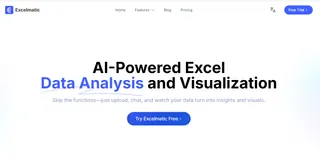
If you want the simplest and most intuitive way to start, Excelmatic is a perfect choice. It is designed for anyone who works with data in Excel but doesn't want to learn complex formulas or new software.
How it Works:
Think of it as having a data expert by your side. Instead of building a technical model, you just talk to it. You can ask questions in plain language like, "Based on our last two years of sales, predict revenue for the next quarter?" or "Show me which factors most influence customer churn."
Key Benefit for Beginners:
There is almost no learning curve. You interact naturally, and it handles the complicated analytics in the background. It gives you charts and answers immediately, making the process feel like a conversation rather than a technical task.
Best For:
Absolute beginners, business professionals (in marketing, sales, finance), and anyone who wants to get actionable insights from their Excel data in minutes without any training.
2. RapidMiner Studio: The Visual Workflow Teacher
RapidMiner Studio is a powerful yet free platform that uses a visual, drag-and-drop interface. You build an analytics "process" by connecting different icons (called operators) that represent steps like loading data, cleaning it, modeling, and scoring.
How it Works:
You visually create a workflow pipeline. This makes the entire logic of your predictive project clear and easy to see. It's excellent for understanding how data moves from raw information to a prediction.
Key Benefit for Beginners:
It teaches you the complete structure of a data science project in a very transparent way. You learn how each step connects to the next.
Best For:
Beginners who are curious about the full process of data science and prefer a logical, building-block approach. It's great for building a strong foundational understanding.
3. Azure Machine Learning Studio: The Automated Powerhouse
This is a cloud-based service from Microsoft. Its standout feature for beginners is automated machine learning (AutoML). You provide the data, and Azure ML automatically tests many different models to find the best one for you.
How it Works:
Your main job is to prepare and upload your data. The platform's AutoML system then runs experiments with various algorithms, compares their performance, and delivers the best model. It also provides clear reports on what the model found.
Key Benefit for Beginners:
It gives you access to very advanced machine learning techniques without requiring you to know which algorithm to choose or how to tune it. It's fast and powerful.
Best For:
Beginners who are results-oriented and want to leverage state-of-the-art machine learning quickly. It's ideal if you have a business problem to solve and want a robust model without getting deep into the technical details.
Your First Practical Steps (Take Excelmatic for Example)
Choosing a platform is the first step. Here's a simple plan to get started:
1. Pick a Very Specific Goal:
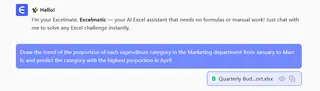
Start with a small, clear question. For example, "Draw the trend of the proportion of each expenditure category in the Marketing department from January to March, and predict the category with the highest proportion in April" A clear goal leads to faster success.
2. Use a Sample Project First:
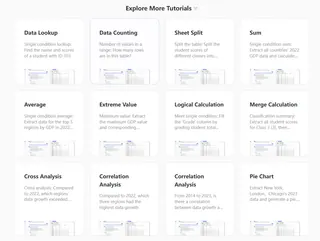
Before using your own data, complete one of the platform's built-in tutorials. This teaches you the tools in a risk-free environment.
3. Try with Your Own Data:
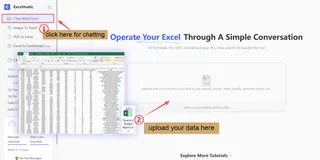
Once you're comfortable, create a new project. Replace the tutorial data with a simple spreadsheet of your own. Follow the same steps you learned.
4. Focus on Understanding, Not Just Numbers:
When you get results, don't just look at the prediction number. Ask: Does this make sense for my business? What is the model telling me is important? Your own knowledge combined with the platform's output creates true insight.
Conclusion: Start Your Journey Today
The best way to learn predictive analytics is by doing. A beginner-friendly platform removes the initial fear and lets you focus on solving problems. Whether you choose the conversational ease of Excelmatic, the visual teaching style of RapidMiner, or the automated power of Azure ML, you are taking a smart step forward.
Your data has stories to tell and answers to give. The right platform helps you hear them. Pick one that fits your style, and dedicate your first afternoon to going through a single tutorial. You will be surprised at how quickly you can go from curious beginner to someone who can make a data-driven prediction.
If you're looking for the most intuitive place to begin, consider starting with Excelmatic.
Frequently Asked Questions (FAQ)
Q1: Are these platforms truly free to use?
A: They offer genuine free access to start, but the models differ. RapidMiner Studio has a full-featured, free Community Edition for learning. Azure Machine Learning offers a free tier with credits for new users, but costs may apply later for heavy computing. For platforms like Excelmatic, you typically get a free trial; it's essential to check their website for the specific terms and pricing after the trial period to avoid surprises.
Q2: Which platform is the absolute easiest for someone with zero tech background?
A: If you already use Excel, Excelmatic is likely the easiest start. You interact with it by asking questions about your spreadsheet as if talking to an expert, receiving charts and answers immediately. It requires no new software interface or technical modeling steps.
Q3: How do I ensure my first project is successful and not overwhelming?
A: Success starts with a very specific, small goal. Instead of "improve sales," try "predict next month's sales for Product X." Always use the platform's built-in sample tutorial first. This lets you learn the tool risk-free before applying the same steps to your own data, building confidence step by step.