Key takeaways:
- An AI dashboard generator helps transform raw data into clear, actionable insights without manual chart building or complex analysis.
- Business owners, executives, and managers use AI dashboards to make faster, data-driven decisions without relying heavily on analysts or IT teams.
- Marketing, sales, and product teams benefit from AI dashboards by simplifying Excel-based reporting and uncovering trends across performance data.
- Startups, small businesses, and non-technical users can leverage AI dashboard generators to gain insights without coding, BI tools, or technical expertise.
- For teams that rely heavily on Excel, tools like Excelmatic make it easy to convert spreadsheets into visual dashboards and AI-powered insights quickly.
In today’s data-driven world, businesses and professionals are surrounded by massive amounts of information. Turning raw data into clear, actionable insights is no longer a luxury—it’s a necessity. This is where an AI dashboard generator comes into play.
But who actually benefits the most from using an AI dashboard generator? Is it only for data scientists, or can non-technical users also take advantage of it? In this article, we’ll explore who should use an AI dashboard generator and why, with real-world use cases along the way.
What Is an AI Dashboard Generator?
An AI dashboard generator is a tool that automatically transforms data from multiple sources into visual dashboards using artificial intelligence. Instead of manually building charts, selecting metrics, and designing layouts, the AI analyzes your data, identifies patterns, and generates dashboards that are easy to understand and act on.
For example, Excelmatic is an AI-powered dashboard generator designed specifically for teams that work heavily with spreadsheets. Users can upload Excel files or connect data sources and instantly turn raw tables into visual dashboards, summaries, and AI-generated insights—without writing formulas or code.

Who should use an AI dashboard generator?
1. Business Owners and Executives
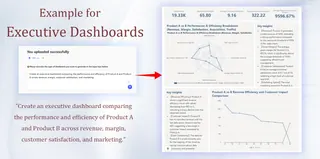
Business owners and executives need quick, high-level insights to guide strategic decisions. However, reviewing static Excel reports or waiting for manual analysis often slows them down.
AI dashboard generators help leaders by:
- Providing real-time performance overviews
- Automatically highlighting key business metrics
- Reducing reliance on analysts or IT teams
- Making complex data easier to understand at a glance
For executives who want more concrete examples, you can explore executive dashboard examples and KPI dashboards designed for strategic decision-making.
Tools like Excelmatic are especially useful for executives who already rely on Excel-based reports. Instead of scrolling through spreadsheets, they can instantly convert existing Excel data into clear dashboards that support faster, more confident decision-making.
2. Marketing and Growth Teams
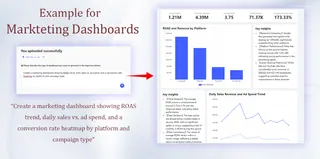
Marketing teams work with data from many platforms — Google Analytics, paid ads, social media, email campaigns, and CRMs. Manually consolidating and visualizing this data can be time-consuming and error-prone.
An AI dashboard generator allows marketing teams to:
- Automatically combine multi-channel data
- Track KPIs such as conversions, ROI, and CAC
- Identify trends and anomalies with AI insights
- Optimize campaigns faster based on real-time data
When campaign data is stored in spreadsheets, AI-powered tools like Excelmatic make it easy to turn marketing Excel files into dynamic dashboards without manual setup.
3. Sales Teams and Revenue Managers
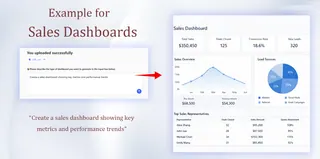
Sales teams rely on data to monitor pipeline health, forecast revenue, and identify risks. Traditional dashboards often require constant updates and technical maintenance.
With an AI dashboard generator, sales teams can:
- Visualize pipeline performance automatically
- Monitor individual and team-level KPIs
- Use AI insights to predict revenue trends
- Spot deals at risk before they stall
For teams tracking sales data in Excel, an AI solution like Excelmatic removes the need for complex formulas and manual reporting.
4. Product Managers and UX Teams
Product managers need clear visibility into user behavior, feature usage, retention, and churn. Turning raw product data into insights often requires time-consuming analysis.
AI dashboard generators help product teams by:
- Automatically surfacing key product metrics
- Detecting changes in user engagement
- Highlighting potential churn signals
- Supporting data-driven product decisions
When product metrics are exported into spreadsheets, AI-powered dashboards can instantly make sense of the data without extra BI tools.
5. Data Analysts and BI Professionals
AI dashboard generators are not meant to replace analysts—instead, they enhance productivity.
Data professionals use AI dashboards to:
- Eliminate repetitive dashboard-building tasks
- Prototype dashboards quickly for stakeholders
- Scale reporting across teams
- Focus on deeper analysis and storytelling
By automating routine visualization work, tools like Excelmatic allow analysts to spend more time delivering strategic insights.
6. Startups and Small Businesses
Startups and small businesses often lack dedicated data teams or expensive BI software. Yet, they still need reliable insights to grow.
AI dashboard generators are ideal for small teams because they:
- Require little to no technical expertise
- Work directly with Excel and existing data
- Deliver fast insights without complex setup
- Scale as the business grows
Excel-focused tools like Excelmatic help smaller teams unlock AI-driven analytics without changing their current workflows.
7. Non-Technical Users and Beginners
One of the biggest advantages of AI dashboard generators is accessibility. Many are built for users with no coding or data analysis background.
Non-technical users benefit because:
- Dashboards are generated automatically
- No SQL, Python, or BI skills are required
- Insights are explained clearly
- Visuals are intuitive and easy to interpret
Platforms such as Excelmatic are designed with this audience in mind—users can simply upload an Excel file and let AI handle analysis, visualization, and insights.
If you’re interested in how Excelmatic works in practice, here’s a complete guide on creating dashboards with Excelmatic.
Who Might Not Need an AI Dashboard Generator?
While AI dashboard generators are powerful, they may not be necessary for everyone. If you:
- Only track one or two very simple metrics
- Already have highly customized BI systems
- Require extremely specialized or regulated reporting
A traditional dashboard or manual reporting process may be sufficient.
Final Thoughts
An AI dashboard generator is more than a reporting tool—it’s a productivity multiplier. From executives and marketers to product teams and small business owners, anyone who relies on data can benefit from automated, AI-driven dashboards.
For teams that work primarily with Excel, tools like Excelmatic make it easier than ever to transform spreadsheets into actionable insights — without complexity, code, or heavy BI infrastructure.
If you want to see how AI dashboards can work with your own Excel data, you can try Excelmatic today and turn spreadsheets into dashboards in minutes.
Frequently Asked Questions (FAQ)
Q: Is an AI dashboard generator better than using Excel alone?
A: An AI dashboard generator goes beyond Excel by automatically analyzing data, identifying patterns, and generating visual dashboards. Excel is powerful for data storage, but AI dashboards help users understand insights faster without manual formulas or chart building.
Q: How does an AI dashboard generator compare to traditional BI tools?
A: Traditional BI tools often require technical setup, data modeling, and ongoing maintenance. An AI dashboard generator focuses on simplicity and speed, allowing teams to generate insights directly from existing data with minimal setup.
Q: How much data do I need to use an AI dashboard generator effectively?
A: Most AI dashboard generators work well with both small and large datasets. Even a single Excel file can generate useful insights, as long as the data is structured and relevant.
Q: Can an AI dashboard generator handle messy or unstructured Excel data?
A: AI dashboard generators can analyze partially structured data, but cleaner spreadsheets produce better results. Basic formatting, consistent headers, and clear data types improve accuracy and insight quality.