Key takeaways:
- An inventory dashboard transforms inventory data from static reports into a decision-support system that reveals stock movement, efficiency, and risk.
- Different inventory dashboards serve different operational goals, including availability monitoring, turnover optimization, demand alignment, warehouse execution, and risk detection.
- Despite varying use cases, most inventory dashboards rely on shared core metrics covering inventory levels, efficiency, demand alignment, operational flow, and risk indicators.
- The value of an inventory dashboard lies in enabling action—metrics must support replenishment, allocation, or purchasing decisions.
- AI-powered tools like Excelmatic simplify inventory dashboard creation by turning spreadsheets into adaptive, conversational dashboards without manual rebuilding.
In 2025, during the height of global supply chain disruptions, many retailers faced a paradox: warehouses were full, yet shelves were empty. Inventory existed—but it was in the wrong place, at the wrong time, and tied up capital instead of enabling sales.
As Peter Drucker famously said,
What gets measured gets managed.
In inventory management, however, what gets measured poorly often gets mismanaged.
This is where an inventory dashboard becomes critical—not as a reporting tool, but as a decision system.
What Is an Inventory Dashboard?
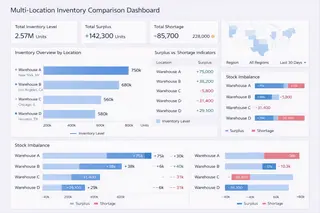
An inventory dashboard is a centralized analytical interface that monitors, analyzes, and visualizes inventory data across warehouses, products, and time periods.
Unlike static inventory reports or stock lists, an inventory dashboard connects inventory levels, movement, demand signals, and risk indicators into a unified view designed to support operational and financial decisions. Its purpose is not simply to show how much stock exists, but to reveal where inventory is flowing, where it is blocked, and where action is required.
A well-designed inventory dashboard enables teams to understand stock availability, turnover efficiency, and potential risks — such as stockouts or overstock — before they impact revenue or cash flow.
Why Inventory Dashboards Matter
Inventory decisions sit at the intersection of operations, finance, and customer experience. Too little stock leads to lost sales and dissatisfied customers. Too much stock ties up capital and increases storage risk.
Inventory dashboards help organizations move from reactive management to proactive control. By providing timely visibility into stock conditions and trends, teams can identify issues earlier, align replenishment with actual demand, and make more confident decisions about purchasing, allocation, and fulfillment.
In fast-moving environments — especially e-commerce and multi-warehouse operations — this visibility is no longer optional.
Common Types of Inventory Dashboards
Inventory dashboards are typically designed around specific operational questions. Each type focuses on a different aspect of inventory performance.
1. Stock Level and Availability Dashboard
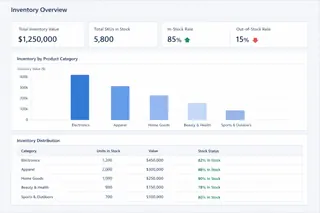
This dashboard answers a fundamental question: What inventory do we have right now, and where is it located?
It tracks current stock levels by SKU, warehouse, or region, helping teams ensure product availability while avoiding unnecessary duplication across locations.
2. Inventory Turnover and Aging Dashboard
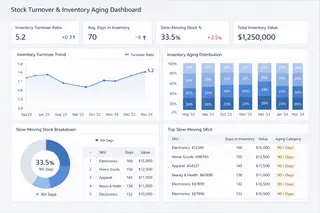
Turnover-focused dashboards analyze how quickly inventory moves through the system. They highlight slow-moving or aging stock that may indicate over-purchasing, declining demand, or forecasting issues. These insights are essential for reducing holding costs and improving cash efficiency.
3. Demand and Replenishment Dashboard
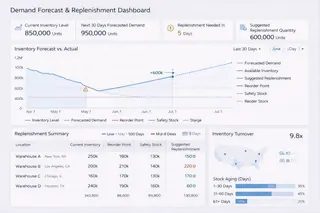
This type of dashboard compares historical sales, demand signals, and replenishment activity. It helps teams evaluate whether restocking decisions align with actual consumption patterns and whether reorder points need adjustment.
4. Warehouse Performance Dashboard
Warehouse dashboards focus on execution efficiency. They examine picking speed, fulfillment rates, and inventory handling performance, providing insight into how warehouse operations affect inventory availability and order delivery.
5. Inventory Risk and Exception Dashboard
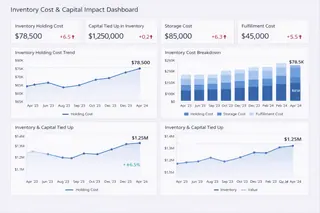
Risk-oriented dashboards surface early warning signals such as low-stock alerts, potential stockouts, excess inventory, or abnormal inventory behavior. Their goal is not prediction for its own sake, but early visibility that enables timely intervention.
Key Metrics Shared Across Most Inventory Dashboards
While inventory dashboards vary by use case, effective ones rely on a shared set of core metrics that support consistent decision-making.
| Metric Category | Key Metrics | What They Indicate |
|---|---|---|
| Inventory Levels | Inventory on Hand, Available Stock | Current stock position and availability |
| Inventory Efficiency | Inventory Turnover, Days of Inventory | How efficiently inventory is being used |
| Demand Alignment | Sell-through Rate, Reorder Point | Alignment between demand and replenishment |
| Risk Indicators | Stockout Rate, Overstock Ratio | Potential service or cost risks |
| Operational Flow | Lead Time, Fulfillment Rate | Speed and reliability of inventory movement |
The value of these metrics lies not in volume, but in action. If a metric cannot support a replenishment, allocation, or purchasing decision, it does not belong on the dashboard.
Creating an Inventory Dashboard with Excelmatic
Building an inventory dashboard traditionally requires extensive spreadsheet work — merging data, cleaning formats, and rebuilding charts whenever questions change. This approach often turns inventory analysis into a bottleneck rather than a support system.
Excelmatic changes this workflow.
Teams can upload existing inventory data directly—whether from Excel exports, warehouse systems, or operational reports — and explore it conversationally. Instead of manually defining every calculation, users ask practical questions such as:
Which SKUs are at risk of stockout next month?
Which products are tying up the most inventory value?
Excelmatic interprets the data structure, performs the analysis, and generates dashboards automatically. As priorities shift, the dashboard adapts — without rebuilding models or reports from scratch. In this workflow, spreadsheets become inputs, not obstacles.
From Inventory Data to Confident Action
An inventory dashboard is not about visibility alone. It is about control.
When teams can clearly see inventory conditions, movement, and risk signals, they respond faster and plan with greater confidence. AI-powered dashboards make this possible by reducing friction between raw data and actionable insight.
If inventory decisions affect your cash flow, fulfillment performance, and customer satisfaction, it may be time to move beyond static reports.
Start building smarter inventory dashboards with Excelmatic today.
Frequently Asked Questions (FAQ)
Q: What problems does an inventory dashboard solve that spreadsheets cannot?
A: Spreadsheets show inventory data at a point in time, but inventory dashboards reveal patterns, risks, and trends across locations and periods, enabling faster and more proactive decisions.
Q: Who typically uses inventory dashboards within an organization?
A: Inventory dashboards are used by operations teams, supply chain managers, finance teams, and business leaders who need shared visibility into stock performance and risk.
Q: Can inventory dashboards support both operational and financial decisions?
A: Yes. Well-designed inventory dashboards connect stock movement with cash flow, holding costs, and service levels, supporting both execution and financial planning.
Q: How do AI-powered inventory dashboards differ from traditional dashboards?
A: AI-powered dashboards adapt to new questions, reduce manual setup, and surface insights conversationally, rather than relying on fixed views and predefined reports.