Key takeaways:
- AI Dashboard Generators represent a paradigm shift, allowing you to create dashboards by simply asking questions in natural language, rather than manually building them.
- The core workflow involves four automated steps: understanding your question, processing the data, generating visualizations, and adding interactive features.
- This technology significantly lowers the barrier to data analysis, empowering business professionals without technical skills to gain insights instantly.
- Practical applications are immediate across all functions, from sales and marketing to finance and HR, compressing analysis time from days to minutes.
- Solutions are now accessible, ranging from features in platforms like Power BI to standalone, user-friendly tools such as Excelmatic that work directly with common spreadsheets.
Remember the last time you were asked to build a dashboard — what did that look like?
One meeting after another tried to turn the business team's vague "I want to see how things are going" into concrete fields and charts. Then came hours or even days of data extraction, cleaning, and validation. After that you open your BI tool and start dragging, configuring, and formatting to build the first draft. Yet feedback usually is: "This chart isn't intuitive," "Can we view it from another angle?" "This number looks wrong."
Round and round it goes, and there's hardly any time left for deep analysis.
Is there a way to skip this long manual process? Can you just tell the system what you need and get an immediately usable, interactive analysis panel?
That's exactly what the AI Dashboard Generator is making possible. It's more than a productivity upgrade for tools — it represents a new interaction paradigm: using language to drive data insight.
What is an AI Dashboard Generator?
AI Dashboard Generator is a tool or system that uses artificial intelligence (especially large language models and automation) to automatically convert natural language descriptions, data sources, or simple instructions into complete, interactive data visualization dashboards.
Put simply, it translates your "business question" directly into a "data answer" and presents it in a professional form.
How does AI Dashboard Generator work?
At its core is an intelligent automation pipeline. When you make a request like "Show the ROI and customer acquisition cost trends by marketing channel for this quarter," it goes through these steps:
1. Natural language understanding:
The system parses your question and identifies key entities (like "this quarter," "marketing channels") and the intent (comparing trends of "ROI" and "customer acquisition cost").
2. Intelligent data connection and processing:
Based on that understanding, it automatically connects to relevant databases, data warehouses, or uploaded files, runs the necessary queries, joins, and calculations, and prepares the required dataset.
3. Visualization recommendation and generation:
The system selects the most effective chart types for the data characteristics and analysis goal (for example, a combined line chart for trends and a table for detailed numbers) and renders them following design best practices.
4. Automated layout and interaction injection:
Charts are intelligently arranged in a clear layout and relevant filters, drill-downs, or chart linking features are automatically added, turning it into a truly interactive dashboard.
This is fundamentally different from the traditional approach:
| Aspect | Traditional BI / Manual Approach | AI Dashboard Generator |
|---|---|---|
| Starting point | How do I use this tool to get the result? | What do I want to know? |
| Input | Drag fields, write formulas, configure properties. | Enter natural language questions or commands. |
| Core skills | Tool proficiency, SQL, data modeling. | Business understanding and the ability to ask the right questions. |
| Iteration speed | Slow; every change requires manual adjustment. | Fast; quickly redo by changing commands or via conversation. |
What can AI Dashboard Generator do for me? Specific scenarios and use cases
The capability of an AI Dashboard Generator isn't theoretical — it serves core business functions directly:
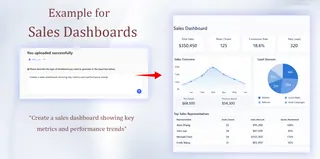
1. Sales dashboards:
A sales director doesn't need to wait for weekly reports. They type: "Generate a month-to-date performance comparison by region, highlighting attainment rates and pipeline health." Within a minute they get a dashboard with maps, leaderboards, and a predictive funnel to adjust strategy on the fly.
2. Marketing dashboards:
A marketer asks: "What was the ROI for all campaigns last week? Show by channel and customer segment." The system might produce a multi-dimensional bubble chart that clearly pinpoints efficient and inefficient spend.

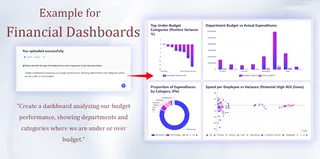
3. Finance dashboards:
A CFO needs a quick overview: "Compare actual spend to budget and list the top three variances by department." A dashboard with traffic-light status indicators and variance bubble charts appears immediately.
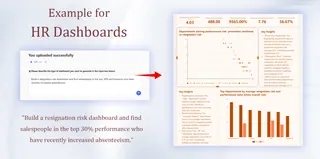
4. HR dashboards:
The head of HR queries: "Show employee churn trends over the past year and allow drill-down by tenure and department." An interactive attrition analysis dashboard delivers insights at once.
5. Executive strategy dashboards:
The CEO says: "Give me a unified view of company health covering revenue, customer satisfaction, and operational efficiency." A cockpit that integrates KPI cards, trend lines, and alerts assembles automatically.
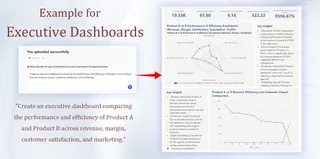
Whether tracking a specific KPI dashboard or building a cross-functional executive view, an AI Dashboard Generator can compress build time from "days" to "minutes."
How can you use an AI Dashboard Generator today?
This technology is no longer a concept — it's within reach. There are three main forms available now:
1. New features embedded in mature BI platforms:
For example, Microsoft Power BI Copilot and Tableau Pulse. They add language-based analysis generation within existing ecosystems and suit organizations already using those platforms.
2. Standalone, innovative AI-first products:
A wave of startups is building platforms designed from the ground up around AI, offering a purer, more focused conversational analytics experience. For example, tools like Excelmatic are representative of this category. They target the most common data starting point — Excel — and let users, via natural language conversation, turn static .xlsx or .csv files directly into dynamic analytical charts and insights.
This approach greatly lowers the barrier to use, allowing business users to instantly turn the data on their desks into interactive dashboards.

3. Self-built solutions based on open-source models:
For technical teams, open-source large models such as Llama can be combined with internal data to build a custom generation engine.
But the core point is that the value of the AI Dashboard Generator as a capability is universal. It's useful to anyone who needs fast answers from data — whether that's a data analyst or a marketing, sales, or operations leader. Among these options, standalone AI products like Excelmatic stand out for accessibility and immediacy.
They fill a key market gap: providing a zero-learning-curve solution for the millions who aren't data experts but work with Excel daily and want instant insights — marketing managers, sales supervisors, finance staff, or HR partners.
Summary and next steps: Let your data speak
In short, the AI Dashboard Generator is turning data analysis from complex technical work into simple natural language conversation. It lets you ask questions and get interactive answers immediately so you can focus on decisions.
Among the available tools, Excelmatic offers an extremely convenient starting point: talk directly to your existing Excel files with no complex prep and convert static data into dynamic dashboards. It embodies the idea of "ask instead of operate."
You can try this change right now: open Excelmatic, upload an Excel file, and type the question you want to analyze. See for yourself how data insight becomes as easy as a conversation.
Frequently Asked Questions (FAQ)
Q: What is the fundamental operational distinction between an AI Dashboard Generator and a traditional PivotTable?
A: A PivotTable requires you to manually build the view by dragging fields. The AI tool understands your question and builds the entire dashboard for you automatically.
Q: What is the core difference between an AI Dashboard Generator and traditional BI tools?
A: Traditional BI asks "how to build?" The AI Dashboard Generator starts with "what do you need to know?" You use language, not manual steps.
Q: If the AI chooses an unsuitable chart for my data, how can I correct it?
A: Use conversational commands. Simply tell the AI Dashboard Generator what you want, for example: "Show this as a line chart instead" to get an instant update.