Key takeaways:
- Dashboards fail most often because teams use the wrong data view for the question they are trying to answer.
- Operational dashboards track what is happening now, while strategic dashboards focus on alignment and long-term direction.
- Analytical dashboards are designed to explain why performance changes, enabling deeper AI data analysis and exploration.
- AI-driven platforms like Excelmatic make dashboards accessible to non-technical teams by removing manual preparation and setup.
Most teams don't lack dashboards. They lack the right dashboard.
Excel files grow larger. CRM data becomes more fragmented. Marketing metrics live across multiple platforms. Everyone is busy building reports, yet decisions still feel slow. The reason is often overlooked: different business questions require different data views, but many teams rely on a single dashboard type to answer everything.
This article looks at the three core dashboard types, explains how they serve different roles, and shows how modern AI-driven tools are changing the way dashboards are built and used.
The Three Core Dashboard Types, Compared in Practice
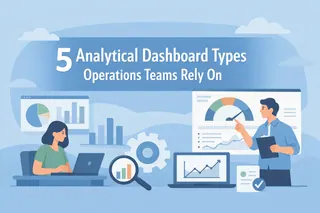
Dashboards are often grouped together, but their intent is fundamentally different. Understanding that difference is the first step toward clarity.
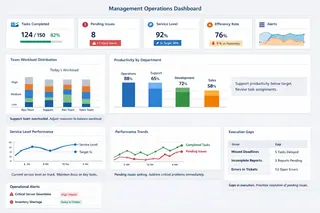
1. Operational dashboards
Operational dashboards focus on the present moment. They answer questions like "What is happening right now?" or "Are today's numbers within range?" These dashboards power daily execution. A sales dashboard tracking hourly revenue or a Customer Retention Dashboard monitoring daily churn falls into this category. Speed and visibility matter more than depth.
2. Strategic dashboards
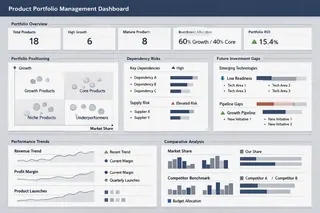
Strategic dashboards operate at a higher level. They are built for leadership and long-term alignment. Monthly trends, quarterly targets, and high-level KPIs dominate these views. The goal is not exploration, but direction. Strategic dashboards trade detail for consistency.
3. Analytical dashboards
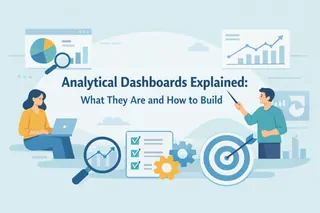
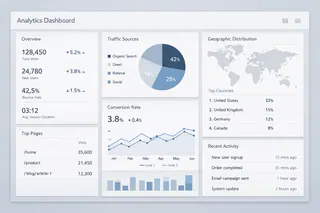
Analytical dashboards serve a different purpose altogether. They exist to explain patterns, compare segments, and uncover drivers behind performance. Instead of asking what, they focus on why. These dashboards support AI data analysis, scenario comparison, and exploratory thinking.
The differences become clearer when viewed side by side:
| Dashboard Type | Primary Question | Typical Audience |
|---|---|---|
| Operational Dashboard | What is happening now? | Frontline teams |
| Strategic Dashboard | Are we on track? | Executives |
| Analytical Dashboard | Why did this happen? | Managers, analysts |
In short, analytical dashboards are not about monitoring. They are about understanding.
How Do You Choose the Right Dashboard?
Choosing a dashboard type is less about tools and more about intent.
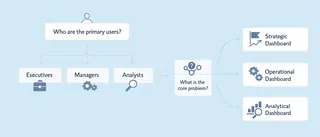
Start with the primary user. Is the dashboard meant for executives scanning performance, operators managing daily work, or teams investigating outcomes?
Next, clarify the core problem. Are you tracking status, aligning strategy, or trying to explain changes in performance?
When these two questions are answered honestly, the dashboard type usually reveals itself. Operational views support execution. Strategic views support alignment. Analytical dashboards support learning and decision-making.
Many teams struggle because they try to force analytical questions into operational dashboards. The result is frustration, not insight.
From Traditional Dashboards to AI-Driven Dashboard
For a long time, building dashboards required deep technical involvement.
Data preparation came first. Excel format issues had to be fixed manually. External data arrived as PDFs or images, forcing teams into slow PDF to Excel or image to Excel workflows before analysis could begin. Handling massive data often meant splitting files or simplifying questions.
Then came modeling and visualization. Analysts built charts by hand, adjusted formulas, and rewrote logic for every new question. Iteration was slow. Insight lagged behind the business.
Modern AI-driven platforms change this dynamic.
Tools like Excelmatic approach dashboards from a familiar place: Excel itself. Instead of replacing spreadsheets, they add intelligence on top. Format cleaning happens automatically. Data from PDFs and images is converted into structured tables without manual effort.
Most importantly, analysis begins with conversation. Users ask questions in plain language. Excelmatic performs quick analysis, applies AI data visualization, and generates charts that reflect business logic without requiring technical setup. This lowers the barrier for teams who understand the business but are not trained analysts.
The shift is not cosmetic. It fundamentally changes ownership and speed:
| Dimension | Traditional Dashboard Workflow | AI-Driven Dashboard |
|---|---|---|
| Data preparation | Manual, time-consuming | Automated in background |
| Skill requirement | Analytical and technical | Business-focused |
| Time to insight | Hours or days | Minutes or seconds |
| Iteration cost | High | Low |
| Scalability | Limited by Excel performance | Built for massive data |
AI dashboards become flexible, exploratory, and accessible — no longer tied to a small group of specialists.
Why This Shift Matters More Than Ever
Dashboards are no longer just reporting layers. They are becoming decision infrastructure.
Choosing the right dashboard type prevents confusion. Choosing the right way to build it determines speed. In a world where insights lose value quickly, that speed becomes a competitive advantage.
Excelmatic fits naturally into this shift. By lowering the barrier to analytical dashboards and enabling exploration without technical overhead, it helps teams move from data to understanding — and from understanding to action.
If your dashboards feel crowded, unclear, or underused, the issue may not be your data.
It may simply be the wrong view.
Start your free trial of Excelmatic and build analytical dashboards that actually answer questions.
Frequently Asked Questions (FAQ)
Q: What are the three core types of dashboards?
A: The three core dashboard types are operational dashboards, strategic dashboards, and analytical dashboards. Each serves a different decision-making purpose.
Q: What is the main difference between analytical and operational dashboards?
A: Operational dashboards monitor real-time performance, while analytical dashboards explore causes, patterns, and drivers behind the numbers.
Q: Who should use analytical dashboards?
A: Analytical dashboards are best suited for managers, business teams, and analysts who need to understand why outcomes change, not just track results.
Q: Can Excel dashboards be used for analytical analysis?
A: Yes. With AI-powered tools like Excelmatic, Excel dashboards can support advanced analytical workflows without requiring technical expertise.
Q: How do AI-driven dashboards improve decision speed?
A: AI dashboards automate data preparation, enable natural-language analysis, and generate visual insights in minutes instead of hours.