Key takeaways:
- The Statistics AI Solver market offers varied tools, each with different strengths, making the right choice crucial for your specific needs.
- Use a structured framework to evaluate solvers based on analytical needs, learning curve, data compatibility, transparency, output quality, and total cost.
- The ideal solver should align with your team's technical level, offering intuitive interfaces for beginners while supporting advanced analysis.
- As a modern solution, Excelmatic exemplifies these principles through its user-friendly design, transparent methodology, and automated data diagnostics.
If you're reading this, you've probably experienced the paradox of choice when it comes to Statistics AI Solvers. The market is flooded with options, each promising to revolutionize your data analysis. But here's the uncomfortable truth: choosing the wrong tool can be worse than choosing no tool at all.
Imagine spending weeks on a project, only to discover your solver used flawed methodology. Or presenting findings to your team, unable to explain how you reached your conclusions. These aren't hypothetical scenarios — they're the real consequences of picking a solver that prioritizes speed over substance, automation over understanding.
The 6 Essential Criteria for Selecting a Statistics AI Solver
1. Precisely Define Your Analytical Needs
The Core Question: "What problems do I actually need to solve?"
Before comparing features, start with the most important question: what are your use cases? Your specific needs should dictate your choice.
- For Academic & Research Work: You might require support for specific statistical tests (like t-tests, ANOVA) and the ability to ensure the rigorous reproducibility of your analysis .
- For Business Intelligence & Reporting: You may need a tool that excels at generating intuitive dashboards, forecasting sales, and seamlessly integrating with your existing workflows (like CRM or ERP systems) .
- For Advanced Data Science Projects: Look for solvers with robust support for machine learning models, predictive analytics, and custom coding in languages like Python or R.
Tools to Consider:
- Specialized Solvers: Some platforms are built for niche areas like finance or research, offering tailored tests and compliance with academic standards.
- General-purpose AI Assistants: Tools like Julius AI focus on conversational data analysis and statistical computation, offering a broad range of capabilities .
- Your Current Ecosystem: Don't overlook the AI features being built into tools you already use, like certain BI platforms that now offer natural language querying.
2. Scrutinize the Learning Curve
The Core Question: "How quickly can my team start using this effectively?"
A powerful tool is useless if no one on your team can operate it. The learning curve should match your team's technical comfort level and available training time.
- For Non-Technical Users (No-code): The ideal solver should have a intuitive, conversational interface. You should be able to ask questions in plain English and get immediate answers without writing a single formula or line of code .
- For Data-Savvy Teams (Low-code): Your team might appreciate a tool that offers a gentle introduction to AI, perhaps through a user-friendly visual interface, while still allowing for some customization and deeper control .
- For Data Scientists & Coders (Pro-code): If your team has programming expertise, a solver that allows integration with Python, R, or SQL, and supports building custom models, would be essential .
Tools to Consider:
- No-code Platforms: Solutions like Excelmatic and some modern BI tools are designed specifically for business professionals, requiring no prior coding or statistics expertise .
- Low-code/Pro-code Platforms: Tools like RapidMiner and KNIME offer visual workflow designers that are accessible but also allow for advanced users to incorporate custom scripts.
3. Examine Data Compatibility and Preprocessing
The Core Question: "How well does it handle my real-world data?"
An AI solver is only as good as the data you feed it. The key is to find a tool that not only accepts your data formats but actively helps you ensure its quality.
- Seamless Integration: The tool must work with your primary data sources, whether it's CSV/Excel files, SQL databases, or cloud storage.
- Intelligent Preprocessing: This is a critical differentiator. A superior tool will automate data health scans, diagnosing and flagging issues like missing values, outliers, and inconsistencies before analysis begins. This proactive approach ensures you're building your analysis on a solid foundation.
Tools to Consider:
- Cloud-native Platforms: Tools like Google BigQuery excel at handling massive datasets in the cloud, offering scalability and power.
- Desktop-focused AI: Some tools are optimized for direct spreadsheet uploads and rapid analysis of business-scale data, prioritizing ease of use and speed for common business formats.
- Data Science Workbenches: Platforms like Alteryx provide powerful, end-to-end data preparation, blending, and advanced analytical capabilities.
4. Demand Analytical Transparency
The Core Question: "Can it explain its reasoning?"
Trust is built on understanding. An AI solver that operates as a "black box" is a major liability, especially when you need to defend your insights to colleagues, stakeholders, or regulators.
- Look for an Audit Trail: The solver should do more than spit out a p-value or a "significant" flag. It must provide a clear, step-by-step breakdown of the methodology it used, the assumptions it checked, and the logic behind its conclusions.
- Understand the "Why": This transparency is what transforms the tool from a magic black box into a true learning partner, helping you build statistical intuition with every analysis.
Industry Context:
The demand for transparent and explainable AI is growing rapidly. From academic research that emphasizes statistical rigor to industry reports highlighting the importance of trust in enterprise AI , the ability to explain oneself is no longer a luxury but a necessity for reliable decision-making.
5. Assess Output Quality and Actionability
The Core Question: "Are the results clear, insightful, and ready to drive decisions?"
A great analysis is useless if you can't understand it or act on it. The output should be more than just numbers; it should be a springboard for action.
- Clarity and Visualization: The tool should generate clear, customizable, and publication-ready charts and graphs without requiring manual design effort.
- From Insight to Action: The best tools translate statistical findings into actionable business intelligence. Look for solvers that provide plain-English interpretations of what the findings mean for your specific goals and, even better, suggest logical next-step analyses.
Tools to Consider:
- Visualization Giants: Tools like Tableau and Microsoft Power BI are renowned for their powerful and intuitive data visualization capabilities, making it easy to create interactive dashboards .
- AI Partners: Some modern AI solvers are designed to not only show results but also to explain the "so what?" and guide you on "what next?".
6. Calculate the True Total Cost of Ownership (TCO)
*The Core Question: "What is the tool's true total cost?"
The price tag is only the tip of the iceberg. A smart evaluation considers all costs associated with the tool over time.
- Look Beyond the Subscription Fee: Consider the cost of training your team, the time spent on implementation, and any hidden fees for advanced features or higher data volumes.
- Evaluate Pricing Models: Tools typically offer a few common models:
- Freemium/Free Trial: A great way to test the tool's core functionality with your data before committing.
- Subscription (SaaS): A predictable monthly or annual fee, common for cloud-based tools.
- Enterprise Licensing: For large organizations, often with custom pricing based on usage and required features.
A Balanced Approach:
The most expensive tool isn't always the best, and the cheapest can be costly in the long run if it lacks critical features or hampers productivity. The goal is to find a tool whose cost is justified by the value and efficiency it delivers
Why Excelmatic Is Designed to Meet This Checklist
Excelmatic is a modern Statistics AI Solver designed to be both powerful and accessible. We built it to solve a common problem: most analytical tools are either too simple to be useful or too complex to use. Excelmatic strikes a balance, offering a streamlined solution that handles the majority of real-world analysis tasks without overwhelming users.
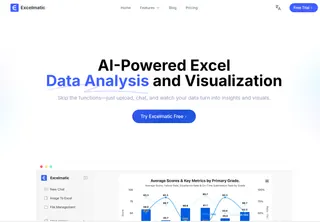
Proactive Data Diagnostics
Excelmatic starts by ensuring your data is ready for analysis. Its built-in Data Health Scan automatically reviews your dataset upon upload, flagging issues like missing values, outliers, and formatting inconsistencies. This step helps you avoid the "garbage in, gospel out" trap before any analysis begins.
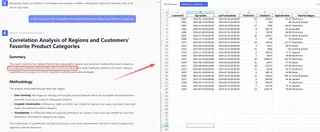
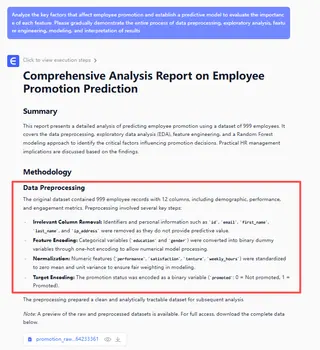
Transparency at Every Step
We believe you shouldn’t have to trust results blindly. Excelmatic explains its reasoning in plain language, showing which tests were used, why they were chosen, and what the outputs mean. This turns every analysis into a learning opportunity, not just an automated report.
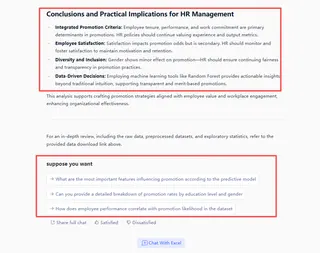
Guidance That Goes Beyond Output
Excelmatic doesn’t stop at results — it helps you act on them. The platform provides contextual interpretations of findings and suggests logical next steps, whether it’s running a follow-up analysis or refining your approach. It’s like having an analytical partner that guides your decision-making process.
Built for Teams, Not Just Technicians
With its intuitive interface and no-code workflow, Excelmatic enables team members of all skill levels to participate in data-driven work. You don’t need a statistics background to generate, interpret, or share insights — just a clear question and a dataset.
Frequently Asked Questions (FAQ)
Q1: I'm already using Excel for basic analysis. Why would I need a specialized Statistics AI Solver?
A: While Excel works for simple tasks, Statistics AI Solvers like Excelmatic handle complex analysis automatically. They choose the correct statistical tests, explain the methodology, and interpret results in context — saving you time and providing deeper insights, especially for hypothesis testing or predictive modeling.
Q2: How do I know if a solver is truly transparent about its methodology?
A: A transparent solver clearly explains each step: which statistical test was used and why, what assumptions were checked, and how to interpret results in plain language. For example, Excelmatic provides a step-by-step "analysis audit trail" to verify the process and build trust in the findings.
Q3: My team has mixed technical skills. What's the best approach for choosing a solver everyone can use?
A: Choose a solver with an intuitive, no-code interface that still supports advanced methods when needed. Excelmatic offers a conversational interface for asking questions in plain English, allowing beginners to get started quickly while enabling deeper analysis as skills grow.
Find the Statistics AI Solver That Actually Fits Your Work
Choosing the right Statistics AI Solver isn't about finding the most powerful or the simplest tool. It's about finding the one that matches your specific needs, your team's skills, and your organization's goals.
Every team works differently. Some need deep statistical rigor for research, while others need clear business insights for quick decisions. The perfect tool should adapt to your workflow, not force you to adapt to it.
We designed Excelmatic to be that adaptable partner. It combines statistical power with clear explanations, giving you both the results and the understanding you need to move forward with confidence.
Ready to find your perfect fit?
Try Excelmatic today and join thousands of data professionals who have found their ideal analysis partner. Start with our free plan and take all the time you need to make the right decision.