Key takeaways:
- Tactical dashboards focus on short-term execution, not long-term strategy or deep analysis.
- They are designed for managers and team leads who need to act on daily or weekly signals.
- Effective tactical dashboards prioritize actionable metrics over comprehensive reporting.
- AI tools like Excelmatic make it possible to build and update tactical dashboards through natural language, not manual Excel work.
Tactical dashboards are where strategy meets execution. They track day-to-day operations, monitor key metrics, and provide teams with the information they need to act right now. Unlike strategic dashboards that look at trends over months, or analytical dashboards that explore why things happen, tactical dashboards focus on the here and now.
From monitoring sales targets and inventory levels to keeping customer service on track, these dashboards transform raw data into actionable insights. Every chart, every KPI, every alert is designed to help teams decide, respond, and execute — without delay.
What Is a Tactical Dashboard?
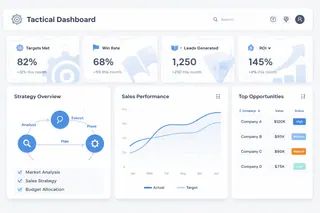
A tactical dashboard is designed to support short-term decision-making and execution control.
It focuses on how work is progressing right now and what needs attention next. The audience is typically managers and team leads — people responsible for turning plans into results.
Their role is narrower, but more operational: keep teams aligned, highlight deviations, and support timely intervention.
Tactical vs Strategic Dashboards: A Practical Distinction
The difference between tactical and strategic dashboards often becomes clear only after teams misuse one for the other.
| Aspect | Strategic Dashboard | Tactical Dashboard |
|---|---|---|
| Purpose | Track long-term direction | Manage short-term execution |
| Timeframe | Quarterly / yearly | Daily / weekly / monthly |
| Audience | Executives, leadership | Managers, team leads |
| Level of detail | Highly aggregated | Moderately detailed |
| Typical decisions | Adjust goals or priorities | Reallocate effort, fix issues |
If a strategic dashboard helps leadership stay aligned, a tactical dashboard helps teams stay on track.
Trying to manage execution with a strategic dashboard usually leads to blind spots. By the time a problem shows up, it's already too late to react.
Common Types of Tactical Dashboards
Tactical dashboards usually align with functional teams. The structure is consistent, even if metrics differ.
1. Sales Tactical Dashboard
Focuses on pipeline movement, conversion rates, deal velocity, and rep-level performance. Used daily or weekly by sales managers to unblock deals and adjust targets.
2. Marketing Tactical Dashboard
Tracks campaign performance, channel ROI, lead quality, and short-term attribution signals. Often refreshed daily during active campaigns.
3. Customer Retention Dashboard
Monitors churn signals, active users, renewal status, and at-risk customer segments. This type of tactical dashboard is critical for SaaS and subscription businesses.
4. Operations Tactical Dashboard
Covers delivery speed, backlog, service-level indicators, and exception rates. Designed to surface issues before they become escalations.
The pattern is clear: tactical dashboards are role-specific and action-driven.
Typical Metrics Used in Tactical Dashboards
Tactical metrics share a few common traits. They update frequently. They are tied to specific actions. And teams can influence them directly.
| Area | Common Tactical Metrics | Why They Matter |
|---|---|---|
| Sales | Pipeline value, win rate, deal aging | Indicates near-term revenue risk |
| Marketing | Daily spend, CPA, lead quality | Allows rapid campaign adjustments |
| Customer Retention Dashboard | Weekly churn rate, inactive users, renewal pipeline | Surfaces early warning signs |
| Operations | SLA breaches, backlog size, cycle time | Highlights execution bottlenecks |
The goal is not completeness. It's relevance. A tactical dashboard works best when every metric answers the question: What should we do next?
How to Build a Tactical Dashboard with AI: The Excelmatic Workflow
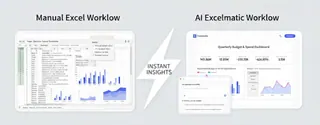
Excel is the gold standard for data, but building a tactical dashboard manually is often a painful process. Most professionals spend hours cleaning data and fixing broken formulas instead of actually analyzing the business.
If AI can write reports and emails, why can't it build your dashboard? With Excelmatic, it can. Here is how the AI-driven workflow replaces the traditional, manual struggle.
Step1: Stop Cleaning Data, Start Importing It
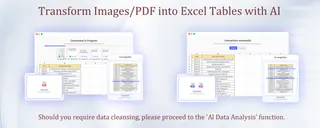
In a traditional workflow, you spend 80% of your time "preparing" data. You have to fix merged cells, format dates, and convert text to numbers just to make a simple pivot table work.
Excelmatic changes this by accepting data as it is. Whether you have a messy CSV export, an operational Excel file, or even a table inside a PDF, you can bring it directly into Excelmatic. The AI automatically recognizes headers, fixes inconsistent formatting, and cleans the data in the background. You skip the "data prep" nightmare and move straight to the insights.
Step2: Define Your Goal, Not Your Layout
Normally, building a dashboard requires you to be a designer. You have to choose between bar charts or line graphs and manually set up slicers.
With Excelmatic, you describe your operational goal in plain language. Instead of clicking through menus, you simply tell the AI what you need to monitor.
The AI understands the logic, not just the visuals. It automatically selects the right KPIs, sets up time-based views, and adds visual alerts for exceptions. It builds the logic for you so you don't have to be an Excel expert.
Step3: Refine and Adjust Through Conversation
Tactical dashboards are not static; they change as your business needs change. In standard Excel, adding a new category or changing a filter often means rebuilding large parts of your spreadsheet.
Excelmatic makes your dashboard interactive and flexible. Refining your dashboard is as easy as having a conversation. You can give instant instructions to update the view:
- "Add a filter for the Northwest region."
- "Compare this month's performance to the same period last year."
- "Change the theme to a professional dark mode for the presentation."
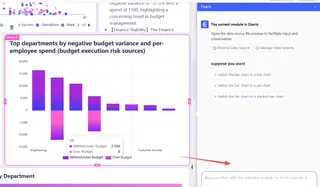
The dashboard updates instantly. This allows you to respond to business changes in seconds rather than hours.
Conclusion: Why Tactical Dashboards Deserve More Attention
The purpose of a tactical dashboard is to help you make faster, better decisions. If you are stuck debugging VLOOKUP or fixing chart alignments, you are losing valuable time.
Excelmatic brings the power of AI directly into your spreadsheets. It allows you to move from raw, messy data to a professional dashboard using nothing but natural language.
Ready to automate your reporting? Try Excelmatic for Free and see how AI can transform your Excel workflow today.
Frequently Asked Questions (FAQ)
Q: What is a tactical dashboard?
A: A tactical dashboard is a data view designed to help managers monitor short-term performance and guide daily or weekly decisions. It focuses on execution, exceptions, and operational control.
Q: How is a tactical dashboard different from a strategic dashboard?
A: Strategic dashboards track long-term direction and high-level KPIs, while tactical dashboards focus on near-term metrics that teams can act on immediately, such as daily sales, fulfillment rates, or churn signals.
Q: What metrics should a tactical dashboard include?
A: Typical tactical metrics include pipeline movement, daily conversion rates, backlog size, SLA breaches, and Customer Retention Dashboard indicators like weekly churn or inactive users.
Q: Who should use a tactical dashboard?
A: Tactical dashboards are mainly used by managers, team leads, and operations owners who are responsible for turning plans into day-to-day execution.
Q: Can AI be used to build a tactical dashboard?
A: Yes. AI-powered tools like Excelmatic allow users to create tactical dashboards by describing goals in plain language, automatically handling data cleaning, KPI selection, and visualization.