Key takeaways:
- Manual statistical calculations in spreadsheets are slow and prone to costly errors, preventing busy professionals from extracting valuable insights from their data.
- A new wave of AI-powered tools acts as a personal math solver for statistics, allowing you to get complex answers by simply typing questions in plain English.
- Using a stats AI calculator dramatically reduces analysis time, improves accuracy, and empowers you to make smarter, data-driven decisions without needing a technical background.
The Universal Struggle: Data-Rich But Insight-Poor
You know the feeling. You're staring at a spreadsheet packed with numbers—sales figures, campaign metrics, customer feedback scores. You know there are golden insights hidden in there, but the thought of wrestling with VLOOKUPs, pivot tables, and cryptic formulas makes your head spin.
It's a frustratingly common problem. You have the data, but getting clear statistical answers feels like a job for a data scientist, not a busy manager or business owner. You need to know the mean, the median, the outliers, the trends... but the process is just too slow and intimidating.
What if you could just ask your spreadsheet for the answers? That's no longer a fantasy. A new generation of stats AI tools is changing the game, acting as an intelligent statistics problem solver that does the heavy lifting for you.
The Hidden Cost of "Good Enough" Spreadsheet Stats
For years, we've relied on manual methods. We painstakingly build formulas, copy and paste data, and double-check our work, hoping we didn't miss a parenthesis or a cell reference. But this "good enough" approach comes with serious hidden costs.
First, there's the time. Hours spent on tedious calculations are hours not spent on strategy, client relationships, or growing the business. Second, there's the risk of human error. A tiny mistake in a formula can snowball into a completely wrong conclusion, leading to a flawed marketing budget or a misguided product strategy.
Honestly, it's just not an efficient way to work anymore. You shouldn't have to become a spreadsheet guru to understand your own business data.
A Smarter Way: Meet the AI Statistics Problem Solver
This is where things get exciting. Imagine having a statistics AI calculator that understands plain English. Instead of learning functions, you just state what you need.
I was in this exact boat a few months ago, drowning in performance data from a recent launch. I knew what I wanted to find out but dreaded the manual analysis. That's when I stumbled upon a new category of tools built for this exact pain point. One I've found incredibly helpful is called Excelmatic. It's a web-based AI agent that you can talk to.
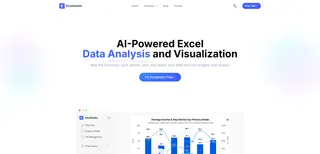
The concept is refreshingly simple. You upload your Excel or CSV file, and then you just tell it what to do in plain language. The AI understands business context, not just formulas. No installation, no complex setup. It's like having a data analyst on call, ready to answer your questions instantly.
Putting Your Stats AI to Work: A Real-World Example
Let's make this real. Imagine you're a marketing manager with a CSV file of campaign results. It has columns for Campaign Name, Ad Spend, and Conversions. You need to quickly figure out your top performers and average costs.
With a traditional approach, you'd be building pivot tables or writing SUMIF formulas. With a math solver for statistics like Excelmatic, the workflow is completely different.
You simply upload your file and type a command, like: "For each campaign, calculate the average ad spend and the total number of conversions. Then, calculate the cost per conversion and present the results in a table."

Instantly, the AI processes your request. It understands the context, performs the calculations across all the relevant rows, and presents you with a new, clean table containing exactly what you asked for. No formulas, no frustration. Just the answer.
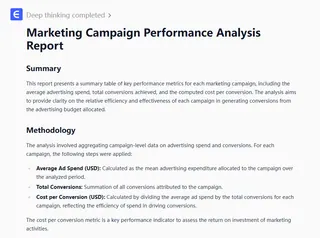
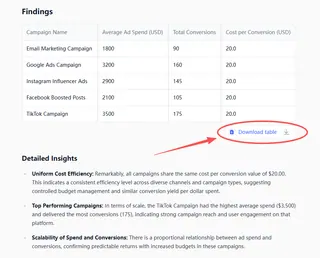
This simple interaction gives you the critical data you need to decide where to allocate your budget next quarter. It's not just about speed; it's about removing the friction between your question and your answer.
Beyond the Basics: What to Look for in a Good Tool
As these AI tools become more common, it helps to know what separates the great ones from the mediocre. When you're looking for a statistics AI calculator, prioritize a few key things.
First, an intuitive, no-code interface is non-negotiable. The whole point is to avoid a steep learning curve. Second, ensure it can handle the file types you use most, like Excel and CSV. Finally, look for speed and accuracy. The tool should deliver reliable results in seconds, not minutes. The goal is to make data analytics a seamless part of your decision-making, not another chore on your to-do list.
Ultimately, you no longer need to be intimidated by statistics. The barrier between you and your data is finally coming down. By embracing a simple AI-powered approach, you can stop being a spreadsheet operator and start being the data-informed strategist you were meant to be.
Ready to transform your relationship with data?
Experience the power of AI-driven statistical analysis with Excelmatic—upload your first spreadsheet and ask your first question in plain English today.