Key takeaways:
- Retail dashboards matter most when performance data from different time horizons—weekly execution and annual targets — can be interpreted together rather than reviewed in isolation.
- Retail dashboard examples are most effective when each dashboard is designed around a specific performance question, such as store execution gaps, category growth quality, or inventory efficiency.
- Store, sales, inventory, customer, and promotion dashboards differ not by metrics alone, but by how they explain why performance changes, not just what changed.
- Retail KPI dashboards create value when metrics are combined to reveal trade-offs between growth, margin, availability, and customer behavior.
- AI-enabled workflows allow retail teams to turn existing Excel data into decision-oriented dashboards faster, reducing manual effort while improving performance clarity.
Every retail team measures performance. Few feel confident about the conclusions.
A regional manager reviews the weekly performance report and sees three familiar signals: total sales are slightly down, inventory levels look acceptable, and promotion spend is within budget. Yet store managers are asking for more stock, finance is questioning margin erosion, and operations insists logistics is not the issue. The same data is being used to support conflicting performance narratives.
This is where retail performance discussions quietly break down. Not because teams lack KPIs, but because performance data is fragmented across sales reports, inventory sheets, and promotion summaries — none of which explain why performance is changing, or where intervention will actually matter.
When retail dashboards fail, they fail at the moment of decision. They show numbers, but they do not reduce uncertainty. And under pressure — weekly targets, seasonal peaks, limited inventory — uncertainty quickly turns into delayed or misdirected action.
Well-designed retail dashboard examples exist precisely to prevent this. Their purpose is not to report performance, but to resolve performance ambiguity before it becomes operational risk.
What Is a Retail Dashboard in Performance Management Context
From a performance perspective, a retail dashboard is a retail analytics interface designed to evaluate how stores, products, and customer activity contribute to business outcomes.
Unlike generic KPI dashboards, a retail dashboard aligns metrics with operational and commercial decisions. It answers questions such as:
Which stores are missing targets for structural reasons, not temporary noise?
How does product performance differ across regions and channels?
Where is inventory constraining sales performance or inflating working capital?
In this sense, a retail dashboard does not aim to summarize all data. Its role is to prioritize performance signals so managers can focus on the areas that materially affect results.
Retail Dashboard Examples by Performance Use Case
Different retail performance questions require different dashboard structures. Below are commonly used retail dashboard examples, each mapped to a specific performance management objective.
1. Store Performance Dashboard
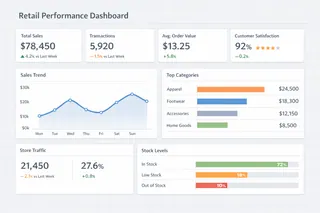
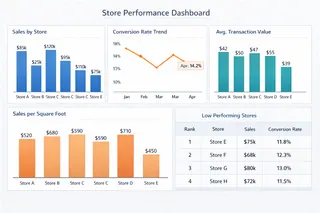
A store performance dashboard is used to evaluate how individual stores perform relative to targets, peers, and historical benchmarks.
Typical metrics include sales per store, conversion rate, average transaction value, and sales per square foot. However, the analytical value comes from comparing these metrics together. For example, a store with stable revenue but declining conversion may indicate pricing or assortment issues rather than demand weakness.
These dashboards are widely used in weekly and monthly performance reviews to identify stores that require operational intervention or strategic adjustment.
2. Sales Performance Dashboard
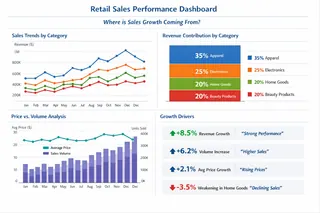
A retail sales performance dashboard focuses on revenue dynamics across categories, brands, and time periods.
Instead of emphasizing total sales alone, effective dashboards analyze category-level growth, seasonal shifts, and price-volume interactions. This helps merchandising teams distinguish between sustainable growth and short-term fluctuations driven by promotions or timing effects.
Sales performance dashboards are particularly valuable for understanding where growth originates and whether it is repeatable.
3. Inventory Performance Dashboard
An inventory performance dashboard evaluates how effectively stock supports sales while controlling capital exposure.
Common views include stock coverage, inventory turnover, sell-through rate, and aging inventory by store or category. When structured properly, these dashboards reveal mismatches between demand and supply — for example, fast-moving products with insufficient stock or slow-moving items tying up capital.
Retail teams rely on inventory dashboards to balance availability, markdown risk, and replenishment priorities.
4. Customer Performance Dashboard
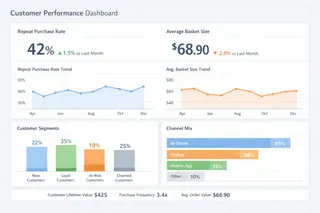
A retail customer dashboard analyzes purchasing behavior rather than transactional volume.
These dashboards typically examine repeat purchase rates, basket composition, customer segments, and channel migration. Their purpose is to detect behavioral changes that affect long-term performance, such as declining loyalty among high-value customers or shifts toward lower-margin baskets.
Customer dashboards support decisions around promotions, personalization, and assortment planning.
5. Promotion Performance Dashboard
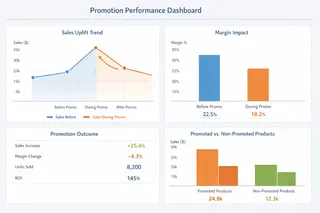
A promotion performance dashboard evaluates how discounts and campaigns affect sales, margin, and customer behavior.
Effective examples go beyond campaign revenue to assess uplift, cannibalization, and post-promotion performance. By comparing promoted and non-promoted periods, these dashboards help teams understand whether promotions generate incremental demand or simply shift purchases forward.
They are essential for aligning short-term sales goals with long-term profitability.
Common Metrics Used in Retail KPI Dashboards
Retail dashboards support decisions when metrics are structured around performance interpretation, not isolated reporting.
| Performance Area | Retail Metrics Commonly Used | Decision Insight Provided |
|---|---|---|
| Store Execution | Sales per store, conversion rate | Store-level performance gaps and execution issues |
| Product Performance | Sell-through rate, category contribution | Demand alignment and assortment effectiveness |
| Inventory Efficiency | Inventory turnover, stock coverage | Balance between availability and overstock risk |
| Customer Value | Repeat purchase rate, basket size | Changes in customer quality and loyalty |
| Promotion Effectiveness | Sales uplift, margin impact | True promotional ROI |
The strength of a retail KPI dashboard lies in how these metrics are combined to explain performance drivers, not simply display outcomes.
How AI Helps Generate Retail Dashboards from Excel Data
Many retail teams still rely on Excel to consolidate POS data, inventory reports, and promotion results. While flexible, this approach often limits how quickly dashboards can be updated and adapted to new performance questions.
AI-powered tools reduce this friction by automating data interpretation and dashboard generation. Using Excelmatic as an example, retail teams can upload Excel-based retail data and describe their analytical goal in natural language — such as “Compare store performance by region and category” or “Identify products with declining sell-through despite stable traffic.”
The system translates these requests into structured retail analytics dashboards, allowing teams to refine views and explore performance patterns without rebuilding reports manually. This workflow shifts effort from data preparation to performance evaluation and decision-making.
Build a Retail dashboards from Excel Data Today
Retail dashboards are most effective when they serve as performance diagnosis tools, not static reports.
By examining practical retail dashboard examples — across store performance, sales, inventory, customer behavior, and promotions — retail teams can design dashboards that clarify why performance changes and where action matters most.
If your retail performance data already exists in Excel, exploring AI-generated retail dashboards with Excelmatic can be a practical next step toward faster, more focused performance analysis.
Frequently Asked Questions (FAQ)
Q: What are retail dashboard examples used for?
A: Retail dashboard examples are used to analyze store performance, sales dynamics, inventory efficiency, customer behavior, and promotion effectiveness in a structured, decision-oriented way.
Q: How do retail dashboards differ from generic KPI dashboards?
A: Retail dashboards are designed around retail-specific performance questions and time horizons, while generic KPI dashboards focus on reporting metrics without explaining performance drivers.
Q: What data is typically used to build retail dashboards?
A: Retail dashboards commonly use POS data, inventory records, promotion results, and customer transaction data, often consolidated from Excel or reporting systems.
Q: Can retail dashboards be built from Excel data?
A: Yes. Many retail dashboards are built from Excel-based data, especially when AI tools are used to automate data interpretation and dashboard generation.