Key takeaways:
- Operations dashboards focus on execution, not strategy. They provide real-time visibility into daily operations, helping teams monitor workflows and maintain operational stability.
- Effective operations dashboards are built around specific business functions. Finance, IT, HR, production, and customer support each require different operational views and metrics.
- Context and interpretation are as important as metrics. Dashboards that attach insights next to charts help teams understand what changes mean and when action is required.
- Scenario-driven dashboards support faster operational response. By aligning metrics with real operational situations, teams can move from monitoring to action more efficiently.
- Tools like Excelmatic enhance operations dashboards by embedding insights into execution workflows. This reduces analysis overhead and improves day-to-day decision speed.
In most organizations, strategy defines direction, but operations determine results. Day-to-day execution — how work actually gets done across teams, systems, and processes — has a direct impact on efficiency, cost control, and customer experience. Yet many businesses struggle to maintain clear, real-time visibility into their operations.
Operations dashboards address this challenge by providing a focused, up-to-date view of operational performance. Rather than analyzing long-term trends or strategic outcomes, they help teams monitor what is happening right now and respond quickly when execution deviates from expectations.
This article explores operations dashboard examples for businesses, showing how different functions use them, what they typically monitor, and how these dashboards support effective execution at scale.
What Is an Operations Dashboard?
An operations dashboard is a visual interface designed to track and monitor the ongoing performance of core business processes. Its primary purpose is to support execution, not strategic planning or deep analysis.
Key characteristics of operations dashboards include:
- Near real-time data updates, enabling continuous monitoring
- Operational focus, centered on processes, workflows, and throughput
- Actionability, highlighting issues that require immediate attention
- Role specificity, tailored to managers and frontline teams
Unlike strategic dashboards, which are reviewed periodically to guide long-term decisions, operations dashboards are used daily — or even hourly — to ensure the business is running as intended.
How Operations Dashboards Support Business Execution
Operations dashboards play a critical role in turning data into operational awareness. By consolidating metrics from multiple systems into a single view, they reduce the time and effort required to understand current conditions.
In practice, an effective operations dashboard helps teams:
- Detect operational issues early, before they escalate
- Coordinate responses across teams using shared visibility
- Allocate resources based on current workload and capacity
- Maintain consistent execution across locations or departments
Modern dashboard platforms such as Excelmatic further enhance this value by not only visualizing metrics but also attaching contextual insights directly next to each chart, helping users understand what changes mean and why they matter — without needing separate analysis reports.
Operations Dashboard Examples for Businesses
Different business functions rely on operations dashboards in different ways. Below are common examples that illustrate how operations dashboards are applied across organizations.
1. Management Operations Dashboard
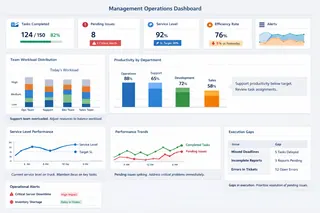
A management operations dashboard provides a consolidated view of daily performance across teams or departments. It is designed for operational managers who need to ensure that plans are being executed consistently.
This dashboard typically highlights workload distribution, productivity indicators, service levels, and short-term performance trends. Rather than focusing on strategic outcomes, it helps managers identify operational bottlenecks, rebalance resources, and address execution gaps in real time.
When paired with tools like Excelmatic, management dashboards can include brief, auto-generated explanations alongside key metrics, making it easier for managers to quickly interpret performance shifts and act accordingly.
2. Finance Operations Dashboard
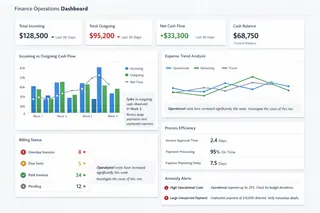
A finance operations dashboard focuses on the execution side of financial management, such as cash flow monitoring, expense control, and billing operations.
Finance teams use this dashboard to maintain short-term financial stability by tracking incoming and outgoing flows, identifying anomalies, and monitoring operational efficiency in financial processes. Unlike financial reports used for planning or compliance, this dashboard supports day-to-day financial operations.
Clear visual indicators, combined with contextual notes explaining unusual changes, help finance teams respond quickly to potential risks.
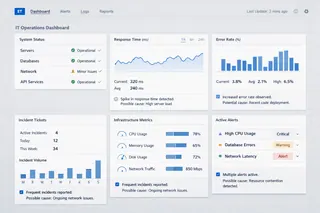
3. IT Operations Dashboard
An IT operations dashboard monitors the health and performance of an organization's technology infrastructure. It consolidates signals from monitoring systems to provide a unified view of system availability and performance.
Typical focus areas include uptime, response times, error rates, and incident volumes. The dashboard's primary value lies in helping IT teams detect issues early and prioritize responses.
By attaching operational insights directly to charts — such as likely causes of performance degradation — tools like Excelmatic help IT teams move faster from detection to resolution.
4. HR Operations Dashboard
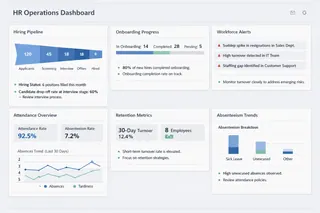
An HR operations dashboard supports the operational management of the workforce. It focuses on processes such as hiring progress, onboarding status, attendance, and short-term retention trends.
HR teams use this dashboard to ensure staffing levels remain stable and operational needs are met. Sudden changes in metrics like absenteeism or turnover can signal issues that require immediate attention.
Operational HR dashboards are most effective when they provide both metrics and concise interpretations, helping HR leaders understand not just what changed, but what it means for workforce stability.
5. OKR Operations Dashboard
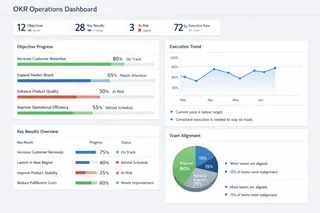
An OKR operations dashboard tracks the ongoing execution of objectives and key results. While OKRs are often discussed in a strategic context, their operational tracking is essential to maintain momentum.
This dashboard focuses on progress updates, execution pace, and alignment across teams. It allows leaders and teams to see which objectives are advancing as planned and which require intervention.
By presenting progress visually and adding brief insights next to key indicators, OKR dashboards help teams stay focused on execution rather than status reporting.
6. Warehouse Operations Dashboard
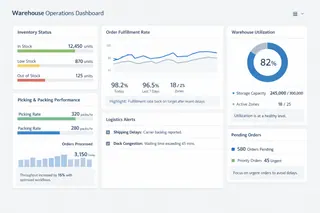
A warehouse operations dashboard provides real-time visibility into inventory levels, order fulfillment, and logistics performance.
Operations teams rely on this dashboard to manage stock availability, monitor throughput, and identify bottlenecks in picking, packing, or shipping. Timely visibility helps reduce delays, errors, and excess inventory.
Insight-augmented dashboards are particularly valuable here, as they help teams understand why fulfillment performance is changing and what actions may be required.
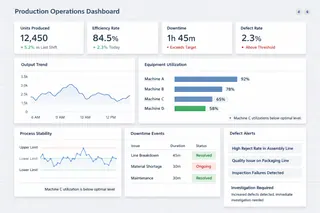
7. Production Operations Dashboard
A production operations dashboard tracks manufacturing performance on the shop floor. It focuses on output, equipment utilization, and process stability.
Production managers use this dashboard to identify deviations from expected performance and intervene quickly to minimize downtime or quality issues. The emphasis is on maintaining smooth, predictable execution.
Dashboards that combine real-time metrics with concise explanatory insights allow supervisors to react faster and communicate more effectively with their teams.
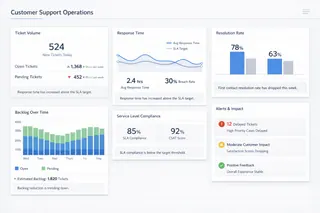
8. Customer Support Operations Dashboard
A customer support operations dashboard monitors support volume, response times, and resolution efficiency.
Support managers use this dashboard to balance workload, maintain service levels, and ensure a consistent customer experience. It provides immediate visibility into ticket backlogs and service delays.
By pairing metrics with short, automated interpretations, tools like Excelmatic help support teams understand trends quickly and adjust staffing or priorities without lengthy analysis.
Operational Dashboard Workflow with Excelmatic
When designing high-impact operations dashboards, the focus should always be on execution clarity, rapid iteration, and contextual interpretation. Excelmatic's AI-driven workflow accelerates this process by turning business questions into dashboards — with minimal manual effort.
Here is a reusable 5-step workflow that teams can follow to build dashboards that work in real operational settings:
| Workflow Step | Operational Value |
|---|---|
| Upload & Prepare | Ensures clean, timely data |
| Describe What You Want | Dashboard aligned with real execution questions |
| Review & Customize | Tailors visuals to operational roles |
| Choose Themes | Improves readability and communication |
| Share & Iterate | Supports continuous execution monitoring |
This workflow transforms static data into dynamic insight — enabling teams to detect problems early, understand context quickly, and act with confidence.
Conclusion
Operations dashboards are essential for businesses that want to execute reliably and efficiently. By providing real-time visibility into core processes, they help teams detect issues early, coordinate responses, and maintain operational stability.
The examples in this article show that effective operations dashboards are not defined by the number of metrics they display, but by how well they support day-to-day execution. When combined with platforms like Excelmatic, which enhance dashboards with contextual insights, operations dashboards become more than monitoring tools — they become practical instruments for operational clarity and action.
Get started with your first operational dashboard using Excelmatic!
Frequently Asked Questions (FAQ)
Q: What is an operations dashboard?
A: An operations dashboard is a real-time or near real-time view of key operational metrics used to monitor daily execution and support immediate action.
Q: How is an operations dashboard different from a strategic dashboard?
A: Operations dashboards focus on short-term execution and monitoring, while strategic dashboards track long-term goals and high-level performance.
Q: What are common examples of operations dashboards?
A: Common examples include finance operations dashboards, IT operations dashboards, warehouse dashboards, production dashboards, and customer support dashboards.
Q: What metrics should an operations dashboard include?
A: Metrics should reflect operational health and execution efficiency, such as throughput, backlog, response time, utilization, or error rates, depending on the function.
Q: How do businesses use operations dashboards effectively?
A: Businesses use them for continuous monitoring, early issue detection, and coordinated operational response across teams.