Key takeaways:
- Purpose & Value: Marketing dashboards transform scattered data into a centralized, real-time view of KPIs, moving teams from reactive reporting to proactive, data-driven decision-making and aligned action.
- Dashboard Types: Choose the right type based on the user: Strategic (executives, high-level trends), Tactical (managers, channel optimization), or Analytical (analysts, deep-dive exploration).
- 4-Step Build Process: Success requires (1) defining clear goals and audience, (2) selecting 5-8 focused KPIs, (3) designing a logical visual narrative, and (4) choosing the right tool while ensuring data quality.
- Tool Selection: Options range from AI-driven tools (e.g., Excelmatic, low-barrier, natural language) for agility, to professional BI platforms (e.g., Power BI) for complex analysis, and built-in platform tools for ecosystem integration.
In the era of data-driven marketing, many teams are still stuck in cyclical data wrangling. Exporting data from different platforms every week or month and manually consolidating reports not only consumes a lot of time, but, more importantly, slows decision-making and often leads to inconsistent interpretations of performance across the team.
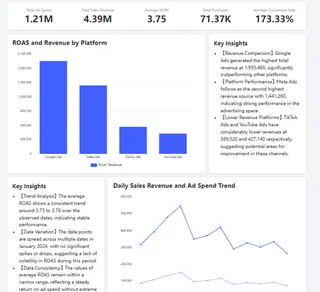
Marketing dashboards exist to solve this exact pain point. They are not just a collection of charts, but a dynamic, centralized view of data designed to tie core marketing performance indicators (KPIs) to overall business goals in real time, enabling teams to monitor, analyze, and act from a single source of truth.
What makes a marketing dashboard effective?
Traditional marketing reports are a "rear‑view mirror," summarizing the past; modern dashboards act like a "real‑time navigator," whose core value is driving forward‑looking decisions:
Real‑time monitoring and agile response:
They surface issues immediately (for example, a spike in cost‑per‑click for a campaign) or reveal opportunities (for example, a piece of content generating a large number of high‑quality leads), allowing teams to adjust strategy within the window of opportunity instead of only reviewing after the fact.Unified measurement and focus on business outcomes:
Dashboards shift the conversation from "how many posts did we publish" (output) to "how many qualified leads and how much revenue did those efforts generate" (outcome). This clearly links marketing activities to sales, revenue, and other ultimate business results.Build a data‑driven collaborative culture:
When marketing, sales, and leadership all see a single, automatically updated data set, communication becomes far more efficient. Discussions are based on "the dashboard shows Channel A's conversion rate fell," rather than vague impressions, which drives more effective collaboration.
What is the core metrics library for a marketing dashboard?
Choosing the right metrics is the foundation of a successful dashboard. Metrics should be layered according to the marketing funnel logic to form a coherent narrative from awareness to loyalty. Below are the core metrics and what they mean:
| Metric Tier | Metric Name | What It Measures | Core Business Significance |
|---|---|---|---|
| Awareness & Acquisition | Website Traffic/Sessions | Total visits driven by marketing activities. | Measures the overall reach of brand and campaign audiences. |
| Channel Traffic Share | Traffic distribution across sources (organic, paid, social, etc.). | Identifies the most efficient traffic sources to guide budget allocation. | |
| Cost Per Click | Cost paid for each click in paid advertising. | Evaluates the basic cost efficiency of paid traffic. | |
| Engagement & Conversion | Total Leads | Number of follow-up contacts acquired via forms, registrations, etc. | Quantifies marketing's ability to capture market demand; a core output. |
| Conversion Rate (e.g., visit to lead) | Percentage of total visitors who complete a desired action. | A key metric for measuring website user experience, content appeal, and landing page efficiency. | |
| Cost Per Lead | Average marketing spend required to acquire one lead. | Evaluates the economic efficiency of marketing activities and channels, crucial for marketing effectiveness. | |
| Revenue & Loyalty | Marketing Attributed Revenue | Revenue from closed deals attributed to marketing activities. | Directly proves marketing's contribution to revenue, the cornerstone for measuring ROI. |
| Customer Acquisition Cost | Total marketing investment required to acquire a paying customer. | A core financial metric for measuring growth efficiency, must be analyzed against Customer Lifetime Value. | |
| Marketing ROI | Ratio of net profit generated by marketing to marketing cost. | The ultimate metric for evaluating the overall financial return of marketing activities, used to judge investment effectiveness. |
Main types of marketing dashboards and their use cases
Depending on the user role and decision needs, marketing dashboards generally fall into the following categories:
1. Strategic dashboards (for executives)
Purpose: Provide a macro view of market performance and financial contribution, focusing on "results" and "return."
Core metrics: Marketing‑attributable revenue, overall ROI, customer acquisition cost, market share, brand health index.
Characteristics: Highly summarized, data updated daily or weekly, extremely simple views that emphasize trends over details.
2. Tactical dashboards (for marketing managers and operations)
Purpose: Monitor the performance of specific channels, campaigns, or projects, optimize day‑to‑day execution, and focus on "efficiency" and "process."
Core metrics: Channel traffic and conversion rates, cost per lead, content engagement, ad click‑through rate and quality score.
Characteristics: Highly granular, near‑real‑time updates, includes comparisons, cohort analysis, and deep‑dive capabilities to guide specific optimization actions.
3. Analytical dashboards (for analysts and strategists)
Purpose: Diagnose issues deeply, explore data relationships, and support comprehensive post‑mortems and strategy planning.
Core metrics: Multi‑touch attribution, conversion path analysis, customer lifetime value distribution, behavioral comparisons across segments.
Characteristics: Highly interactive, supports custom queries, multi‑dimensional slicing, and data model exploration — the analyst's workbench for deep insights.
Build path: Four steps to create your dashboard
The key to building an effective dashboard is clear preparation and planning. Follow these four steps to avoid common pitfalls and build a dashboard that actually drives action.
Step 1: Clearly define goals and audience
This is the starting point for everything. You must answer two questions:
Who is this for? Identify the core users. Is it decision‑makers focused on total revenue, managers who oversee channel budgets, or operators optimizing content performance? Different roles have different needs.
Why build it? Clarify the core business problem you want to solve. Is it "identify where money is most effectively spent"? Or "speed up conversion from leads to revenue"? A dashboard should ideally focus on answering one or two core questions.
Step 2: Select key performance indicators (KPIs)
Based on Step 1, pick 5-8 KPIs from the mass of available data. Avoid data overload and follow the "pyramid" principle:
Apex (Outcome layer): 1-2 outcome metrics, e.g., "marketing‑attributable revenue," "return on investment (ROI)."
Body (Process layer): 3-4 driver metrics, e.g., "number of qualified leads," "cost per lead."
Base (Operational layer): 1-2 monitoring metrics, e.g., "website traffic," "content downloads."
Ensure that changes in the base metrics can explain results at the top of the pyramid.
Step 3: Design a logical data narrative
The layout of the dashboard itself should tell a data story; its logic should guide users to instantly understand overall performance.
Step 4: Choose tools and ensure data quality
To do great work you need the right tools. Choosing the appropriate platform is the key to turning your design into reality.
Tool choices today generally fall into three categories:
AI‑driven tools, represented by Excelmatic, let you generate charts and insights directly from natural language. For example, typing "compare last month's channel performance" will prompt automatic analysis and visualization. These tools dramatically lower the barrier to entry, ideal for business teams that need quick insights but have limited technical resources — especially useful for routine monitoring and agile analysis.
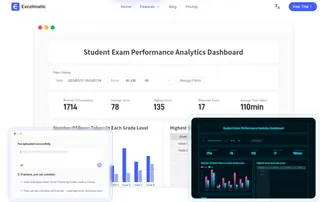
Professional business intelligence platforms, such as Power BI and Tableau, offer powerful data integration and advanced analytics. These suit organizations with analysts, used to build unified data portals and complex reports.
Marketing platform built‑in tools, such as HubSpot's dashboards, provide deep integration and out‑of‑the‑box convenience. They are ideal for teams that have fully adopted that marketing ecosystem.
In an era of increasing intelligence, AI tools have made dashboard building easier than ever. No matter which tool you choose, you must ensure the accuracy and consistency of data sources — this is the foundation of trustworthy analysis. For most teams, starting with an AI‑driven tool is the most pragmatic first step toward data‑driven decision‑making.
Toward intelligent decision‑making: make data‑driven growth instinctive
Marketing dashboards are a strategic tool that turns data into a decision advantage. They not only align team goals and enable agile responses, but also reveal deeper business logic through visual storytelling. From defining goals and selecting metrics to crafting a logical narrative, every step is designed to make data truly drive growth.
Today, building such an insights hub is easier than you think. With AI‑driven tools like Excelmatic, you don't need a complex technical background — natural language commands can generate automated charts and smart interpretations.
Rather than wait, start small and practical.
Define one core business question now, try connecting your key data sources with Excelmatic, and build your first intelligent dashboard. Let data insights become the everyday engine of your growth.
Frequently Asked Questions (FAQ)
Q: Which dashboard type is right if I’m both a manager and do hands‑on execution?
A: Start with a tactical dashboard, but ensure it includes high‑level outcome metrics (like Marketing Attributed Revenue) so you can see both performance drivers and business impact.
Q: Can I build a useful marketing dashboard without a data analyst?
A: Yes—AI‑driven tools like Excelmatic allow you to create dashboards using natural language. Start with a simple MVP (Minimum Viable Product) using 2–3 key data sources, then iterate based on insights.
Q: What’s the biggest mistake teams make when designing their first dashboard?
A: Including too many metrics without a clear narrative. Focus on answering one core business question first — for example, “Where is our most cost‑effective lead source?”—and build the layout to tell that story visually.