Key takeaways:
- A logistics dashboard is designed to translate transportation and delivery data into decision-relevant signals, rather than static performance reports.
- Different logistics dashboard types exist because shipment execution, delivery quality, cost control, and network behavior require distinct analytical perspectives.
- Logistics metrics create value when they are structured to explain variability, reliability, and trade-offs, not just average performance.
- AI-powered workflows, such as those built on Excel data with Excelmatic, reduce the effort required to turn logistics data into interpretable and actionable dashboards.
By 2025, logistics has become one of the most volatile components of business operations. Freight rates fluctuate sharply, delivery expectations continue to tighten, and logistics networks are increasingly exposed to regional disruptions and capacity constraints.
Despite this, most logistics teams are not lacking data. Shipment timestamps, carrier scorecards, freight invoices, warehouse dispatch logs, and delivery confirmations are recorded in detail — often across multiple systems and spreadsheets. The real challenge lies elsewhere: logistics decisions often fail because information is fragmented across time, locations, and operational layers, making it difficult to understand how execution issues propagate through the network.
A logistics dashboard exists to close this gap — not by adding more metrics, but by structuring logistics data so execution risks and trade-offs become visible early enough to act.
What Is a Logistics Dashboard?
A Logistics Dashboard is a decision-oriented analytical interface that organizes transportation and delivery data into signals about flow reliability, execution risk, and network behavior.
Unlike general performance dashboards, logistics dashboards are designed around movement over time and space. Their analytical value comes from revealing where delays accumulate, how variability differs across routes or partners, and which parts of the logistics network amplify disruption.
In practice, a well-designed logistics dashboard reduces reaction time by helping teams identify where intervention matters, rather than forcing them to manually reconcile disconnected reports.
Common Types of Logistics Dashboards Used in Practice
1. Transportation Management Dashboard
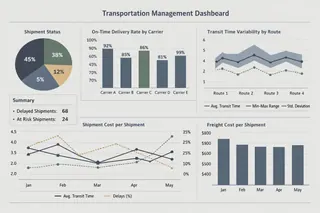
Transportation management dashboards are widely used by logistics and operations teams to monitor shipment execution and carrier performance. These dashboards focus on shipment status, transit behavior, delivery punctuality, and transportation costs.
Their primary decision value lies in highlighting lane-level and carrier-level variability, enabling teams to intervene when service reliability deteriorates rather than after service failures become systemic.
2. Delivery Performance Dashboard
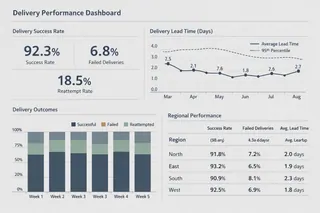
Delivery performance dashboards concentrate on last-mile execution and customer-facing outcomes. They are commonly used in retail, e-commerce, and distribution-intensive industries.
Instead of tracking shipments in isolation, these dashboards connect delivery timeliness, failure rates, and reattempts to customer experience. This structure helps teams understand how operational execution translates into service perception and contractual risk.
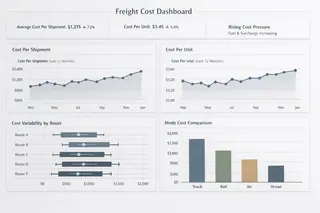
3. Freight Cost Dashboard
Freight cost dashboards are designed to support cost control and pricing decisions within logistics operations. They track freight spend, cost per shipment, cost per unit, and cost behavior across routes or modes.
Their analytical strength comes from revealing cost volatility and structural inefficiencies, rather than simply reporting total spend. This allows organizations to assess whether rising costs stem from market conditions, execution issues, or network design choices.
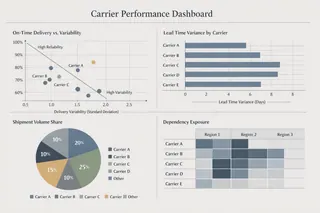
4. Carrier Performance Dashboard
Carrier performance dashboards evaluate reliability, consistency, and dependency across logistics partners. These dashboards are commonly used during carrier reviews, contract negotiations, and sourcing decisions.
By emphasizing consistency and variance instead of average performance, they help logistics teams detect hidden risks—such as carriers that meet service targets overall but fail frequently under peak conditions.
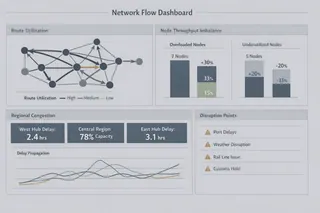
5. Network Flow Dashboard
Network flow dashboards focus on how goods move across the logistics network as a whole. They are used to analyze route utilization, regional congestion, handoff delays, and cross-node dependencies.
These dashboards support structural decisions by showing how localized disruptions can propagate through the network, affecting service levels and costs elsewhere.
Key Logistics Metrics and Their Decision Roles
Logistics dashboards are most effective when metrics are organized by decision intent, not by reporting convention.
| Decision Focus | Key Metrics | What They Help Teams Assess |
|---|---|---|
| Shipment Reliability | On-time delivery, transit time variance | Predictability of transportation execution |
| Cost Control | Freight cost per unit, cost variability | Structural cost pressure across routes or modes |
| Delivery Quality | Delivery success rate, failure frequency | Impact of logistics on customer commitments |
| Network Utilization | Route utilization, throughput imbalance | Flow constraints and congestion risk |
| Operational Risk | Delay frequency, recovery time | Exposure to disruption and response effectiveness |
The analytical value of these metrics depends on how they are combined to explain execution behavior, rather than viewed individually.
How AI Helps Build Logistics Dashboards from Excel Data
In many organizations, logistics analysis still relies heavily on Excel. Shipment records, freight bills, carrier evaluations, and operational logs are often maintained in spreadsheet form, making dashboard creation time-consuming and error-prone.
AI-enabled workflows reduce this friction by shifting effort away from manual preparation toward interpretation. Using Excelmatic as an example, the process begins by ingesting Excel-based logistics data and automatically interpreting data structures, relationships, and inconsistencies.
Users then describe their analytical goal in plain language — such as “Compare delivery reliability by carrier and region” or “Identify routes with increasing transit time variability.” The system translates this intent into analytical logic, generating dashboards that emphasize patterns, deviations, and emerging risks.
As questions evolve, dashboards can be refined conversationally, allowing logistics teams to explore scenarios without rebuilding analyses from scratch. The result is a workflow that prioritizes decision clarity over mechanical dashboard construction.
Conclusion and a Measured Next Step
Logistics dashboards are no longer optional reporting tools. In an environment defined by volatility and tight service expectations, they function as early-warning systems for execution risk and network stress.
If your logistics data already exists in Excel, you can start exploring AI-generated logistics dashboards today with Excelmatic.
Frequently Asked Questions (FAQ)
Q: What is a logistics dashboard?
A: A logistics dashboard is an analytical interface that structures transportation, delivery, and network data to support operational and strategic logistics decisions.
Q: What types of logistics dashboards are commonly used?
A: Common types include transportation management dashboards, delivery performance dashboards, freight cost dashboards, carrier performance dashboards, and network flow dashboards.
Q: What metrics are typically included in a logistics dashboard?
A: Typical metrics include on-time delivery, transit time variability, freight cost per unit, delivery success rate, and route utilization.
Q: How does AI improve logistics dashboards?
A: AI helps identify patterns, highlight anomalies, and generate insights automatically, reducing analysis time and improving decision clarity.