Key takeaways:
Two Approaches Exist Predictive analytics can be done through traditional coding (for experts) or modern, AI-driven tools (for business users).
Core Techniques Are Foundational Methods like regression, classification, and time-series analysis answer different types of business questions.
The Traditional Path Has Bottlenecks The code-heavy method offers control but is slow, creating dependency on data scientists.
Modern Tools Democratize Access AI-powered platforms like Excelmatic allow anyone to generate forecasts using simple language and their existing spreadsheets.
The Strategic Choice is Yours Success depends on choosing the method that matches your team's skills and your business's need for speed versus complexity.
While a data analyst is crafting a complex regression model in Python, a marketing manager is asking an AI in plain language, "Forecast next quarter's sales." Both are performing predictive analytics, but they operate in fundamentally different worlds.
Many businesses invest in sophisticated platforms only to find that their teams struggle to move from data to decisive forecasts. The gap between promise and reality often lies not in the data, but in the approach. This guide demystifies the core of modern predictive solutions by contrasting two distinct paths: the traditional, code-intensive method and the new wave of AI-assisted tools designed for everyday business users.
What is Predictive Analytics?
At its core, predictive analytics is the practice of extracting information from historical data to identify patterns and predict future outcomes and trends. A true predictive analytics solution encompasses more than just software; it is a blend of data, statistical methodologies, and technology designed to answer the question, "What is likely to happen next?" Whether forecasting sales, assessing risk, or optimizing supply chains, the goal is to provide a probabilistic, data-driven glimpse into the future to inform better decision-making.
Core Predictive Analytics Techniques
The potential applications for predictive analytics are vast, and so are the types of models that generate these insights. Choosing the right techniques for your organization starts with one crucial step: defining a clear objective. Once you know the precise question you need to answer, selecting the most suitable model becomes a logical next step. Predictive analytics models can be broadly categorized into the following core types.
1. Regression Models
Use regression to predict a specific numerical outcome, like sales revenue, and to measure how different factors influence it. This technique helps answer "what-if" scenarios.
2.Classification Models
This method sorts data into predefined categories. It is commonly used for applications like identifying fraudulent transactions or predicting if a customer is likely to churn.
3. Clustering Models
Clustering finds natural groupings within your data where categories are not predefined. It is excellent for discovering customer segments or identifying pattern-based insights.
4. Time Series Models
When your data is recorded over time, use time series analysis. It forecasts future values based on past trends and seasonal patterns, essential for demand and inventory planning.
5. Advanced Techniques
Modern solutions often combine these core methods. Techniques like neural networks can model complex relationships for tasks such as advanced forecasting or image recognition.
Your business goal dictates the choice. Define the question clearly, and the suitable technique for actionable insights will follow.
The Traditional Path: An Expert-Centric, Code-Heavy Journey
Historically, executing this workflow demanded specialized expertise. Here's how it typically operated:
Step 1:
The data scientist or statistician takes the lead, using programming languages like Python or R. They write code to import and manipulate datasets using libraries like Pandas.
Step 2:
They perform exploratory data analysis through custom scripts, visualizing distributions and correlations to inform the next steps.
Step 3:
They manually select and code algorithms from scikit-learn or TensorFlow libraries, spending significant time tuning hyperparameters and iterating.
Step 4:
They script the validation process and generate performance reports. The final model might be wrapped in an API for deployment, requiring collaboration with engineering teams.
Step 5:
A dedicated MLOps (Machine Learning Operations) pipeline is often needed to maintain and retrain the model in production.
This path offers deep control and customization but creates a bottleneck. The business user must translate their need to the expert, wait for the cycle to complete, and often cannot explore "what-if" scenarios independently.
The Modern Solution: Putting Power in the Hands of Business Users
Newer solutions are dismantling these barriers by integrating AI directly into user-friendly interfaces. Tools like Excelmatic exemplify this shift. Let's see how the same predictive workflow unfolds for a sales analyst forecasting quarterly revenue:
Step 1:
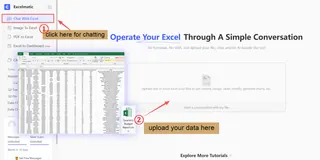
Instead of writing code, you simply upload your Excel spreadsheet containing past sales data directly to the Excelmatic web platform.
Step 2:
You interact with an AI assistant using plain language. You might type, "Clean this data and identify any missing values in the 'Revenue' column." The AI executes the task and explains what it did.
Step 3:
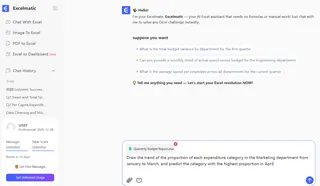
To build the forecast model, you ask, "Predict next quarter's sales based on historical trend and marketing spend." The AI analyzes the data, selects an appropriate time-series algorithm, trains the model, and generates a forecast chart.
Step 4:
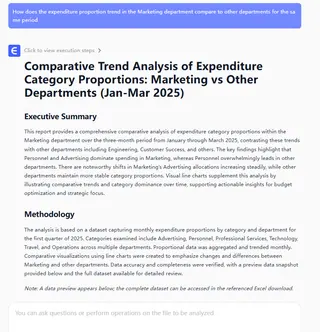
You are presented with clear visualizations of the forecast and key accuracy metrics.
You can instantly ask follow-up questions like, "How does the expenditure proportion trend in the Marketing department compare to other departments for the same period" to interpret the results.
Step 5:
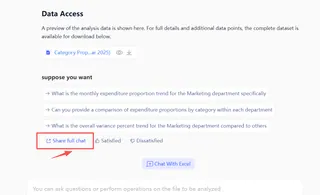
You download the forecast back into your spreadsheet or share the chat with your friends, all within a few clicks. The entire process, from question to answer, happens in minutes without leaving your browser.
Side-by-Side: A Clear Choice for Democratization
| Aspect | Traditional, Code-Centric Approach | Modern, AI-Assisted Solution (e.g., Excelmatic) |
|---|---|---|
| Primary User | Data Scientists, Statisticians | Business Analysts, Managers, Domain Experts |
| Required Skills | Programming (Python/R), Advanced Statistics | Domain Knowledge, Basic Data Literacy |
| Speed to First Insight | Weeks to Months | Minutes to Hours |
| Flexibility & Iteration | High, but slow (requires re-coding) | High and immediate (conversational) |
| Barrier to Entry | Very High | Low |
| Key Strength | Ultimate customization for complex problems | Accessibility and speed for common business problems |
Conclusion: Finding Your Path Forward
Predictive analytics solutions are no longer the exclusive domain of technical teams. The fundamental question for your organization is not just what to predict, but who you want to empower to make those predictions.
The traditional path remains vital for groundbreaking, unique research problems. However, for the vast majority of business forecasting needs — from sales and finance to marketing and operations — the intelligent, user-centric approach offers unmatched agility and accessibility. It closes the gap between data and decision, allowing those who understand the business context best to also generate its insights.
Ready to see how accessible predictive analytics can be?
The future of forecasting is not about writing more code, but about asking better questions.
Start by exploring how a solution like Excelmatic can turn your team's existing data and expertise into actionable foresight today.
Frequently Asked Questions (FAQ)
Q1: This article compares two paths. How do I definitively know which one is right for my team right now?
A: Conduct a simple audit. List your last three forecast requests. If they were complex, first-of-the-kind problems requiring novel data, the expert path is likely better. If they were recurring business questions (e.g., sales, demand forecasts) using internal data, the modern, AI-assisted path will deliver faster value and empower your business teams directly.
Q2: What's the most time-consuming part of implementing a predictive solution that articles don't always mention?
A: Beyond model building, data preparation and ongoing governance are the largest hidden burdens. Regardless of the path, ensuring consistent, clean, and reliable data flow from source systems consumes 60-80% of the effort. Modern solutions can automate cleaning, but establishing a single source of truth is a prerequisite project.
Q3: Can a "no-code" AI solution really handle the specific quirks of my industry's data?
A: Modern solutions are designed for adaptability. While they use pre-built algorithms, their core strength is in automatic feature engineering — identifying relevant patterns in your specific data. For most common business metrics, this is sufficient. The true test is a pilot: run a past scenario to see if the tool's prediction matches the known outcome.