Key takeaways:
- Predictive analytics uses historical data and statistical/ML models to forecast future outcomes.
- The field evolved from manual statistics to automated, AI-driven forecasting.
- Conversational Excel AI lets non‑experts run forecasts with natural‑language prompts.
- Four-step workflow: define goal → connect & clean data → auto‑select & train model → interpret & iterate.
- Common models: regression (linear, XGBoost), classification (logistic, random forest), time series (ARIMA, Prophet).
- The tool automates feature engineering, model selection, and returns explainable results with confidence intervals.
What once required days of work from statistical experts can now be done in a few sentences. This transformation stems from forecasting methods evolving from "manual calculation" to "intelligent learning."
Imagine a decade ago a sales manager wanting to forecast next month's performance had to manually compute historical averages and trend lines, or ask a data analyst for help. Today, the same task only requires telling a spreadsheet tool, "Forecast sales for the next three months," and a clear prediction curve and figures appear automatically.
This leap from complex to simple is precisely what predictive analytics is: a process that uses historical data and models to identify future trends and possible outcomes.
Definition and Evolution of Predictive Analytics
The core of predictive analytics is simple: using historical data and statistical modeling techniques to make probabilistic predictions about future outcomes. It rests on a straightforward belief: the past can offer a glimpse of the future.
The methods used to achieve this have evolved from "manual actuarial work" to "intelligent learning."
Traditional forecasting is like a meticulous mathematician.
It relies on fixed formulas and human expertise, and the analytical tools are relatively basic:
Classic tools: Microsoft Excel (manual use of functions and charts), SPSS, SAS, and other professional statistical packages. Analysts must manually select appropriate statistical methods (such as linear regression or time series analysis) and interpret complex outputs.
Core limitation: these methods can only capture linear or simple patterns. When real-world situations are influenced by many interacting factors, traditional approaches become clumsy and less accurate.
Modern AI forecasting, acts like an autonomous assistant.
It uses machine learning algorithms to automatically uncover complex relationships hidden in the data.
Core tools: conversational AI analytics tools like Excelmatic are becoming mainstream. In addition, Python (with libraries such as Scikit-learn and TensorFlow), R, and various AutoML platforms are widely used.
Core advantage: they can automatically handle complex nonlinear relationships, adapt to changing scenarios, and reduce the operational barrier to a minimum.
Key Steps: When Conversational AI Takes Over Forecasting
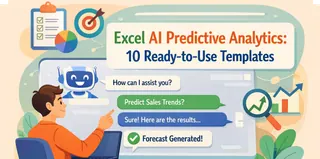
Traditional forecasting workflows are complex and demand high expertise. Now, conversational AI tools like Excelmatic simplify the process into a natural "ask-and-answer" flow. Here are the concrete steps tied to its capabilities:
1. First step: define the goal and ask directly
You no longer need to translate business questions into technical parameters. Just state your request in Excelmatic's chat box as if asking a colleague:

2. Second step: connect and prepare the data
The traditional approach required tedious data cleaning. Now, you simply authorize Excelmatic to access your data sources (like an Excel sheet or a database) and give it instructions:
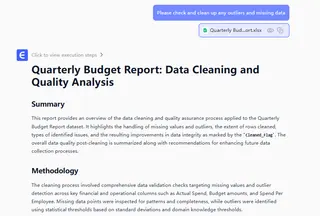
3. Third step: automatic model selection and training
This is the core stage. You don't need to know algorithmic details — Excelmatic will automatically recommend and run the most suitable model based on the data's characteristics. Common predictive models include:
• For numeric prediction (regression): linear regression, decision tree regression, gradient boosting regression trees (e.g., XGBoost).
• For categorical prediction (classification): logistic regression, random forests.
• For time series forecasting: ARIMA, Prophet.
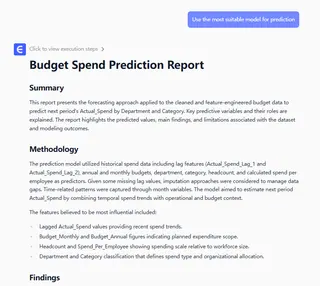
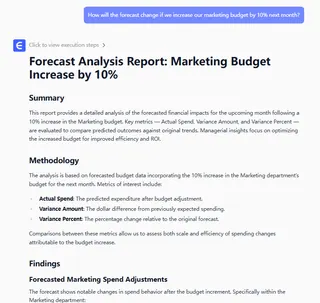
4. Fourth step: interpret results and iterate
AI doesn't just provide numbers; it explains insights in natural language.
Why Excelmatic Is an Advantage: When Everyone Can Forecast
The emergence of tools like Excelmatic has torn down the technical barriers around predictive analytics. Their core advantages are:
1. Absolute no-code friendliness
It replaces coding and complex formulas with natural language interaction. Marketing, sales, and operations teams no longer need to wait for the data team — they become the analyst themselves and can validate ideas instantly.
2. End-to-end intelligent guidance
From data cleaning and feature engineering to model selection and tuning, the traditionally most time-consuming and error-prone professional steps are automated. Users don't need to be all-round experts to obtain professional-grade analysis.
3. Dynamic, conversational insights
Forecasting is not a static report. You can ask follow-ups, adjust assumptions, and run scenario simulations — having a "conversation" with your data. This turns analysis from a backward-looking summary into forward-looking exploration, greatly improving decision agility and depth.
This means forecasting capability is no longer monopolized by a handful of experts. Every business user can directly query the data and quickly obtain forward-looking insights — truly achieving the "democratization of predictive capability."
Start Your First Forecasting Conversation
From fixed-formula traditional analysis to code-driven machine learning to today's natural language-driven intelligent conversations, the barriers to predictive analytics are dropping rapidly.
The essence hasn't changed: better understand patterns, reduce uncertainty, and make smarter decisions. But the way we achieve it has become unprecedentedly simple and direct.
Excelmatic stands at the forefront of this change, packaging complex algorithms into simple dialogue so anyone with a business question can access AI-powered forecasting. The future won't belong only to those who can read reports, but to those who can talk to their data and actively explore possible futures.
Now, open Excelmatic and ask your first forecasting question. Let the data give you a clear answer about the future.
Frequently Asked Questions (FAQ)
Q: Can I trust the AI's explanations and confidence intervals?
A: Many conversational tools produce natural-language explanations and confidence intervals derived from model outputs. Treat them as informed guidance — verify key claims with charts, sensitivity checks, and alternative models.
Q: When should I still use traditional statistical models?
A: For small, well-understood problems, strict regulatory contexts, or where full model interpretability is required, classical methods (ARIMA, linear regression) remain valuable. Use AI for complex, feature-rich datasets.
Q: Can I run scenario analysis (what‑ifs) with Excel AI?
A: Yes. Most conversational forecasting tools support simulations — adjust inputs (e.g., marketing spend) and re-run forecasts to compare outcomes quickly.
Q: How do I get started quickly?
A: Prepare a clean sample dataset in Excel, define the forecasting goal, and ask the tool a clear prompt (e.g., "Forecast monthly sales for product A next quarter"). Then validate the output and run a couple of what‑if scenarios.