Key takeaways:
- Understand Your Team's Needs: Choose an AI dashboard generator based on who will use it — whether it's for data analysts, marketing teams, or executives. This ensures the tool fits the specific workflows of your team.
- Test AI Capabilities: Not all AI dashboard tools are the same. Test them with real-world data and complex queries to ensure they go beyond basic chart generation and offer actionable insights.
- Data Integration is Crucial: Ensure the tool connects smoothly to your data sources, like Google Sheets, Salesforce, or e-commerce platforms, for accurate and efficient analysis.
- Consider Total Cost of Ownership: Look beyond the initial price — account for hidden costs like data cleaning, connector fees, and scaling as your user base grows.
- Customization and Collaboration Features Matter: Ensure the tool supports customization (for internal reports or client-facing dashboards) and collaboration features, such as commenting and co-editing, to enhance teamwork.
You've surely seen those headlines: "AI will transform data analytics!" "Generate a full dashboard with one sentence!" It feels like the space is on fire, right?
But when you actually open a browser and search "AI dashboard generator," you're met with a long list of tools: Akkio, Tableau Pulse, Power BI with Copilot, Zoho Analytics... Each one claims to be the smartest, the simplest, the most powerful among AI Dashboard Generators.
The excitement quickly turns into decision paralysis. Feature lists look similar, pricing pages are confusing. Your real question is: "Which one actually fits me — not just the one that looks the coolest?"
Don't worry — that confusion is completely normal. Choosing these tools isn't about chasing the flashiest AI. It's about a pragmatic match. Let's skip the marketing copy and talk about the aspects you should really care about when comparing AI Dashboard Generators.
Step 1: Ask Key Questions Before You Start Looking at Tools
I know you want to jump straight to comparison tables. But take two minutes to answer a few questions. The answers will act like a compass and clear the fog.
1. Who Are the Actual Users?
This seemingly simple question affects everything. Is it for the data team to do rapid exploration, the marketing team needing real-time campaign monitoring, or executives wanting a clear strategic view?
2. What Are the Data Sources?
Is your data neatly sitting in Google Sheets, or scattered across Salesforce, your e‑commerce platform, and a PostgreSQL database? If data connections are a nightmare, even the smartest AI Dashboard Generators can't work miracles without usable data.
If much of your business data starts in Excel or Google Sheets, tools like Excelmatic — optimized for intelligent spreadsheet analysis — clearly have an edge: they can directly understand the business logic in your sheets, turn tedious prep into a few simple conversational commands, and let you move quickly from raw data to insights, saving a lot of upfront work.
3. What Are the Core Use Cases?
Do you want to ask every morning "How were yesterday's sales?" and get a number or trend instantly, or do you need a fixed, formal dashboard to share with the board or clients? Is your core scenario ad‑hoc queries, or a monitoring wall?
4. What's Your Real Budget?
We're not talking sticker price, but total cost of ownership. Consider hidden factors: will you need to hire people to clean data? Buy extra connectors? Hire experts for initial setup? How does cost scale when users go from 5 to 50?
Once you've clarified these, let's move on.
Step 2: Evaluate AI Capabilities Beyond Marketing Claims
Today almost every tool wears an "AI" label. So what's the difference between AI Dashboard Generators? It comes down to understanding and conversational depth.
You can imagine two scenarios:
- You type "Show sales data." It spits out a table full of numbers. Helpful — but not much.
- You type, "Compare last month and this month for high‑margin products in Europe, broken down by product category, and also check which cities have abnormal return rates." Can it understand that?
The real difference lies here. Focus on:
- Does the natural language interaction feel conversational? Great AI Dashboard Generators let you follow up and refine. For example: "Change last month to the same period last year," or "Don't use bars; switch to a line chart." Is this a smooth collaboration or a one‑off, brittle command?
- Is it an assistant with business sense, or just a chart generator? Some tools will proactively suggest, "It looks like customer churn is a key metric — should I track it?" That kind of proactivity beats passive responses.
Here's the practical advice: try them. Prepare a real, slightly messy dataset and a few complex questions you actually ask. Talk to each tool's AI yourself. You'll find some understand remarkably well; others just apply templates.
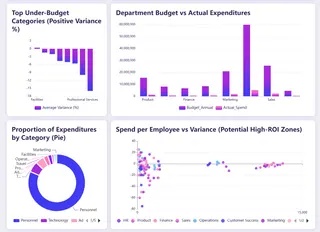
When testing, design targeted scenarios. For example, we once used a complex‑formatted Excel sales file from finance across multiple AI Dashboard Generators and found Excelmatic could, without manual preprocessing, accurately identify product categories, time periods, and currency fields, then perform intelligent analyses around those dimensions. Below is the financial dashboard Excelmatic generated.
Step 3: Assess the Data Foundation Supporting the AI
AI can generate insights, but only if the data foundation is solid. When evaluating this, look past marketing and focus on three practical areas.
1. Quality of Data Connections
A tool may list hundreds of connectors, but you need to confirm whether it includes your core business systems. More importantly, is the connection a few simple steps, or does it require complex engineering?
2. Data Preparation Capabilities
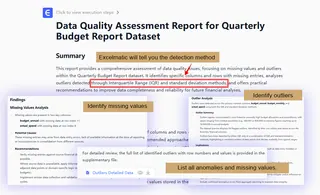
A good tool should help with common data issues — auto‑detect duplicates, normalize date formats, suggest appropriate data types. If all cleaning must be done externally up front, the whole process loses agility.
After trying many AI models, I found that Excelmatic is the most convenient. It can not only generate dashboards but also help you clean up data.
3. Effectiveness of Access Controls
For team use, permission management and security compliance aren't optional. Confirm whether you can control which members see which data, whether it supports your SSO, and whether it has required security certifications. These determine if the tool can be used safely in an enterprise.
Step 4: Consider Visuals and Collaboration Features
Creating charts is just the start; real value lies in how you act on those insights.
1. Customization Needs
If dashboards are mainly for internal quick analysis, clear default templates may suffice. But if you need to embed them in client reports or follow strict brand guidelines, you need finer control — tweak colors, fonts, layouts until every detail matches.
2. Collaboration features
These determine whether the tool fits into team workflows. The ideal AI Dashboard Generator lets discussion happen next to the data: team members can comment on charts, @ colleagues, even co‑edit. Version history helps avoid mishaps from accidental edits.
In short, a good tool should shift data work from solo analysis to team collaboration, and from static reports to dynamic decision support.
How to Make Your Final Decision
Forget hunting for a "perfect" tool. Your goal is to find the solution that best integrates into your workflow.
It's like picking a partner — you need mutual understanding and smooth collaboration. Based on what you learned about your needs, shortlist 2-3 AI Dashboard Generators and give them a real test. Don't just watch demos; use your actual problem data and questions.
The whole process is about upgrading your workflow from "hunt for data everywhere" to "ask the data directly." When you find that tasks that used to take hours of cleaning Excel, making charts, and writing reports can now yield core insights in a few conversations, that's where real value lies.
While we're at it, it's worth saying: if you're looking for a quick‑to‑start, feature‑complete starting point, a tool like Excelmatic is a pragmatic choice — especially for teams that want a one‑stop solution to data problems.

Why? Because many teams face chained data challenges: data scattered across places, inconsistent formats; analysis requiring switching between multiple tools; final presentation needing rework. Excelmatic's design ties data preparation, intelligent analysis, and dashboard generation into one coherent flow — exactly the sequence most organizations need from AI Dashboard Generators.
For example, you can upload Excel files for conversational analysis, and you can also turn messy PDF reports and even image tables into analyzable structured data. This front‑end "data standardization" step actually solves the most time‑consuming part of most analytics projects. When your data sources are unified and clean, subsequent AI analysis is more accurate and the resulting dashboards are far more persuasive.
At the end of the day, choosing a tool is choosing a smarter way of working. The best test is to bring your most realistic, specific business question — like "How should we allocate next quarter's marketing budget?" — and try it with a couple of AI Dashboard Generators.
When you see the whole chain from data cleaning to analysis to presentation flow seamlessly, you'll know you've found the right fit.
So, are you ready to let AI redefine how you work with data? Get started with Excelmatic now!
Frequently Asked Questions (FAQ)
Q: What is an AI Dashboard Generator?
A: An AI Dashboard Generator is a tool that uses artificial intelligence, particularly large language models, to automatically turn raw data into interactive and visually appealing dashboards. These tools simplify data analysis by enabling users to create dashboards through natural language queries without needing to write code.
Q: What are the main benefits of using an AI Dashboard Generator?
A: AI Dashboard Generators offer several key benefits:
- Increased efficiency: Automates time-consuming tasks, reducing the need for manual data wrangling.
- User-friendly: No coding required—simply ask questions in natural language and receive actionable insights.
- Improved decision-making: AI detects trends and anomalies, helping businesses make data-driven decisions faster.
Q: Are there free AI Dashboard Generators available?
A: Yes, many tools offer free versions or trials. For example, Excelmatic, Polymer, and Bricks provide free tiers that let you get started with no upfront cost. These free options are great for small teams or those looking to test out the features before committing.
Q: What is the best AI Dashboard Generator for non-technical users?
A: For non-technical users, Excelmatic is an excellent choice. It features a conversational interface that requires no prior technical knowledge. Users can simply upload data and ask questions in plain language to generate dashboards instantly.