Key Takeaways
- Custom-Fit Logic: Move beyond rigid to-do lists. Whether it's a 2-week sprint or a 6-month roadmap, generate a structure that fits your project's heartbeat.
- Automated Accountability: AI-generated templates come with built-in excel formulas for tracking overdue days, status changes, and completion percentages.
- Two Ways, 30 Seconds: Describe your workflow via prompt or grab a proven layout from the Excelmatic Showcase.
- Data-Driven Execution: A generated tracker is just the start; use integrated AI tools to clean, filter, and visualize your project's health in real-time.
The "Endless List" Problem: Why Generic Templates Fail
The average project manager spends 4.5 hours per week manually updating task statuses and fixing broken Excel formulas. That's two full work weeks wasted every year.
It's time to let AI do the heavy lifting.
The problem isn't your project; it's your tool. Most downloaded project templates are either too simplistic or overwhelming. With Excelmatic, you don't adjust your workflow to fit a template—the template is generated to reflect your specific management style.
What Kind of Project Are You Managing Today?
🤔 Are you a 'detail freak' or a 'big picture' person?
Scroll down to see how AI adapts to YOUR management style 👇
Instead of a one-size-fits-all approach, use Template Generation to match the complexity of your current task load.
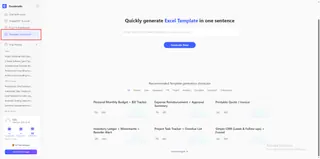
Scenario A: The Agile Sprint (Speed & Focus)
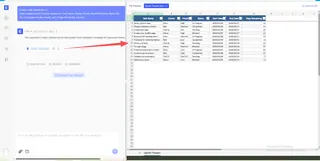
For fast-moving teams, visibility of "Status" and "Priority" is everything.
- The Prompt:
Create a task tracker for a 2-week software sprint. Include columns for Task Name, Owner, Priority (High/Med/Low), Status (To-Do, In Progress, Review, Done), and a 'Days Remaining' formula.
- The Power: The AI builds in conditional formatting automatically, turning overdue tasks red so you can't miss them.
Scenario B: The High-Level Roadmap (Visual Timelines)
If you're managing milestones and dependencies, you need to see the "Big Picture."
- The Prompt:
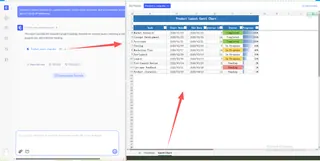
Generate a project roadmap for a product launch. I need a Gantt chart view, start and end dates, and a progress bar that updates as I check off milestones.
- The Power: It handles the complex calculation logic required to link dates to a visual bar chart—a task that usually takes hours of manual setup.
Beyond the Prompt: One-Click Professional Layouts
Sometimes you don't want to describe the wheel; you just want to use it. If you need a battle-tested structure that has already helped thousands of teams stay on track, our Showcase collection is your shortcut.
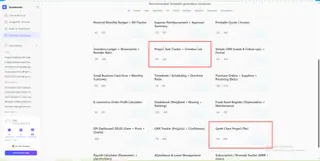
Instead of writing a prompt, simply browse the Project Management category and select a pre-verified layout:
- Project Task Tracker + Overdue List: Ideal for daily operations. It automatically highlights tasks that have slipped past their due date, ensuring nothing falls through the cracks.
- Gantt Chart Project Plan: Best for high-level stakeholders. It turns your dates into a visual timeline, showing task dependencies and overall project health.
💡 Pro Tip: Every project template generated via Excelmatic includes a dual-sheet structure to get you started faster:
- The "Sample" Sheet: Pre-filled with example tasks to demonstrate how the Excel formulas and conditional formatting respond to status changes.
- The "Blank" Sheet: A clean, formula-ready version of the same structure, waiting for your real project data.
From Creation to Control: Your Advanced Workflow
Generating the template is only the first 30 seconds. To turn your spreadsheet into a high-performance management tool, follow this AI-powered workflow:
- Standardize Your Input: If you are importing tasks from scattered meeting notes or old docs, use Automate Data Cleaning to fix date formats and remove duplicates before you begin.
- Focus with Precision: As your list grows, use Data Filtering to instantly toggle between "My Critical Tasks," "Pending Approvals," or "Completed Milestones."
- Generate Visual Reports: Don't just present a grid of text. Use Instant Data Visualization to turn your task statuses into a "Project Progress Dashboard" for your next team sync.
- Consolidate Multi-Team Data: If different departments are using their own trackers, use Merge Multiple Sheets to combine them into one master executive overview.
FAQ: Smart Task Management
- Does the Gantt chart update automatically? A: Yes. The AI builds the underlying calculation logic so that whenever you adjust a Start or End Date, the visual progress bar moves accordingly.
- Can I add automated reminders for overdue tasks? A: Absolutely. You can specify "Add a column that calculates days remaining" in your prompt, or use our Data Validation tools to ensure team members only enter valid status updates.
- What if I need to add more complex rules later? A: You don't need to rebuild the sheet. Use our Generate Complex Formulas tool to inject new logic—like weighted priorities—into your existing file.
🚀 Stop Listing. Start Executing.
Don't let another deadline slip by. Generate a smart, automated project tracker with AI in seconds.
⚡ Create My Smart Tracker in 30 Seconds