Key Takeaways
- The Template Struggle: Finding an invoice sheet that actually matches your local tax rules and service types is a common productivity killer.
- The AI Breakthrough: Instead of "fixing" a downloaded file, use Excelmatic to generate a custom-built structure from a single sentence.
- Built-in Intelligence: Every generated template comes with pre-verified formulas for tax, totals, and discounts, eliminating the risk of manual math errors.
- Instant Professionalism: Choose between writing a specific prompt or clicking a pre-designed showcase to get an executive-ready financial system in under 60 seconds.
Background: The "Broken Template" Cycle
Small business owners and freelancers often fall into a frustrating cycle: downloading a "free" invoice template only to find it has broken Excel formulas, messy layouts, or rigid tax fields that don't match local regulations.
It’s okay if you don’t have a starting file—we provide the blueprint and the builder. Instead of settling for a generic download, Excelmatic gives you two paths to a professional financial system through a single powerful feature.
Two Ways to Generate Your Perfect Billing System
Path A: Natural Language Generation (The "Custom" Way)
If you have a unique business model—such as tiered pricing or specific international tax requirements—simply describe it in plain English.
- Prompt Example: "Create a professional invoice for a creative agency with columns for Task, Rate, Hours, 10% Discount, and 7% Sales Tax."
- Why it works: The AI understands the validation rules needed for currency and date fields, building a robust framework for you instantly.

Path B: One-Click Showcases (The "Fast" Way)
If you prefer to start with a battle-tested professional design, browse our Finance or Sales categories in the showcase.
- How it works: Select from verified templates like "Printable Quote / Invoice" or "Expense Reimbursement + Approval Summary."
- The Result: You get a high-end structure that has already helped thousands of users achieve significant productivity boosts by eliminating the need for manual setup.
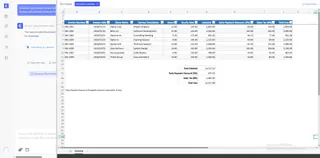
Pro Tip: When you generate a template like the "Printable Quote / Invoice," you'll find two sheets:
- The "Invoice" sheet: Includes pre-filled examples to showcase the formulas in action.
- The "Blank" sheet: A clean, formula-ready canvas for your own professional data entry.
How to Guide: 3 Steps to Your Financial Command Center
Step 1: Choose Your Entry Point
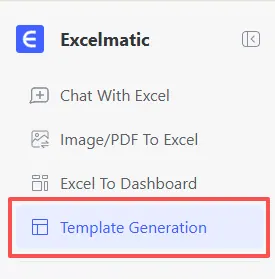
Log in to Excelmatic and navigate to the "Template Generation" tab. Decide if you'll use a custom prompt or pick a showcase template.
Step 2: Define and Refine
Input your requirements or select your favorite layout. The AI will ensure the data formats for dates and currencies are consistent throughout the document.
Try these prompts to see the magic:
- For Freelancers:
Create a professional invoice with columns for Task, Rate, Hours, and a 15% Tax calculation.
- For Small Businesses:
Build a monthly expense tracker that categorizes spending (Marketing, Rent, Payroll) and shows total profit vs. loss.

Step 3: Generate & Deploy
Click "Generate Now." In 30-60 seconds, your professional .xlsx file is ready for download.
After Generation: What's Next for Your Data?
Getting your template is just the beginning of your AI-powered Excel journey. Here is how to maximize your new system:
- Clean Up Messy Records: If you are moving data from an old, disorganized sheet into your new template, use Automate Data Cleaning to scrub duplicates and fix formatting in seconds.
- Visualize Your Profit: Turn your monthly expense rows into a professional dashboard. Use Instant Data Visualization to see which categories are eating your budget.
- Deep Financial Insights: Once you have a few months of data, use Master Data Analysis to identify seasonal spending trends or your most profitable clients without writing a single Pivot Table.
- Consolidate Yearly Reports: At tax time, use our Merge Multiple Sheets tool to combine 12 monthly invoice files into one master annual report.
Comparison: Generic Downloads vs. Excelmatic AI
| Feature | Generic Online Templates | Excelmatic AI Generation |
|---|---|---|
| Setup Time | 30 - 60 Minutes of "fixing" | 30 - 60 Seconds |
| Formula Accuracy | Often broken or missing | Logic-Verified & Automated |
| Customization | Hardcoded and rigid | Unlimited via Prompting |
| Workflow Support | A static file only | Integrates with Cleaning/Analysis |
Frequently Asked Questions (FAQ)
Can I use this for multi-currency expenses? A: Yes. Simply prompt the AI to "Add a currency conversion column" or choose a multi-currency finance showcase.
Is my financial data safe? A: Yes. Excelmatic uses encrypted transmission, and during template generation, only your structural description is sent to build the framework.
🚀 One Sentence, One Invoice, Zero Stress.
Don't waste another second on manual billing. Generate your professional financial system with AI today.
📊 Build Your First Template Free