Key Takeaways
- End the Endless Search: Stop wasting time downloading "generic templates" that don't fit your needs; customize your inventory tracking precisely to your business requirements.
- Automated Formula Integration: AI-generated templates come with built-in inventory logic (like auto-calculating stock levels), eliminating the need to write complex formulas manually.
- Zero-Threshold Generation: Start from scratch with a simple description or use professional built-in showcases to generate a high-end tracking system instantly.
- Dynamic Adaptability: From simple retail stock lists to complex warehouse ledgers with reorder alerts, Excelmatic generates the exact structure you need.
Background: The Struggle of Finding the "Perfect" Inventory Sheet
Are you a small business owner or a warehouse manager still tracking stock on a mismatched spreadsheet? Many users spend hours searching for the "perfect" inventory excel template online. You might find that pre-made templates are often too complex, missing key columns like batch numbers or supplier info, or contain broken formulas that corrupt your data.
It’s okay if you don’t have a template yet—we have exactly what you need right here. Instead of forcing your business to fit into someone else's template, why not let AI build one specifically for you?
The Old Way: Manual Entry and Formula Chaos
Before AI, managing inventory in Excel was a tedious game of manual updates:
- Column Guesswork: Deciding whether you need SKU, Location, Supplier, or Batch numbers.
- Manual Calculations: Trying to remember the formula for
Opening Stock + In - Out = Current Stock. - Missing Alerts: Forgetting to restock because you didn't know how to set up conditional formatting for low-stock warnings.
- Data Fragmentation: Having separate files for sales and stock that never seem to sync.
The Intelligent New Way: Instant Customization
With Excelmatic's Template Generation, you can skip the search and go straight to management. Whether you have a specific vision or a blank canvas, our AI has you covered.
Method A: One-Sentence Customization (Custom Prompt) Describe your specific business type.
- Example:
Create an inventory management sheet for a boutique clothing store with columns for SKU, Size, Color, Initial Stock, Sales, and a 'Restock Alert' that turns red when stock is below 5.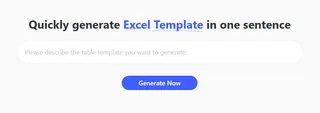
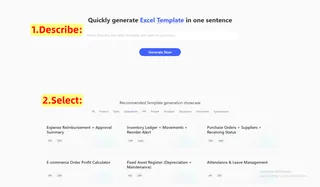
Method B: Inspiration from our Showcase (We Have the Templates!) Don't have a prompt in mind? No problem. Browse our Operations category in the Showcase and select "Inventory Ledger + Movements + Reorder Alert" to generate a battle-tested structure instantly.You'll get a professional template with pre-built fields for date, item description, inflow/outflow tracking, and automatic current balance calculations—all formatted and ready for your data.
How to Guide: 3 Steps to Your AI Inventory System
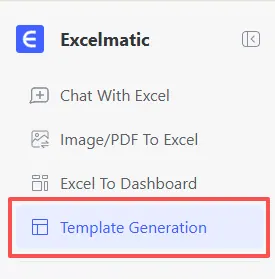
- Step 1: Access the Interface Log in to Excelmatic and select "Template Generation" from the left sidebar.
- Step 2: Describe or Select Enter your inventory requirements in the prompt box, or click on our ready-made inventory showcase.
- Step 3: Generate & Control
Click "Generate Now." In just 30-60 seconds, your custom inventory system is ready. Download the
.xlsxfile and take control of your warehouse.
Beyond Generation: Mastering Your Inventory Flow
Getting your AI-generated template is just the beginning. Here is how you can use the result to transform your warehouse management immediately:
- Real-Time Stock Oversight: Open your generated file and input your current stock. The built-in formulas will automatically update your "Balance" as you record daily sales or new shipments.This gives you an up-to-date view of your inventory value at any moment.
- Zero-Risk Procurement: Keep an eye on the Restock Alert column. Instead of manual counting, let the AI-powered conditional formatting highlight exactly which SKUs need reordering today to avoid stock-outs—a crucial feature for effective small business inventory control.
- Simplified Financial Audits: Use the structured movement logs (In/Out) to reconcile your physical inventory with your financial records at the end of the month—no more missing entries or ghost stock.
- Scale as You Grow: If your warehouse expands to multiple locations, you don't need a new system. Just come back to Excelmatic and update your prompt to "Generate a multi-warehouse inventory tracker," and your system evolves with you.
Comparison: Old vs. New
| Feature | Searching for Generic Templates | Excelmatic AI Generation |
|---|---|---|
| Setup Time | Hours of searching & tweaking | 30 - 60 Seconds |
| Logic/Formulas | Manual & prone to errors | Built-in & Automated |
| Customization | Limited by the original design | Unlimited (built for you) |
| Inventory Alerts | Hard to set up manually | Integrated via Prompt |
Frequently Asked Questions (FAQ)
Can I link this inventory sheet to my sales data? A: Absolutely! Once generated, you can use our Merge Multiple Sheets guide to consolidate your sales and inventory files into one master dashboard.
What if my inventory needs change next month? A: That's the beauty of AI. You can simply come back and generate a new version with updated requirements, or use our Generate Complex Formulas tool to add new automated features—like an automatic reorder formula based on lead times—to your existing sheet.
What other business templates can I create? A: Excelmatic is a full-scale business assistant. You can also generate:
- Automate Data Cleaning: To fix messy supplier lists.
- Master Data Analysis: To identify your best-selling products.
- Instant Data Visualization: To see your stock levels in a professional chart.
🚀 One Sentence, One Chart, One Second Insight
Don't wait for stock-outs. Generate your professional inventory management system with AI today.
📊 Generate Your First AI Template Free