Key Takeaways
- The Compliance Risk: Manual payroll entry isn't just slow—it's a legal risk. Small errors in overtime or tax calculations can lead to costly disputes.
- The AI Solution: Use Excelmatic Template Generation to build HR systems that embed complex labor logic directly into your formulas.
- Centralized Data: Move away from scattered files. Generate a unified Employee Database that links directly to your payroll and attendance logic.
- Instant Scalability: Whether you have 5 employees or 50, generate a system that grows with your team in under 60 seconds.
The HR Nightmare: "Why is the Paycheck Wrong?"
For small business owners, the end of the month is often a sprint through messy spreadsheets. Managing hourly rates, overtime rules, and leave deductions in a static Excel file is a recipe for disaster.
You don't need a bloated HR software subscription. Excelmatic’s Template Generation gives you the precision of high-end software with the flexibility of Excel.
Two Paths to a Stress-Free Payday
Inside the Template Generation hub, you can secure your HR workflow using two professional methods.
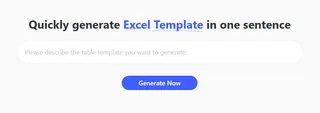
Option 1: The AI Prompt (Tailored to Your Labor Rules)
Labor laws vary by region. If you have specific overtime multipliers or bonus structures, simply describe them to the AI to create a bespoke solution.
The Experience: Describe your columns and required math, such as tiered tax brackets or commission structures, and the AI builds the underlying calculation logic for you.
Try this Prompt:
Create a monthly payroll calculator for 20 employees. Include columns for Base Salary, Overtime Hours (1.5x rate), Tax Deductions, and Net Pay. Add a summary sheet for total monthly labor costs.
Option 2: Professional Showcases (Ready-to-Use HR Logic)
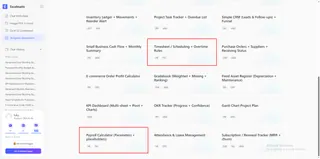
For standard administrative needs, our HR & Operations showcase features industry-standard templates used by thousands of growing companies worldwide.
- Top Picks: Select from specialized layouts like the "Payroll Calculator (Parameters + placeholders)" for financial precision, the "Attendance & Leave Management" for tracking time off, or the "Timesheet / Scheduling + Overtime Rules" for managing hourly staff.
- The Result: You receive a professional-grade data visualization of your team's availability and labor expenses.
Why "Generated" HR Sheets are Better
Whether you pick a showcase or use a prompt, the Template Generation engine ensures your file follows professional standards:
- Multi-Sheet Architecture: Your system separates Employee Profiles from Monthly Pay Slips, which is how professional HR departments operate.
- Logic-Verified Formulas: We use Excel formulas that handle complex math—like IF statements for overtime—so you don't have to write them manually.
- Data Integrity: Both paths include data validation to create dropdown menus for "Department" or "Leave Type," preventing typos from breaking your reports.
Pro-Level Execution: 3 Steps to Launch
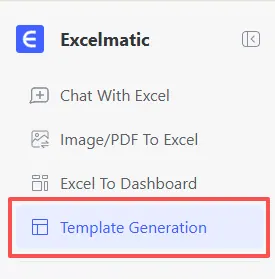
Step 1: Select Your Module
Navigate to the Template Generation tab. Decide if you need a custom-built commission tracker or a standard attendance sheet from our showcase.
Step 2: Define Your Variables
Tell the AI your specific constraints. Use data validation to ensure your team picks from a set list of "Status" options.
Try these high-performance prompts:
- For Retail/F&B:
Build a weekly shift scheduler that tracks total hours worked per employee and flags anyone exceeding 40 hours to avoid overtime costs.
- For Tech Startups:
Generate an OKR-linked bonus tracker that calculates quarterly payouts based on individual performance scores and company profit.
Step 3: Generate & Verify
Click "Generate Now". In 30-60 seconds, your professional .xlsx file is ready for download. If your tax rate changes next year, simply use the AI assistant to update the logic across the entire sheet.
Keeping Your Team Data Clean & Insightful
Once your template is generated, use the Excelmatic ecosystem to maintain a professional edge:
- Scrub Employee Lists: If you are moving data from an old system, use Automate Data Cleaning to fix capitalization, remove duplicate IDs, and standardize phone numbers.
- Analyze Labor Trends: Use Data Filtering to see which departments have the highest absenteeism or overtime spend.
- Annual Summaries: At tax time, use our Merge Multiple Sheets tool to combine 12 monthly payroll files into one master annual report.
FAQ: Smart HR Tracking
Q: Can the AI handle different tax brackets? A: Yes. In your prompt, specify the tiers (e.g., "10% tax for income under $3000, 15% for above"). The AI will write the complex formula for you.
Q: How do I track "Remaining Leave" days? A: When generating an Attendance & Leave Management sheet, the AI typically includes a "Summary" tab that subtracts "Used Days" from "Total Entitlement" automatically.
Q: Is it safe to put employee names in the AI prompt? A: Yes. Excelmatic uses encrypted transmission. However, you don't need to include specific names during generation; just describe the structure (e.g., "I need a column for Name and ID") and fill in the data locally after downloading.
🚀 Spend Less Time on Paperwork, More Time on People.
Stop the month-end payroll stress. Generate your custom HR management system with AI today.
📅 Build My HR Template Free