Key Takeaways
- Eliminate Inventory Blindness: Move away from broken manual sheets that cause stockouts and capital tied up in "dead stock" due to calculation errors.
- Custom AI Generation: Use Excelmatic Template Generation to build a dynamic system tailored to your specific SKU variations and multi-channel logic, rather than settling for rigid downloads.
- Automated Decision-Making: Leverage built-in Excel formulas and conditional formatting to receive instant restock alerts and accurate profit margins per order.
- Proven Efficiency & Scalability: Save an average of 6+ hours weekly and ensure your data infrastructure grows seamlessly alongside your Amazon or Shopify store's success.
The Profit Killer: "I Think We Have Enough Stock"
In E-commerce, "guessing" is expensive. Whether you are dealing with Amazon FBA storage fees or Shopify stockouts, the cost of a messy spreadsheet is higher than you think.
- The Reality Check: 43% of small businesses don't track their inventory at all, and those who do often use broken Excel formulas that lead to overstocking.
- The AI Solution: Instead of a static table, you need a living system. Excelmatic doesn't just give you a grid; it generates logic that understands your SKU variations and sales velocity.
Stop Downloading, Start Generating
Most sellers fail because they try to fit their unique business into a generic, downloaded template. If your business has specific SKU bundles, multi-channel pricing, or custom tax rules, a "free download" will eventually break.
The solution is Excelmatic Template Generation. This feature allows you to describe exactly how your business operates, and the AI builds a professional-grade .xlsx file designed just for you. By simply describing your needs, the AI validates your data structure, embeds the math, and formats the UI instantly.

3 Critical E-commerce Scenarios: Solved by AI
Once you are in the Template Generation hub, you can either enter a custom prompt or deploy a high-performance system from our Recommended Showcase. Here is how we solve the 3 biggest headaches for modern sellers:
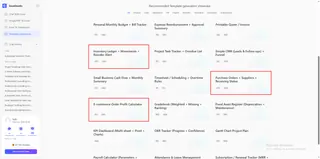
1. The "Too Many SKUs" Headache (Apparel & Electronics)
The Pain: You sell items with hundreds of variations (Size, Color, Model). A standard list isn't enough.
The Fix: Generate the Inventory Ledger + Movements + Reorder Alert template.
- Why it works: It’s built for high-frequency movements. It tracks every "In" and "Out" and triggers a red alert when you hit your safety stock level.
2. The "Hidden Losses" Headache (Margin Control)
The Pain: You’re making sales, but at the end of the month, the bank account doesn't match. You’re losing money on shipping, fees, or returns.
The Fix: Deploy the E-commerce Order Profit Calculator showcase.
- Why it works: It calculates your net margin per SKU, helping you identify which products are actually paying your bills.
3. The "Supplier Delay" Headache (Supply Chain)
The Pain: Your supplier says the goods shipped, but your warehouse says they haven't arrived.
The Fix: Generate the Purchase Orders + Suppliers + Receiving Status template.
- Why it works: It centralizes your supply chain. Track what’s in transit and what’s been received in real-time.
Don't Describe the Wheel—Tell the AI How to Spin It
If our showcases don't fit your unique workflow, use the prompt bar to build a bespoke system.
Pro Tip for Sellers: Don't just ask for a "Stock Sheet." Be specific:
Create an automated inventory tracker for an Amazon FBA seller. Include columns for SKU, FBA Fee, Unit Cost, Sale Price, and a 'Days of Supply' formula based on 30-day sales velocity.
By being specific, the AI builds the calculation logic directly into your .xlsx file, saving you hours of manual math.
Scaling Up: The Post-Generation Workflow
Once your template is ready, the real magic happens when you connect it to the rest of the Excelmatic ecosystem:
- Clean Your Store Exports: Use Automate Data Cleaning to fix SKU formatting from Shopify or Amazon before pasting into your new template.
- Filter for Winners: Use Data Filtering to instantly focus on your top 20% of SKUs.
- Visual Asset Audit: Use Instant Data Visualization to turn your inventory rows into a professional pie chart of asset value.
- Multi-Warehouse Sync: Use Merge Multiple Sheets to consolidate both FBA and local stock reports into one master dashboard.
FAQ: E-commerce Smart Tracking
- Q1: Can the AI-generated Excel template automatically sync data from my Shopify or Amazon store?
- A: Great question—and honestly, it's the first thing most sellers ask. Currently, templates require manual data export and paste—but here's the thing: that takes about 10 seconds. More importantly, once you paste, Automate Data Cleaning fixes every formatting quirk your export throws at you (inconsistent SKU casing, rogue spaces, you name it) in one click. We're actively building more advanced auto-sync features—stay tuned.
- Q2: My business logic is messy: same SKU across FBA and FBM, plus bundle deals. Can AI really handle that?
- A: This is exactly where Excelmatic shines. You don't adapt to a template; AI builds one for you. Just describe it: "I need an inventory tracker that treats the same SKU as separate rows for FBA vs local warehouse, and automatically breaks down bundle SKUs into individual inventory deductions." AI embeds that logic directly into Excel formulas. Not happy with the result? Tweak your description and regenerate. No manual formula writing required.
- Q3: Are there any limitations to the free trial version? Will the generated templates have watermarks or row limits?
- A: There are no limitations, no watermarks, and no row limits (except for limitations supported by Excel itself). Every template you generate is fully functional and permanently yours. What's the difference between the free and paid versions? Limited generation times and access to advanced template previews. But every template you generate—whether free or paid—is permanently usable and fully editable.
📦 Ready to Stop Guessing and Start Growing?
Don't let manual errors eat your profit. Generate a professional, automated E-commerce inventory system in 30 seconds.
⚡ Build My Automated Inventory Sheet