Key Takeaways
- End the Endless Search: Stop wasting time downloading "generic templates" that don't fit your sales process; customize your CRM tracking precisely to your business requirements.
- Automated Sales Logic: AI-generated CRM templates come with built-in pipeline tracking, eliminating the need to manually calculate deal probabilities or follow-up dates.
- Zero-Threshold Generation: Start from scratch with a simple description or use professional built-in showcases to generate a high-end lead management system instantly.
- Dynamic Adaptability: From simple contact lists to complex sales funnels with automated status alerts, Excelmatic generates the exact CRM structure you need.
Background: Why Your Sales Team is Drowning in "Generic" Sheets
Every sales manager has been there: you need a way to track leads, but enterprise CRM software is too expensive and complex, while basic Excel sheets are too messy. You spend more time "cleaning the data" than actually closing deals.
It’s okay if you don’t have a template yet—we have exactly what you need right here. Instead of forcing your sales process into a rigid template, why not let AI build a CRM that understands your specific workflow?
The Old Way: Manual Pipeline Pains
Before AI, managing a sales pipeline in Excel was a constant struggle:
- Status Confusion: Manually typing "Warm," "Cold," or "Closed" and forgetting to update them.
- Formula Nightmares: Trying to calculate the "Weighted Pipeline Value" based on deal probability.
- Missing Follow-ups: Losing track of when you last contacted a lead because there was no automated alert.
- Formatting Mess: A sea of white cells that makes it impossible to see which deals are urgent.
The Intelligent New Way: Instant Sales Automation
With Excelmatic's Template Generation, you can turn a simple sentence into a fully functional sales machine.
Method A: One-Sentence Customization (Custom Prompt) Describe your sales stages and key metrics.
- Example:
Create a professional CRM sheet for a real estate agency with columns for Lead Name, Property Type, Budget, Sales Stage (Lead, Viewing, Negotiation, Closed), and a follow-up reminder.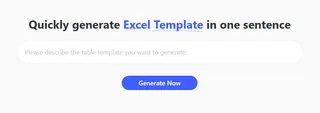
Method B: Inspiration from our Showcase (We Have the Templates!) Don't have a prompt? Browse our Sales category in the Showcase and select "Simple CRM + Sales Pipeline" or "Customer Lead Tracker" to get started with a battle-tested structure instantly.
How to Guide: 3 Steps to Your AI-Generated CRM
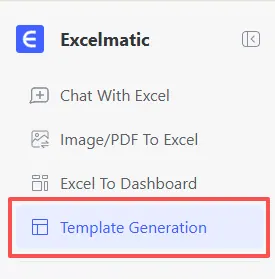
- Step 1: Access the Tool Log in to Excelmatic and navigate to the "Template Generation" tab.
- Step 2: Define Your Funnel
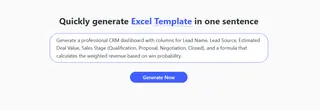
Enter your requirements in the prompt box
- Example:
Generate a professional CRM dashboard with columns for Lead Name, Lead Source, Estimated Deal Value, Sales Stage (Qualification, Proposal, Negotiation, Closed), and a formula that calculates the weighted revenue based on win probability.You'll get a professional template with pre-built fields for lead source, deal value, and status tracking—all formatted and ready for your data.
- Step 3: Generate & Export
Click "Generate Now." In 30-60 seconds, your custom CRM is ready. Export the
.xlsxfile and start closing deals.
Beyond Generation: Managing Your Sales Growth
Your AI-generated CRM is built to do more than just record names; it's built to drive action:
- Visual Pipeline Oversight: The built-in conditional formatting (generated by AI) will highlight high-value deals or stalled leads, giving you an up-to-date view of your sales health at any moment.
- Smart Lead Control: Use the "Follow-up" column to identify exactly who needs a call today—a crucial feature for effective small business sales control.
- Clean Data Integrity: By using a structured AI framework, you ensure all deal values and probabilities are calculated consistently, making your end-of-month reports 100% reliable.
Comparison: Old vs. New
| Feature | Manual CRM Spreadsheets | Excelmatic AI CRM |
|---|---|---|
| Setup Time | Hours of manual setup | 30 - 60 Seconds |
| Pipeline Logic | Manual status updates | Automated Funnel Stages |
| Customization | Hard to change once built | Unlimited (Regenerate in seconds) |
| Sales Alerts | Easy to forget leads | Built-in Follow-up Triggers |
Frequently Asked Questions (FAQ)
Can I customize the sales stages later? A: Absolutely! The exported file is a standard .xlsx format. You can manually adjust stages or use Excelmatic to regenerate a new version if your sales process evolves.
How do I analyze my top-performing sales channels? A: Once your data is in the CRM, use our Master Data Analysis tool to instantly identify which lead sources are bringing in the most revenue.
What other sales tools can I generate? A: Excelmatic can build your entire sales ecosystem:
- Automate Data Cleaning: To scrub messy lead lists from LinkedIn or web exports.
- Instant Data Visualization: To turn your pipeline into a professional sales dashboard.
- Generate Complex Formulas: To calculate custom sales commissions or multi-currency deal values.
🚀 One Sentence, One Chart, One Second Insight
Don't let leads slip through the cracks. Generate your professional CRM system with AI today.
📊 Generate Your First AI CRM Free