Key Takeaways
- End the Endless Search: Stop wasting time downloading "generic templates" that don't fit your needs; customize your financial tracking precisely to your requirements.
- Automated Formula Integration: AI-generated templates come with core calculation logic built-in, eliminating the need to write complex budget summary formulas manually.
- Zero-Threshold Generation: Start from scratch with your own ideas or use high-quality built-in showcases to generate a professional sheet instantly.
- Dynamic Adaptability: From personal monthly expenses to small business cash flow management, Excelmatic generates the exact structure you need.
Background: When Financial Planning Stalls at "Building the Sheet"
In an era of diverse consumption, everyone wants to master their finances. You might open Excel with high spirits, only to get lost immediately: Should categories or dates come first? How do I make the total expenditure update dynamically? Downloaded templates are often either too simple or so complex they are impossible to understand. This frustration of "wanting to manage money but failing at the spreadsheet" is a common pain point. This is why using AI tools like Excelmatic for "Automated Template Generation" has become a major trend in productivity.
The Old Way: The Time-Consuming "Handmade Era"
Before AI, creating a functional budget sheet typically required:
- Structural Brainstorming: Agonizing over header categories (rent, food, transport, etc.).
- Manual Input: Adjusting column widths, colors, and borders just to make it readable.
- Formula Nightmares: Debugging
=SUMIF()or=VLOOKUP(); one mistake and your entire financial report is a mess. - Repetitive Patching: Adding a new category meant manually updating every single formula range.
The Intelligent New Way: Flexible Generation That Understands You
In the Excelmatic Template Generation interface, you can quickly obtain the perfect budgeting tool in two ways:
- Method A: One-Sentence Customization (Custom Prompt) Describe your needs directly in the input box, and the AI builds it from scratch.
Example:
Generate a personal monthly budget sheet including income categories, fixed expenses, variable expenses, and an automated remaining balance calculation.

- Method B: Inspiration from the Showcase If you're not sure where to start, browse the Showcase for inspiration. Click on existing cases like "Personal Monthly Budget + Bill Tracker" to generate a structure based on proven designs.
How to Guide: 3 Steps to Your Custom Budget Sheet
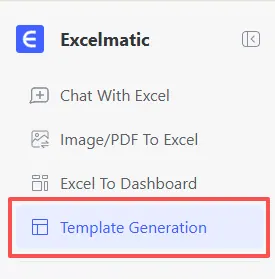
- Step 1: Access the Interface Log in to Excelmatic and select "Template Generation" from the left sidebar.
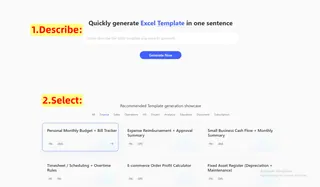
- Step 2: Describe or Select Enter your template requirements in the central input box, or click on a pre-existing budget case from the Finance category below.
- Step 3: Generate Now Click the blue "Generate Now" button. In just 3-5 minutes, the AI will present a logically rigorous and beautifully formatted Excel framework.
As you can see from the preview, Excelmatic doesn't just give you a blank sheet; it delivers a logic-ready dashboard tailored to your specific prompt.
Comparison: Old vs. New
| Feature | Traditional Manual Creation | Excelmatic AI Generation |
|---|---|---|
| Average Time | 30 - 60 Minutes | 3 - 5 Minutes |
| Technical Skill | Requires formula & formatting mastery | Just describe what you need |
| Aesthetics | Often inconsistent & hard to adjust | Professional, clean business styles |
| Flexibility | Updating formulas is tedious | Quickly regenerate with new prompts |
Frequently Asked Questions (FAQ)
Q: Can I modify the formulas in the generated budget sheet? A: Absolutely! The exported file is a standard
.xlsxformat. You can manually fine-tune any part of the sheet as needed.Q: What else can Excelmatic do besides generating templates? A: Excelmatic is an all-in-one assistant designed to handle your entire data workflow. Check out our other guides to see how you can:
- Automate Data Cleaning: Learn how to scrub messy data and remove duplicates in seconds.
- Master Data Analysis: Discover how to extract deep insights without manual filtering.
- Instant Data Visualization: Turn your raw numbers into stunning charts effortlessly.
- Merge Multiple Sheets: Stop copy-pasting and learn how to consolidate data with one click.
- Generate Complex Formulas: Never memorize a syntax again; let AI write your INDEX MATCH for you.
Q: Is my data secure? A: Yes. Excelmatic uses encrypted transmission. When generating templates, only your text description is sent to the AI to build the framework, ensuring your private local data remains protected.
🚀 One Sentence, One Chart, One Second Insight
Upload your data file today and generate your first professional chart with AI.
📊 Generate Your First AI Chart Free