Key Takeaways
- The Template Gap: Traditional pre-made templates are often too rigid or overly complex, forcing office professionals to spend hours manually fixing broken formulas instead of analyzing data.
- AI-Driven Architecture: Excelmatic Template Generation shifts the workflow from manual data entry to "Strategic Architecture," where AI builds the logic, pivots, and dashboards based on your specific business needs.
- Customization vs. Speed: Whether you need a bespoke system built from a unique prompt or a high-performance preset to get moving fast, Excelmatic provides the flexibility to choose either path.
- Executive-Ready Results: Every generated file is architecturally verified and includes professional, dashboard-style visualizations that are ready for immediate use in Excel or Google Sheets.
The "Infinite Scroll" Problem
We’ve all been there: You need a specific tracker for your project, so you spend an hour scrolling through generic online templates. You finally download one, only to realize it doesn't fit your workflow. You try to fix it, a formula breaks, and suddenly you’re three hours deep into a "simple" task with nothing to show for it.
The reality is that most ready-made templates are either too simple for real work or too complex to customize. This gap between what you need and what you can build is where productivity goes to die.
Excelmatic Template Generation was designed to bridge this gap, moving you from a "spreadsheet builder" to a "strategic architect."
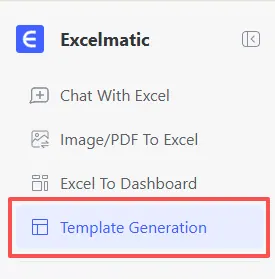
Your Vision, AI’s Architecture
The core power of Excelmatic lies in its ability to understand your specific business logic. Instead of forcing your data into a pre-set box, the AI builds the box around your data.
1. Tailor-Made for Your Specific Needs
Whether you are managing a niche marketing campaign, tracking a local retail inventory, or scaling a small service business, a "one-size-fits-all" sheet won't cut it.
With Excelmatic Template Generation, you simply describe your goal. The AI handles the "plumbing"—the VLOOKUPs, the pivot ranges, and the conditional formatting—ensuring the foundation is professional and error-free.
2. No Inspiration? No Problem.
While customization is our strength, we know that sometimes you just need to get moving fast. If you aren't sure where to start, Excelmatic offers a curated library of Recommended Template Showcases.
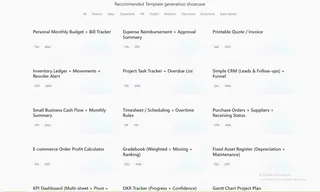
These aren't your standard basic grids; they are architecturally sound systems covering everything from E-commerce Profit Calculators to Project Task Trackers that you can use instantly or use as a base for further AI refinement.
Master the Prompt: Expert Frameworks to Get You Started
Not sure what to say to the AI? We’ve engineered several prompts designed specifically for the common challenges office professionals face. Simply copy, paste, and watch the architecture build itself.
For Sales & Growth
Create a Sales CRM and Pipeline Tracker. Include sheets for Client Contacts, a Daily Activity Log (calls/emails), and a monthly Forecast. Automatically calculate conversion rates and show a funnel visualization on the dashboard.
For Marketing & Campaigns
Architect a Multi-Channel Marketing Budget. I need to track spend across Facebook, Google, and LinkedIn. Include a sheet for Campaign Performance (Clicks, CPC, Conversions) and a dashboard that calculates ROI per channel.
For Operations & Inventory
Build a Retail Inventory Management System. Include an Item Master List with SKU and reorder points, an Incoming/Outgoing log, and a dashboard that alerts me when stock levels are low.
For Freelancers & Solopreneurs
Generate a Project Billing and Expense Tracker. Include a Time Log by project, an Invoicing Status sheet, and a Profit/Loss dashboard that separates business expenses from personal income.
Pro Tip: You can even add specific formatting requests like "Use a professional dark theme" or "Include 50 rows of sample data" to see the logic in action immediately.
How to Deploy Your First System
The process is designed to be frictionless, taking you from a blank screen to a professional dashboard in seconds:
- Define: Enter a custom description or select a preset from the Showcase.
- Generate: Watch the AI architect the sheets, formulas, and pivots.
- Execute: Download your file and start entering data immediately.
Frequently Asked Questions (FAQ)
Q: Do I need advanced Excel skills to use the Template Generator? A: Not at all. That is the core advantage of Excelmatic. You only need to describe your business goals in plain English. The AI handles the complex "plumbing"—including formulas, pivot tables, and dashboard linking—so you can focus on the results.
Q: Can I modify the template after it’s been generated? A: Absolutely. Each generated system is a standard
.xlsxfile. You have full ownership and can manually add columns, change colors, or adjust formulas after downloading the file. Alternatively, you can have the AI regenerate a new version at any time based on your update needs.Q: Is the generated file compatible with Google Sheets? A: Yes. While the file is generated with high-performance Excel logic, it is designed to be "cloud-ready." Simply upload the
.xlsxfile to your Google Drive, and Google Sheets will convert it into its native format while preserving the architectural integrity.
🚀 Ready to build something that works?
Don't settle for "good enough" templates. Experience the power of custom AI architecture today.
Start Generating for Free