Key takeaways:
- While advanced Excel skills are a gateway to high-paying jobs like analyst and accountant, these roles are often burdened by hours of manual, error-prone data manipulation and reporting.
- Excel AI, exemplified by Excelmatic, replaces the need for complex formulas (
VLOOKUP,SUMIFS, Pivot Tables) with natural language, allowing professionals to perform sophisticated analysis by simply asking questions. - By using Excelmatic to automate tedious tasks, you can shift your focus from data wrangling to strategic insight, answer business questions faster, and significantly accelerate your career growth and value.
The Problem: Great Jobs, Terrible Manual Work
Excel proficiency is a non-negotiable skill for many of the most sought-after and well-compensated careers. Roles like financial analyst, marketing manager, accountant, and project coordinator all rely on spreadsheets to drive decisions, track performance, and manage operations. Landing one of these jobs is a significant career achievement.
But there's a hidden reality that often comes with the territory: the "Excel grind." Professionals in these roles often find their days consumed not by high-level strategy, but by mind-numbing, manual spreadsheet tasks. They spend countless hours downloading raw data, cleaning messy columns, stitching together files with VLOOKUP, and building the same weekly or monthly reports from scratch.
Imagine you're a business analyst. It's the first Monday of the month. You spend your morning downloading sales figures from three different systems, manually correcting date formats, and using SUMIFS across a dozen columns to build a performance summary. Just as you finish, your manager asks, "This is great, but can we see the same data broken down by customer segment instead of region?" Suddenly, your perfectly crafted formulas are useless, and you're facing another hour of rework. This isn't strategy; it's digital manual labor.
The Traditional Solution: A Toolkit of Manual Functions and Its Limits
For decades, the answer to these challenges was to become an "Excel guru." Professionals armed themselves with a powerful, yet cumbersome, toolkit of functions and features to wrestle data into submission.
The traditional workflow for a task like creating a monthly sales performance report typically involves:
Data Consolidation: Manually copy-pasting data from different sources (e.g., CSV exports, other Excel files) into a single master sheet.
Data Cleaning: Tediously finding and removing duplicates, correcting typos, and standardizing formats (e.g., "NY" vs. "New York").
Data Enrichment: Using functions like
VLOOKUPor the more modernINDEX(MATCH)to pull in related information from other tables, such as matching aProductIDto itsCategoryorPrice.=VLOOKUP(A2, Products!$A$2:$B$100, 2, FALSE)Aggregation: Writing complex
SUMIFSorCOUNTIFSformulas to calculate key metrics. For example, to find the total sales for a specific product in a specific region:=SUMIFS(Sales[TotalAmount], Sales[Region], "North", Sales[Product], "Widget A")Summarization with Pivot Tables: Creating a Pivot Table, then manually dragging and dropping fields into the Rows, Columns, and Values areas. You'd then need to apply filters, change calculation types (e.g., from Sum to Average), and refresh it every time the source data changes.
The Inherent Flaws of the Manual Approach
While powerful, this traditional method is fraught with problems that limit a professional's effectiveness:
- Brittle and Error-Prone: A single incorrect cell reference in a complex formula can silently corrupt your entire analysis. Debugging these issues is a nightmare.
- Extremely Time-Consuming: Each step is a manual process. A report that takes minutes to read can take hours or even days to build and verify.
- Inflexible: Traditional reports are static. Answering a follow-up question or exploring a different angle often requires rebuilding the formulas or Pivot Table from scratch.
- High Barrier to Entry: Mastering this toolkit requires significant training and practice. It creates a knowledge gap where only a few "Excel experts" on a team can build or maintain critical reports.
- Difficult to Collaborate: Sharing a workbook filled with intricate formulas is risky. It's easy for a colleague to accidentally break something without realizing it.
The Modern Solution: Using Excel AI (Excelmatic)
Instead of forcing you to become a human computer, Excel AI Agents like Excelmatic flip the script. You provide the business context and the questions, and the AI handles the complex technical execution. It's a conversational partner for your data.
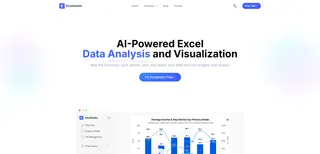
The new workflow is radically simpler. You upload your raw data file, and then you start a conversation, just as you would with a human data analyst.
Step-by-Step: From Raw Data to Insight in Minutes
Let's revisit the monthly sales report. Here's how you'd build it in Excelmatic:
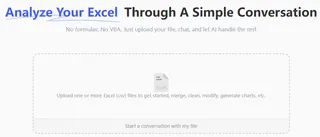
- Upload Your Data: Drag and drop your Excel (
.xlsx) or CSV file into Excelmatic. The AI instantly reads your headers and understands the structure of your data.
Describe What You Need in Plain English: Instead of writing formulas, you just ask. Type your request into the chat interface.
- For a Sales Manager: "Calculate the total sales revenue for each region and sort them from highest to lowest."
- For a Marketing Analyst: "Show me the top 5 performing products by quantity sold for Q2 2025."
- For a Financial Analyst: "Create a pivot table that shows the monthly revenue breakdown by product category."
- For a Project Manager: "Filter the project list to show all tasks with a 'High' priority that are past their due date."
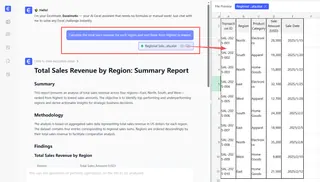
- Review and Iterate with Conversation: Excelmatic instantly generates the result—a table, a pivot table, or a chart. But the real power is in the follow-up. You can continue the conversation to refine the analysis.
*   "Great. Now add a column that calculates the percentage of total revenue for each region."
*   "Can you visualize this as a bar chart?"
*   "Exclude the 'Returns' data and recalculate."
- Export Your Finished Work: Once you have the exact insight you need, you can download the results as a new, clean Excel file containing the generated tables and charts. You can even ask Excelmatic for the formula it used, so you can learn from it or apply it in your own spreadsheets.
Dialogue Example: An Analyst's New Workflow
Here’s how a typical conversation might look, transforming hours of work into a few minutes of dialogue.
User: I've uploaded our quarterly sales data. It's a bit messy. Can you please remove any duplicate rows and standardize the 'State' column to use two-letter abbreviations?
Excelmatic: Done. I've cleaned the data, removing 112 duplicate rows and standardizing the state names. The clean dataset is ready. What would you like to do next?
User: Create a pivot table showing total sales by Region and by Sales Rep. I want to see the top 3 reps in each region.
Excelmatic: I've generated the pivot table. For each region, I have highlighted the top 3 sales reps based on their total sales. The 'East' region shows the highest overall performance.
User: Perfect. Now create a bar chart just for the East region, comparing the sales of its top 3 reps. And add data labels to the bars.
Excelmatic: Here is the bar chart for the East region's top performers. The chart and the pivot table are ready for download. Would you like me to combine them into a single dashboard view?
Traditional Excel vs. Excelmatic: A Career-Changing Shift
| Aspect | Traditional Excel | Excelmatic (Excel AI) |
|---|---|---|
| Primary Focus | Manual data preparation and formula writing. | Strategic questions and interpreting results. |
| Time to Insight | Hours or days. | Minutes. |
| Required Skill | Deep knowledge of advanced functions and syntax. | Ability to articulate a clear business question. |
| Flexibility | Rigid. New questions require major rework. | Dynamic. Instantly adapt and explore with follow-up questions. |
| Outcome | A static report. | An interactive analysis and a ready-to-share result. |
FAQ
Do I still need to know basic Excel to use Excelmatic? Basic Excel knowledge is helpful for understanding your data's structure (columns, rows, data types). However, you no longer need to be a formula or Pivot Table expert. Excelmatic handles the complex "how," so you can focus on the "what" and "why."
Is my company's data secure when I upload it to Excelmatic? Data security is a top priority. Excelmatic uses industry-standard encryption for data in transit and at rest. Your files are processed securely and are not used for training models. For specific enterprise needs, always refer to the official privacy policy and terms of service.
Can Excelmatic handle messy, real-world data? Yes. In fact, this is one of its strengths. You can use natural language to ask Excelmatic to perform data cleaning tasks, such as "remove all rows where the 'email' column is blank," "standardize the date format to MM/DD/YYYY," or "merge this sheet with the 'Customer Data' sheet using the 'Customer ID' column."
What kinds of jobs benefit most from Excel AI? Any role that is data-intensive and currently relies on manual spreadsheet work can benefit immensely. This includes financial analysts, business analysts, accountants, marketing managers, sales operations, HR generalists, and project managers.
Can I export the formulas that Excelmatic creates? Yes. You can ask Excelmatic to "show me the formula to do this," and it will provide you with the exact Excel formula. This is a great way to learn advanced techniques or to implement the logic in your existing, offline spreadsheets.
Is this just for one-off analyses, or can I automate recurring reports? You can easily automate recurring reports. By saving your successful prompts, you can quickly re-run the same analysis each week or month on a new data file. This turns a recurring multi-hour task into a one-click process.
Take the Fast Track in Your Career with Excelmatic
Stop letting manual spreadsheet tasks define your job and limit your potential. The most valuable professionals are not a computer's extension; they are strategic thinkers who can quickly extract and communicate insights from data. By offloading the tedious, error-prone work to an AI, you free up your time and mental energy to focus on what truly matters: making smarter decisions, solving bigger problems, and driving business value.
This shift doesn't just make you more efficient; it makes you more promotable. You become the go-to person who can answer complex business questions on the fly, not the one who says, "I'll need a few hours to get back to you."
Ready to upgrade your professional toolkit? Try Excelmatic today. Upload that spreadsheet you've been dreading and ask it the question you need answered. Experience the future of data analysis and take control of your career.