Key Takeaways:
- The Financial Liability: Poor data quality costs organizations an average of $12.9 million annually. It's not just a mess; it's a budget leak.
- The Bottleneck: Traditional tools like VLOOKUP and Power Query are deterministic — they fail if your data has typos or inconsistent logic.
- The Solution: Excelmatic introduces Probabilistic Scrubbing, allowing AI to understand "what you mean" to fix errors that formulas simply can't see.
The High Cost of "Garbage In, Garbage Out" (GIGO)
It’s the same story every month. You export a report from your CRM or receive a "master file" from a vendor, only to find it's a disaster zone. Mixed date formats, duplicate customers with slightly different spellings, and those invisible "ghost spaces" that break every analysis.
Dirty data is more than an annoyance—it’s a career killer. According to Gartner, data professionals spend nearly 80% of their time acting as "Data Janitors"—cleaning and prepping data instead of analyzing it. When your "Client_Name" column has three different spellings for the same multi-million dollar account, your sales analytics are skewed. You aren't just losing time; you’re making critical business decisions based on hallucinations.
The 3 Data Disasters (And Why Traditional Tools Fail)
1. The Date Chaos (Formatting Nightmares)
The Mess: One column contains 01/12/2026 (EU), Dec 1, 2026 (US), and 2026-12-01 (ISO).
Why Formulas Fail: Standard Excel formatting requires a single input type. To fix this manually, you'd need complex DATEVALUE nested strings or Power Query "Change Type with Locale" settings that break the moment a new format appears.
2. The Fuzzy Identity (Semantic Duplicates)
The Mess: "Apple Inc", "apple inc.", and " Apple Inc. " appear as three distinct companies.
Why Formulas Fail: TRIM and PROPER only solve surface-level issues. Traditional tools are deterministic; they require an exact character match. They cannot "know" that a typo like "Amzon" actually refers to "Amazon.com."
3. The Ghost Spaces (The VLOOKUP Destroyer)
The Mess: A cell looks like "NY" but contains a non-printing character or trailing space ("NY ").
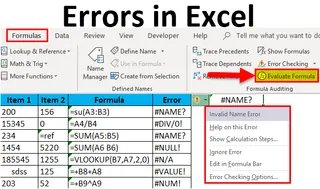
Why Formulas Fail: Your VLOOKUP or XLOOKUP returns #N/A, and you spend 30 minutes debugging a perfectly good logic because of a single hidden pixel.
The Technical Gap: Why AI Beats Power Query
Most Excel power users turn to Power Query or Python scripts for cleaning. While powerful, these tools rely on Rule-based Logic. You have to predict every single error in advance and write a specific rule for it.
Excelmatic AI uses Semantic Processing. Instead of looking for character matches, the AI looks for intent. It uses vector-based logic to understand that "Microsoft Corp" and "MSFT" are the same entity in a business context. It bridges the gaps that would take a human auditor hours of manual cross-referencing to find.
The 60-Second Recovery: How to Scrub Like a Pro
To get the most out of AI scrubbing, you need to shift from "writing formulas" to "guiding intelligence."
Step 1: Ingest the Mess
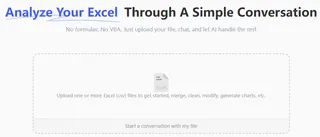
Upload your messy data files—whether they are .xlsx, .csv, or any other supported format. Don't worry about pre-formatting; let the AI see the raw chaos.
Step 2: Use Contextual Commands
Instead of generic commands, use Pro-Level Prompts to handle multi-step reasoning.
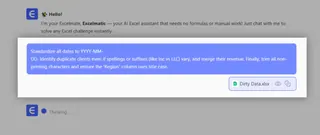
Try this "Master Command":
Standardize all dates to YYYY-MM-DD. Identify duplicate clients even if spellings or suffixes (like Inc vs LLC) vary, and merge their revenue. Finally, trim all non-printing characters and ensure the 'Region' column uses title case.
Step 3: Review and Reclaim Your Value
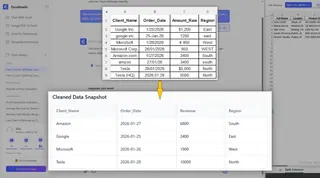
In under 60 seconds, Excelmatic generates a clean, audit-ready dataset. You are no longer a "Data Janitor." You are a Strategic Analyst ready for the boardroom.
| Metric | Manual Cleaning | Power Query | Excelmatic AI |
|---|---|---|---|
| Setup Time | Hours | 20-40 Minutes | 60 Seconds |
| Skill Required | Patience | Intermediate Tech | Basic language |
| Handles Typos? | Yes (but slow) | No (requires rules) | Yes (Fuzzy Logic) |
| Decision Accuracy | Low (Human Error) | High (if rules are perfect) | Highest (Semantic) |
FAQ: Frequently Asked Questions about AI Data Cleaning
Q: Is my data secure when using AI?
A: Absolutely. Excelmatic is built for professional use with enterprise-grade encryption. Your data is processed for the cleaning task and is not stored or used to train public models without your consent.
Q: Can it handle 100,000+ rows?
A: Yes. Unlike local Excel which often freezes during heavy macro or Power Query runs, our cloud-based AI infrastructure is built for scale.
Q: Does it work with different languages?
A: Yes. Because the AI understands semantic meaning, it can often reconcile data across different languages (e.g., matching "Sales" in English with "Ventas" in Spanish).
Stop Cleaning. Start Analyzing.
Your professional value isn't defined by your ability to fix broken spreadsheets; it's defined by the insights you extract from them. Every hour you spend fixing a date format is an hour you aren't spending on strategy.
The "Excel Night Shift" and the era of the "Data Janitor" are officially over. It's time to offload the drudgery and get back to the work that actually gets you promoted.
Put Your Messiest File to the Test
Stop wrestling with dirty data. Upload your "nightmare file" to Excelmatic today and experience the 60-second recovery plan for yourself.
🚀 Scrub My Data Now