Key takeaways:
- A cash flow dashboard provides a real-time, visual view of how cash moves in and out of a business, improving liquidity awareness beyond traditional reports.
- Cash flow dashboards help teams move from retrospective financial reporting to continuous monitoring and faster financial decision-making.
- There are multiple types of cash flow dashboards, including operational, runway, receivables and payables, forecasting, and executive-level overviews.
- Effective cash flow dashboards focus on a small set of decision-driven metrics such as net cash flow, burn rate, cash balance, and receivables aging.
- Modern AI-powered tools make it possible to generate flexible cash flow dashboards directly from spreadsheet data without complex setup.
In business, cash flow is often described as the ultimate truth-teller. Revenue may look impressive on paper, but when cash stops moving, operations slow, decisions become reactive, and risk escalates quickly. As Warren Buffett famously noted,
Only when the tide goes out do you discover who’s been swimming naked.
For many companies, cash flow is that tide.
Yet despite its importance, cash flow is still commonly tracked through static spreadsheets, delayed reports, or fragmented financial views. This gap between data and visibility is exactly where a cash flow dashboard becomes essential.
What Is a Cash Flow Dashboard?
A cash flow dashboard is a visual, continuously updated view of how cash moves in and out of a business over time. Instead of scanning multiple spreadsheets or financial statements, teams use dashboards to see inflows, outflows, balances, and trends in one place.
Unlike traditional cash flow statements, which are often reviewed monthly or quarterly, a cash flow dashboard is designed for ongoing monitoring and decision-making. It transforms raw financial data into a dynamic interface that highlights liquidity status, emerging risks, and short-term cash positions.
Why Cash Flow Dashboards Matter
Cash flow dashboards exist to answer one critical question: Do we have enough cash to operate confidently today and tomorrow?
When designed well, they help finance teams and decision-makers spot issues early, such as delayed receivables, rising operating expenses, or sudden changes in cash burn. More importantly, they reduce dependency on manual reporting cycles and allow teams to respond faster.
In volatile markets or fast-growing companies, this shift from retrospective reporting to real-time awareness can make the difference between proactive control and last-minute firefighting.
Common Types of Cash Flow Dashboards
Cash flow dashboards are designed around specific financial questions, and different scenarios call for different dashboard structures. In practice, most organizations rely on a combination of the following types.
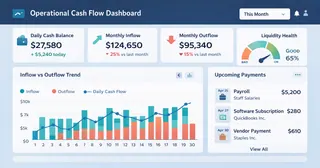
1. Operational Cash Flow Dashboards
Operational Cash Flow Dashboards focus on short-term liquidity. They track daily or weekly cash inflows and outflows to ensure the business can meet immediate obligations such as payroll, vendor payments, and operating expenses. These dashboards are especially valuable for finance teams managing tight cash cycles.
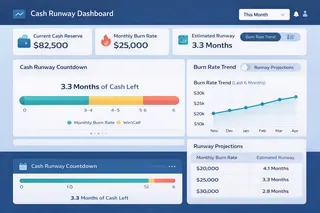
2. Cash Runway Dashboards
Cash Runway Dashboards are commonly used by startups and fast-growing companies. Rather than focusing on daily movements, they visualize how long current cash reserves will last under existing burn rates. This view helps leadership anticipate funding needs and make informed decisions about hiring, spending, or fundraising timelines.
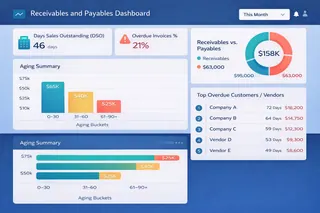
3. Receivables and Payables Dashboards
Receivables and Payables Dashboards highlight how cash is tied up across customers and vendors. By surfacing overdue invoices, payment terms, and aging balances, these dashboards help teams improve collection efficiency and avoid unexpected cash shortfalls.
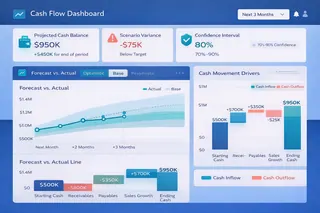
4. Forecasting and Scenario-Based Dashboards
Forecasting and Scenario-Based Dashboards combine historical cash data with projections. They allow teams to model different scenarios — such as revenue slowdowns, cost increases, or delayed payments — and understand how those changes could affect future liquidity.
5. Strategic Cash Overview Dashboards
Strategic Cash Overview Dashboards provide a high-level view for executives. Instead of operational detail, they emphasize trends, net cash position, and early warning signals that may require strategic intervention.

Together, these dashboard types form a flexible toolkit, allowing organizations to monitor cash flow from daily operations to long-term planning.
Key Metrics Typically Found in Cash Flow Dashboards
Regardless of the dashboard type, effective cash flow visibility depends on choosing the right metrics.
| Metric | What It Represents | Why It Matters |
|---|---|---|
| Cash Inflows | Money received from operations, sales, or financing | Shows how effectively the business generates cash |
| Cash Outflows | Payments for expenses, payroll, and investments | Helps identify cost pressure and spending patterns |
| Net Cash Flow | Difference between inflows and outflows | Indicates whether cash position is improving or declining |
| Opening Cash Balance | Cash available at the beginning of a period | Provides context for short-term liquidity |
| Closing Cash Balance | Cash remaining at the end of a period | Signals immediate financial health |
| Burn Rate | Rate at which cash is being spent | Critical for startups and fast-growing teams |
| Days Cash on Hand | How long current cash can sustain operations | Measures resilience against revenue disruptions |
| Receivables Aging | Outstanding customer payments by time period | Highlights potential collection risks |
| Forecasted Cash Position | Projected future cash levels | Supports proactive planning and scenario analysis |
The value of these metrics lies not in their quantity, but in their relevance. A well-designed cash flow dashboard includes only metrics that directly support financial decisions—removing noise while sharpening focus.
Choosing the Right Tool to Build a Cash Flow Dashboard
Creating an effective cash flow dashboard depends heavily on the tools used.
1. Traditional BI platforms
Traditional BI platforms often require complex data modeling and technical setup, which can slow down finance teams and limit flexibility. Spreadsheet-based dashboards, while familiar, tend to break as data grows or questions change.
2. AI dashboard generators
Modern AI dashboard generators offer a different approach. Instead of manually building charts and formulas, teams can upload existing financial data and explore it conversationally. This allows dashboards to evolve as questions change, without constant rebuilding.
Tools like Excelmatic are designed specifically for this workflow. Finance teams can upload spreadsheets directly, ask natural-language questions about cash flow, and generate clear, structured dashboards without manual preprocessing. By combining data preparation, analysis, and visualization in one place, Excelmatic reduces friction and shortens the path from data to insight.
Conclusion: Turning Cash Flow Into Clarity
A cash flow dashboard is more than a reporting tool — it is a decision framework. By making cash movement visible and understandable, dashboards help organizations move from reactive management to confident control.
As businesses face increasing uncertainty and faster decision cycles, relying on static reports is no longer enough. AI-powered cash flow dashboards offer a practical way to stay informed, responsive, and prepared.
If you’re ready to move beyond spreadsheets and gain clearer visibility into your cash position, start building your cash flow dashboard with Excelmatic today.
Frequently Asked Questions (FAQ)
Q: What is the main purpose of a cash flow dashboard?
A: A cash flow dashboard helps businesses monitor liquidity in real time, making it easier to detect cash risks early and support timely financial decisions.
Q: How is a cash flow dashboard different from a cash flow statement?
A: A cash flow statement is a static financial report, while a cash flow dashboard is an interactive, continuously updated view designed for ongoing monitoring and exploration.
Q: Who should use a cash flow dashboard?
A: Cash flow dashboards are useful for finance teams, founders, and executives who need visibility into liquidity, cash runway, or short-term financial health.
Q: What data is needed to build a cash flow dashboard?
A: Most cash flow dashboards are built from existing financial data such as spreadsheets, accounting exports, or transaction records showing inflows and outflows.
Q: Can cash flow dashboards be created from Excel files?
A: Yes. Modern AI-powered dashboard tools allow teams to upload Excel files directly and generate cash flow dashboards without complex setup.