Key takeaways:
- A business forecast dashboard gives SMBs a clear, connected view of revenue, expenses, and cash flow for better budgeting decisions.
- Different forecast dashboards serve different needs, including revenue and expense planning, cash flow management, marketing budgets, hiring, and scenario analysis.
- For SMBs, forecasting dashboards are less about perfect predictions and more about seeing financial risks early and reacting faster.
- Most SMBs can build effective business forecast dashboards by connecting existing Excel data rather than replacing their spreadsheets.
It's usually late when budgeting questions start to feel heavy.
A founder looks at next quarter's plan. Numbers technically add up. Revenue forecast looks reasonable. But something feels off. Ad costs are rising faster than expected. Inventory is tying up cash. Hiring plans are still written in pencil.
This is the uncomfortable gap many SMBs live in: data exists, forecasts exist, but clarity doesn't.
Spreadsheets alone rarely solve this. That's why more teams are turning toward a business forecast dashboard — not to predict the future perfectly, but to see financial consequences earlier.
What Is a Business Forecast Dashboard?
A business forecast dashboard is a visual system that connects historical performance, current [financial data](financial data), and forward-looking assumptions into one continuously updated view.
Unlike a static budget spreadsheet, a forecasting dashboard is designed to answer evolving questions.
How will cash change if revenue slows?
What happens to margins if costs rise?
How long does runway last under different scenarios?
In practice, this means combining revenue forecasts, expense projections, and cash flow data into a single financial forecasting dashboard that updates as inputs change. For SMBs, this reduces guesswork and shortens reaction time.
Why SMBs Rely on Forecast Dashboards More Than Enterprises
Large organizations can afford forecasting mistakes. Small businesses usually can't.
In many SMBs, budget planning lives across multiple Excel files: one for revenue forecasting, one for expenses, another for cash flow tracking. Each file may be accurate on its own, but together they rarely tell a complete story.
A budget forecast dashboard solves this by aligning numbers across functions. It turns separate assumptions into one shared financial narrative. Instead of reviewing budgets quarterly, teams can monitor trends weekly — or even daily — without rebuilding models from scratch.
Five Business Forecast Dashboard Examples SMBs Actually Use
1. Revenue and Expense Forecast Dashboard
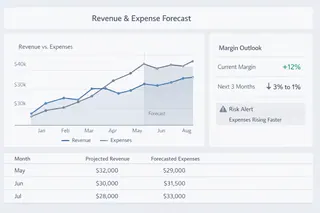
This is the most common type of revenue forecasting dashboard for small businesses. It compares projected revenue against expected operating costs over future periods.
The value lies in visibility, not precision. When revenue growth slows or expenses creep upward, the dashboard shows margin pressure early. Teams use this view to adjust pricing, pause discretionary spending, or delay hiring before profitability erodes.
2. Cash Flow Forecast Dashboard
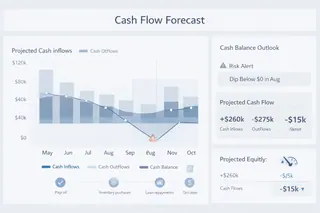
A cash flow forecast dashboard focuses on liquidity rather than profit.
It tracks expected inflows and outflows, payment timing, and projected cash balances. Inventory purchases, payroll cycles, loan repayments — everything that affects cash position over time appears in one place.
For SMBs, this dashboard often answers the most urgent question: will there be enough cash three months from now?
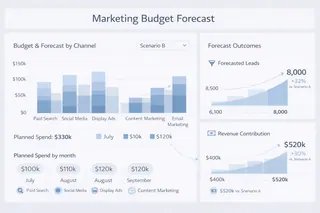
3. Marketing Budget Forecast Dashboard
Marketing budgets are rarely fixed. Spend shifts constantly based on performance.
A marketing budget forecast dashboard connects planned marketing spend with expected outcomes, such as leads, conversions, or revenue contribution. Instead of debating whether to increase or cut spend, teams can evaluate how budget changes affect future financial results.
This type of forecasting dashboard is especially useful for digital-first businesses where ad costs fluctuate quickly.
4. Hiring and Headcount Forecast Dashboard
People costs scale faster than many SMBs expect.
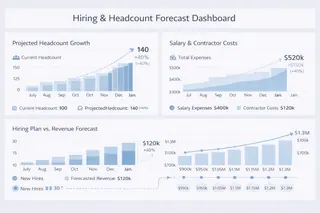
A headcount forecasting dashboard models salary expenses, contractor costs, and hiring timelines against revenue projections. It helps leaders understand when growth investments support capacity — and when they strain cash flow.
This view often prevents reactive hiring decisions driven by short-term pressure.
5. Scenario-Based Financial Forecast Dashboard
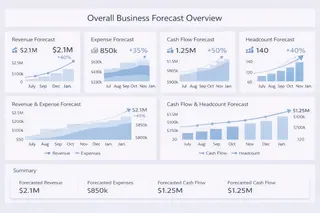
A scenario-based forecast dashboard compares multiple financial paths side by side.
Base case, conservative case, aggressive growth. Same structure, different assumptions. This approach doesn't aim to predict outcomes. It prepares teams to respond when conditions change.
For SMB leadership teams, this type of financial forecasting dashboard supports more confident decision-making under uncertainty.
Common Metrics Found in a Forecasting Dashboard
Across different dashboard types, most SMB forecasting dashboards rely on a shared set of metrics.
| Metric Name | What It Measures | Why It Matters in Forecasting |
|---|---|---|
| Revenue Forecast | Expected revenue over a future period based on historical data and assumptions | Forms the baseline for budgeting, hiring, and investment decisions |
| Sales Growth Rate (Projected) | Anticipated percentage increase or decrease in sales | Helps evaluate whether growth targets are realistic |
| Demand Forecast | Predicted customer demand for products or services | Prevents overproduction or stock shortages |
| Operating Expense Forecast | Estimated future operating costs | Ensures cost growth stays aligned with revenue |
| Cash Inflow Projection | Expected incoming cash from sales or receivables | Indicates liquidity health |
| Cash Outflow Projection | Anticipated outgoing cash for payroll, suppliers, and overhead | Helps avoid cash shortfalls |
| Net Cash Flow Forecast | Difference between projected inflows and outflows | Signals financial sustainability |
| Forecast Accuracy (Variance) | Gap between forecasted and actual results | Improves future model reliability |
| Scenario Sensitivity Indicators | Impact of key assumptions changing (price, demand, costs) | Supports risk-aware decision-making |
The goal isn't to track every number. It's to monitor the metrics that directly influence decisions.
How Excelmatic Helps Build a Business Forecast Dashboard from Excel
Most SMB financial data already lives in Excel. Sales forecasts, expense budgets, cash trackers — they're familiar, trusted, and deeply embedded in daily work.
The challenge isn't collecting data. It's connecting it.
Excelmatic is designed specifically for this gap. Instead of replacing spreadsheets, it works with them. Teams upload existing Excel files, describe what they want to forecast in plain language, and generate a business forecast dashboard without manually rebuilding models or writing complex formulas.
A typical workflow looks simple. Upload revenue and expense spreadsheets. Ask Excelmatic to generate a budget forecast dashboard or a cash flow forecasting dashboard. Then explore scenarios by adjusting assumptions through conversation, not formulas.
This approach shifts effort away from spreadsheet maintenance and toward financial interpretation. The Excel files remain. The insight becomes clearer.
Planning With Less Guesswork, More Visibility
Forecasting will never eliminate uncertainty. Markets change. Costs rise. Demand fluctuates.
But a well-designed business forecast dashboard reduces surprises. It helps SMBs see financial pressure earlier, understand trade-offs faster, and adjust with more confidence.
If budgeting still feels like a once-a-quarter exercise locked inside spreadsheets, the next step may not be a better formula. It may be a clearer forecasting dashboard — and a simpler way to build it.
Start using Excelmatic today to build your first business forecast dashboard from Excel.
Frequently Asked Questions (FAQ)
Q1: What is a business forecast dashboard?
A: A business forecast dashboard is a visual financial tool that combines historical data, current performance, and future assumptions to help SMBs plan budgets and anticipate financial outcomes.
Q2: How is a forecast dashboard different from a budget spreadsheet?
A: Unlike static spreadsheets, a forecast dashboard updates continuously and shows how changes in revenue, costs, or assumptions impact cash flow and profitability.
Q3: Why are business forecast dashboards important for SMBs?
A: SMBs have limited margin for error. Forecast dashboards help identify cash risks, margin pressure, and growth constraints earlier, reducing costly surprises.
Q4: What metrics are typically included in a forecast dashboard?
A: Common metrics include forecasted revenue, operating expenses, cash balance, burn rate, and variance between actual and forecasted results.
Q5: Can SMBs build a business forecast dashboard from Excel data?
A: Yes. Many SMBs build forecast dashboards directly from existing Excel files, connecting revenue, expenses, and cash flow without rebuilding models from scratch.