Key takeaways:
- AI-powered sales dashboards transform revenue tracking from static reporting into an interactive decision-making process.
- Effective revenue tracking connects outcomes with pipeline behavior, conversion efficiency, and time-based patterns.
- AI dashboards are designed to adapt to evolving sales questions rather than fixed metrics.
- A practical workflow allows teams to turn existing Excel sales data into decision-ready dashboards through conversational analysis.
- Well-designed AI sales dashboards reduce friction, improve confidence, and support faster revenue decisions.
Sales teams generate enormous amounts of data, yet clear revenue insight remains surprisingly hard to achieve.
Revenue figures are scattered across spreadsheets, CRM exports, and weekly reports. By the time these numbers are consolidated, the moment to act has often passed. Traditional sales dashboards — usually built manually in Excel or rigid BI tools — tend to reflect static snapshots rather than the evolving reality of sales performance.
AI-powered sales dashboards address this gap. Instead of focusing on assembling reports, teams can focus on understanding revenue drivers, identifying risks early, and making faster, more confident decisions. In this guide, we explore how to create a sales performance dashboard with AI that supports revenue tracking in real-world business scenarios.
Why Sales Performance Dashboards Need AI Today
Revenue tracking is no longer a reporting task — it is a decision-making challenge.
Sales leaders rarely ask only what happened. They ask why performance changed and what it means for future outcomes. Questions evolve quickly:
Is the revenue dip caused by fewer deals, slower deal velocity, or lower win rates?
Are certain regions or segments signaling risk before targets are missed?
Traditional dashboards assume fixed metrics and predictable questions. AI-powered sales dashboards are designed differently. They support ongoing exploration, allowing teams to move from surface-level numbers to deeper explanations without rebuilding reports each time.
What Revenue Tracking Means in AI-Powered Sales Dashboards
In an AI sales dashboard, revenue tracking is not isolated. It is continuously connected to pipeline behavior, conversion efficiency, and time-based patterns.
Rather than displaying revenue as a standalone metric, AI dashboards help relate outcomes to their underlying drivers. This context is what enables sales teams to detect early signals — whether that means a slowdown in pipeline flow or an emerging opportunity in a specific market.
In short, effective revenue tracking with AI connects what happened to why it happened, making the dashboard actionable rather than descriptive.
A Practical Workflow for Creating an AI Sales Performance Dashboard with Excelmatic
Building an AI-powered sales performance dashboard usually begins with the data sales teams already rely on, rather than with new systems or complex setup.
In a typical workflow using Excelmatic, the process unfolds in a few natural stages:
1. Start with existing sales data
Most teams begin with Excel files exported from CRM systems, revenue trackers, or weekly sales reports. These files can be uploaded directly into Excelmatic without manual restructuring, allowing the AI to first understand the structure and business meaning behind the data.
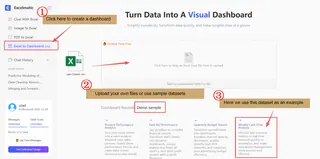
2. Move from data preparation to question-driven analysis
Once the data is available, users interact with it through natural language. Questions such as “How is revenue tracking against targets this month?” or “Which regions are driving growth?” guide the AI to identify relevant dimensions like time, region, and deal value, and generate initial views automatically.
3. Refine insights through conversational exploration
As patterns emerge, teams can follow up with more specific questions — comparing time periods, drilling into segments, or adjusting how results are visualized. Instead of rebuilding charts manually, the dashboard evolves through continuous interaction.
4. Stabilize insights into a decision-ready dashboard
Over time, exploratory views settle into a consistent sales performance dashboard that reflects how the team reviews revenue. Because the workflow remains flexible, the dashboard can adapt as new questions arise, rather than becoming outdated after a single reporting cycle.
This approach mirrors how sales teams actually work: starting with familiar data, asking better questions, and refining insights over time. By keeping the workflow conversational and iterative, Excelmatic removes much of the friction traditionally associated with dashboard creation while supporting faster, more confident revenue decisions.
Designing Sales Dashboards for Decisions, Not Just Visualization
A well-designed AI sales dashboard prioritizes clarity and action over visual density.
Instead of displaying every possible metric, it emphasizes patterns that require attention — such as deviations from targets, changes in deal velocity, or emerging performance gaps across segments. When questions arise, users can explore further without leaving the dashboard or requesting new reports.
This adaptive design approach transforms dashboards from static reporting tools into active decision-support systems. As a result, sales reviews become more focused, and revenue discussions are grounded in evidence rather than assumptions.
From Sales Reporting to Revenue Confidence
The ultimate value of an AI-powered sales performance dashboard lies in confidence.
When teams trust that their dashboard reflects the current state of revenue — and can adapt as questions change — decision-making becomes faster and more aligned. Forecasts improve, performance reviews become more constructive, and leadership discussions shift from debating numbers to deciding next steps.
For organizations still dependent on manual Excel reporting, AI dashboard generators like Excelmatic provide a practical path forward. By turning familiar spreadsheet data into interactive, AI-driven dashboards, they help teams move from reporting to revenue confidence without disrupting existing workflows.
Final Thoughts: Building Smarter Revenue Dashboards with AI
Creating a sales performance dashboard with AI is not about replacing spreadsheets or adopting technology for its own sake. It is about enabling better decisions through faster insight.
When dashboards are designed to support exploration, context, and action, they become an integral part of revenue strategy. AI makes this possible by reducing friction between data and understanding.
For sales teams seeking to move beyond static reports and toward more responsive revenue tracking, AI-powered dashboards represent the next step in how sales performance is managed and improved.
Start building AI-powered sales dashboards with Excelmatic today.
Frequently Asked Questions (FAQ)
Q: What is an AI sales dashboard?
A: An AI sales dashboard is an interactive analytics tool that uses artificial intelligence to help teams explore sales data, identify revenue drivers, and answer evolving business questions in real time.
Q: How is an AI sales dashboard different from a traditional Excel dashboard?
A: Traditional Excel dashboards rely on static charts and predefined metrics, while AI sales dashboards adapt to new questions through conversational analysis and dynamic exploration.
Q: Can I create a sales dashboard with AI using existing Excel data?
A: Yes. Many AI dashboard tools, including Excelmatic, allow teams to upload existing Excel sales files and generate dashboards without manual restructuring.
Q: How does Excelmatic support AI sales dashboard creation?
A: Excelmatic enables teams to upload Excel-based sales data, ask questions conversationally, and generate adaptive dashboards that evolve with sales analysis needs.