Key takeaways:
- AI Dashboard Generators transform static data into predictive insights and prescriptive actions, going beyond traditional reporting.
- Three core functions drive value: automated prediction, actionable recommendations, and natural language interaction.
- Impact is proven in real cases, including higher ad ROI, smoother cash flow, and better budget control.
- Start by defining clear decisions, structuring key metrics, then choosing the right generator tool.
- The shift is complete: from viewing reports to receiving AI-guided decisions.
9:00 a.m. — an automatically generated sales report arrives on time. It not only shows performance by region but highlights critical points: South China's sales unexpectedly fell 12% last week, and the system attributes this mainly to competitors' promotions; it also detected a 30% increase in searches for Product D and recommends adjusting inventory allocation. Reports like this, produced by modern AI dashboard generators, are starting to replace traditional dashboards.
A recent Harvard Business Review survey shows the share of companies claiming to have "established a data-driven culture" jumped from 21% to 43% — the largest increase in the survey's history. At the same time, a McKinsey report notes that driven by generative AI, 40% of companies plan to increase their investment in AI technologies. Demand for AI Dashboard Generators is growing as businesses push to turn data into fast, actionable decisions.
Key AI Dashboard Functions: Predictive, Prescriptive & Interactive
Traditional dashboards mainly offer descriptive analytics: they show historical sales, month-over-month growth rates, or customer retention curves. Those insights are useful, but they essentially summarize what has already happened.
An AI dashboard combines more advanced capabilities:
- Predictive analytics: estimating future trends using machine learning algorithms
- Prescriptive analytics: offering concrete optimization recommendations
- Natural language interaction: supporting conversational queries of the data
AI Dashboard Generators take these capabilities and make them accessible to business teams without heavy engineering. Instead of static charts, you get models that forecast, recommend, and explain.
AI-Driven vs Traditional Dashboards: A Feature Comparison
Most companies today still use traditional dashboards to monitor business performance. Those tools mainly provide descriptive analytics, such as year-over-year price changes, monthly sales growth, or recent trends in average customer revenue. While helpful, they have significant limitations.
The table below compares traditional dashboards and AI-driven dashboards across several key dimensions:
| Dimension | Traditional dashboard | AI-driven dashboard |
|---|---|---|
| Production | Requires IT support; hard for business users to participate | Modular configuration; business users can adjust independently |
| Analysis | Can only answer "what happened" | Can explain "why it happened," predict "what will happen," and recommend "what to do" |
| Usability | Requires understanding data structures; high learning curve | Supports natural language questions; near zero learning curve |
| Speed | Reports are slow to generate and often delayed | Real-time analysis, instant alerts, supports fast decisions |
Traditional dashboards are valuable for summarizing the past. The core of AI dashboards — and of the best AI Dashboard Generators — is embedding data science into daily decisions, making complex analysis simple and actionable.
How AI Dashboards Improve Decision-Making
1. Improve decision speed
AI algorithms can detect anomalies and patterns in real time. When a metric deviates from its normal range, the system alerts the team so they can act quickly. The right AI Dashboard Generators turn those alerts into prioritized, business-focused recommendations.
2. Lower the barrier to analysis
With natural language processing, users can ask directly: "Show me Q1 vs. Q2 sales and analyze possible causes for the decline using other indicators." The system will explain the main causes in business terms, without the user having to build queries or learn specialized tools. That's the promise of AI Dashboard Generators: conversational insights that anyone on the team can use.
3. Provide action guidance
Prescriptive analytics not only predict what will happen but also suggest what should be done. For example, the system might recommend: "Based on seasonal trends, shift 15% of next month's marketing budget toward digital channels." Modern AI Dashboard Generators often package these recommendations with estimated impact and expected improvement.
Industry Applications: Real AI Dashboard Case Studies
1. Smart optimization of paid advertising
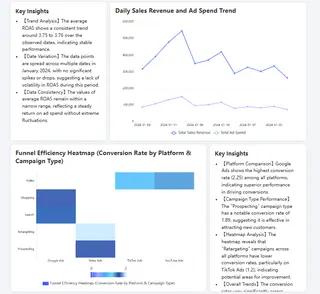
An e-commerce company spends $1.2 million a month across Google, Meta, TikTok, and YouTube. Each week, the team manually consolidates dozens of reports and only sees surface-level performance: Google brings the highest revenue ($1.955M), Meta follows ($1.441M), but deeper problems are hard to find.
After deploying a smart advertising dashboard built with AI Dashboard Generators, the system ran multi-dimensional analysis: although Google led total revenue, its search ad conversion cost was 40% higher than Meta's remarketing; TikTok's remarketing conversion rate was only 1.2%, well below industry norms.
Based on these insights, the dashboard generated concrete recommendations: move 30% of TikTok's remarketing budget to the higher-converting Meta platform and optimize Google search keyword matching. The system projects that after those adjustments, next quarter's overall advertising ROI could rise from 3.75 to 4.2.
Smart analysis not only surfaces performance gaps but also generates executable optimization plans, shifting ad management from experience-driven to data-driven. That's exactly the value delivered by effective AI Dashboard Generators.
2. Direct benefits from finance intelligence
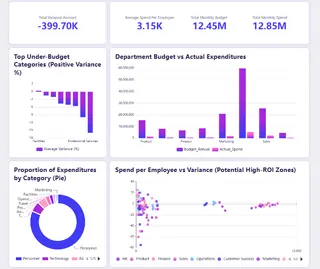
A finance director at a mid-sized tech firm faced the same monthly headache: total spending of 1.285 billion exceeded the budget by 40 million, yet it was hard to quickly find the root causes. Traditional reports showed marketing was the largest overrun but couldn't explain why that department's per-capita productivity looked highest.
After introducing a smart finance dashboard via an AI Dashboard Generator, things became clear immediately. The system flagged three key findings:
- Engineering saved 6.7% on travel but overspent on tech procurement with low efficiency.
- Marketing's ad spend performed best, but other marketing expenses included waste.
- Customer success had reasonable headcount costs but excessive operating expenses.
Armed with these insights, the finance team quickly reallocated budget: redirect engineering's travel savings to high-performing ad channels, optimize procurement processes, and streamline customer success operating costs. AI Dashboard Generators made the analysis accessible and actionable.
3. Smart cash-flow insights
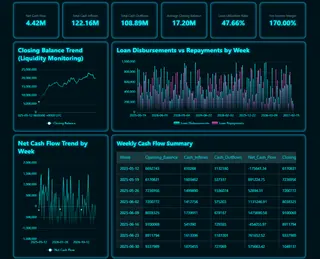
A growing company's CFO, reviewing weekly cash positions, found that although net cash flow was overall positive ($442k), weekly swings were dramatic — peak inflows of $147k and troughs of $45k outflows. Traditional reports showed the volatility but couldn't explain the causes or recommend smoothing strategies.
The smart dashboard, produced by an AI Dashboard Generator, revealed key patterns: cash flow swings closely followed loan cycles. For example, the week of May 19 saw a loan disbursement that drove a $160k inflow, while the week of June 16 had concentrated repayments of $72.9k, causing a net outflow. The system also noted the company typically held $1.72M in balances but had a loan utilization rate of 47.66%, highlighting reliance on short-term financing.
Based on this, the finance team adjusted tactics: stagger loan and repayment schedules, restructure payment plans, and set up cash-flow alerts. One month later, cash-flow volatility fell by 40% and loan utilization dropped to 35%, markedly improving capital efficiency. The smart dashboard not only explained why fluctuations occurred but also guided how to optimize, turning cash-flow management from passive reporting into proactive planning. Again, that's the measurable impact businesses expect from leading AI Dashboard Generators.
Designing Effective AI Dashboards: 3 Core Considerations
Building a valuable smart dashboard requires balancing three core factors: focus on critical decision scenarios, select an actionable metric set, and choose the right intelligent analytics tools — ideally those categorized as AI Dashboard Generators.
1. Focus on critical decision scenarios
A smart dashboard's success depends on whether it solves specific business decisions. That means being clear: what decision scenarios will this dashboard support? Is it dynamic allocation of marketing budgets, precise inventory control, or early warning for cash-flow risk? Clearly defining decision scenarios ensures the dashboard's features target business priorities and avoid falling into the trap of data hoarding. The best AI Dashboard Generators are built around these decision flows.
2. Structured design of analysis dimensions
When you hand data to AI, you must define the analytical framework. That includes three key settings:
Dimension definitions: Clarify time granularity (daily, weekly, monthly), business segmentation logic (by product, region, or customer tier), and comparison baselines (targets, historical, or industry benchmarks).
Metric selection: Choose metrics that directly drive action, indicate future trends, and reveal causality. For example, a drop in "inventory turnover" should trigger procurement review; a rising "customer churn risk score" should warn retention teams.
For marketing analysis, an explicit instruction might be: "Analyze weekly customer acquisition cost, conversion rate, and customer value by channel; compare with last month and industry benchmarks to detect anomalies."
Structured descriptions help AI accurately understand analysis intent and ensure insights map directly to business decisions — precisely what you should expect from AI Dashboard Generators.
3. Choose the right intelligent analytics tools
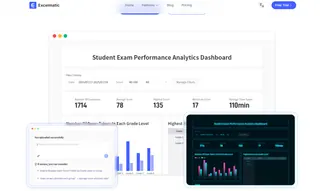
The tool you pick determines the depth of intelligence and ease of use. When evaluating tools, focus on whether they support automated trend forecasting and anomaly detection, whether they offer natural language interaction to lower the learning curve, and whether they generate explainable recommendations rather than just charts. For example, Excelmatic is one of the AI Dashboard Generators that offers a balanced option: business users can build predictive models without coding, get insights through conversational analysis, and embed smart alerts into existing workflows.
Selecting AI Dashboard Generators with strong integration, explainability, and no-code model-building features will accelerate adoption and deliver faster ROI. The right generator turns defined decision scenarios and metrics into real-time decision support.
These three factors are interconnected: clear decision scenarios determine the metric design, and the right AI Dashboard Generators turn those metrics into real decision support. Only when all three align can a dashboard evolve from a data display into a true business decision partner.
AI Dashboard Generators are changing how companies make decisions
The advertising optimization, cash-flow management, and budget control dashboards shown above were all generated by the Excelmatic platform — a category-leading example among AI Dashboard Generators. These cases demonstrate that modern analytics shouldn't be a pile of complex charts — they should answer business questions, predict trends, and provide actionable recommendations. That is precisely what high-quality AI Dashboard Generators deliver.
Excelmatic's design philosophy is simple: make intelligent analytics clear, concise, and easy to use. Users without technical backgrounds can quickly build dashboards that truly support decisions — whether it's real-time ad optimization, precise cash-flow management, or dynamic budget control. Excelmatic stands out among AI Dashboard Generators for enabling conversational analysis, no-code predictive models, and embedded alerts that map directly to business actions.
Data is most valuable when it directly guides action. Choose intuitive, efficient AI Dashboard Generators so every decision is evidence-based.
Frequently Asked Questions (FAQ)
Q: What's the main difference between traditional and AI dashboards?
A: Traditional dashboards only show past data. AI dashboards also predict future trends, suggest specific actions, and let you query data using natural language.
Q: Do I need technical skills to use an AI dashboard?
A: No. Modern AI dashboards are built for business users. Features like natural language search and automated alerts require no coding or data science knowledge.
Q: What kind of business problems can AI dashboards solve?
A: They excel at optimizing budgets (e.g., ad spend), managing financial metrics (e.g., cash flow), and identifying hidden inefficiencies across sales, marketing, and operations.
Q: Are AI dashboards secure and reliable for decision-making?
A: Reputable platforms operate with enterprise-grade security and explainable AI. They highlight the confidence level of predictions and the data behind recommendations for informed trust.