Key takeaways:
- Excel is effective for data handling, but it becomes a bottleneck when teams need fast, repeatable insights.
- AI Dashboard Generators shift analytics from manual reporting to real-time, decision-focused workflows.
- Key signals to switch include slow report creation, reliance on one spreadsheet owner, and increasingly complex business questions.
- Modern teams often use Excel and AI dashboards together, treating spreadsheets as inputs rather than final reports.
- The right AI Dashboard Generator helps teams move faster by turning existing data into actionable insights with minimal setup.
Excel has been the backbone of business reporting for decades. From tracking sales to managing budgets, spreadsheets are familiar, flexible, and powerful. For many teams, Excel is still the first tool they open when data needs to be analyzed.
But as businesses grow and decisions need to be made faster, a critical question starts to appear:
When does Excel stop being enough—and when does it make sense to switch to an AI Dashboard Generator?
This article breaks down that exact moment. Not to replace Excel entirely, but to help you recognize when your workflow is holding you back — and how AI dashboards can unlock faster, more actionable insights.
Why Excel Still Works (and Why Teams Love It)
Excel remains popular for good reasons:
- It’s flexible and widely understood
- It gives users full control over formulas and calculations
- It’s excellent for adhoc analysis and oneoff reports
- It’s often the starting point for raw business data
For small datasets, individual analysis, or exploratory work, Excel is still one of the most effective tools available.
The problem isn’t Excel itself.
The problem begins when Excel is used for tasks it wasn’t designed to scale.
Where Excel Starts to Break Down
Excel struggles not because it’s weak, but because modern data workflows demand speed, consistency, and collaboration.
Common friction points include:
- Manual data preparation: Cleaning, formatting, and merging data every time
- Version chaos: Multiple files, conflicting updates, and unclear sources of truth
- Slow insights: Reports take hours or days instead of minutes
- High dependency on experts: Only a few people know how the spreadsheet really works
When teams spend more time preparing data than acting on it, Excel becomes a bottleneck rather than a solution.
Excel Is for Handling Data. AI Dashboards Are for Making Decisions.
This is the most important distinction.
Excel excels at data manipulation. AI Dashboard Generators excel at decisionmaking.
Instead of building charts, adjusting formulas, and rewriting reports, AI dashboards allow teams to:
- Ask questions in natural language
- Get instant visual answers
- Track changes and trends continuously
- Focus on what to do next, not how to calculate it
The shift isn’t about tools—it’s about moving from manual analysis to insightdriven workflows.
5 Signs It’s Time to Switch from Excel to an AI Dashboard Generator
This is the clearest indicator that Excel is no longer the right tool for the job. If your team recognizes two or more of the signs below, the cost of staying in Excel is already higher than you think.
1. Reports Take Too Long to Build
If creating a weekly or monthly report still involves manually cleaning data, updating formulas, rebuilding charts, and double-checking numbers, Excel has become a productivity drain. What should take minutes often turns into hours of repetitive work.
AI dashboard generators remove this friction by automating data preparation and visualization. Instead of rebuilding reports, teams can focus on understanding results and taking action.

2. Decisions Depend on a Single Spreadsheet Owner
Many teams rely on one “Excel expert” who understands how the file works. When that person is unavailable, insights are delayed and decisions stall. This creates a hidden bottleneck that limits team agility.
AI dashboards democratize access to data. Anyone can ask questions and explore insights without needing to understand complex formulas or spreadsheet logic.

3. Business Questions Are Getting More Complex
Excel works well for answering “what happened” questions. But as soon as teams start asking “why did this change,” “what’s driving growth,” or “where should we focus next,” spreadsheets struggle to keep up.
AI dashboard generators are built for exploratory and iterative analysis, allowing users to ask follow-up questions and instantly see updated insights.

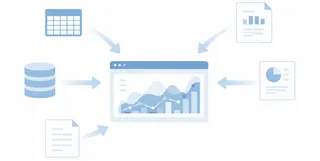
4. Data Is Scattered Across Multiple Sources
When data lives in multiple spreadsheets, PDFs, exports, and systems, Excel requires constant manual consolidation. This increases the risk of errors and outdated information.
Modern AI dashboards are designed to handle messy, multi-source data, turning fragmented inputs into a single, reliable source of truth.
5. You Need Answers Now, Not Tomorrow
In fast-moving businesses, waiting days for reports is no longer acceptable. Leaders need up-to-date insights to respond to changes in real time.
AI dashboard generators enable on-demand analysis. Instead of waiting for the next report cycle, teams can get answers the moment questions arise.

If you recognize these signs, it’s a strong signal that your workflow — not just your tool — needs to evolve. These are the moments when teams naturally start exploring AI Dashboard Generators.
A Smarter Workflow: Excel and AI Dashboards Together
Switching doesn’t mean abandoning Excel.
In practice, many teams use both:
- Excel for raw data collection and familiar formats
- AI dashboards for fast analysis, visualization, and decision support
With an AI Dashboard Generator, spreadsheets become inputs—not obstacles.
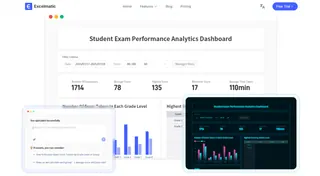
Tools like Excelmatic are built specifically for this workflow. Teams can upload spreadsheets directly, ask questions conversationally, and turn messy data into clear dashboards without manual rebuilding.
The result is a faster loop from data to insight.
Why AI Dashboard Generators Drive Better Outcomes
When reporting becomes automated and interactive, teams gain:
- Faster insight generation
- Reduced manual workload
- Clearer decision signals
- Better alignment across teams
Instead of spending hours preparing reports, teams spend minutes understanding what matters.
That shift changes how organizations operate.
The Practical Next Step
You don’t need a complex BI system to move forward.
For teams that want a simple, fast, and professional way to turn spreadsheets into insights, Excelmatic offers a practical starting point. No setup overhead, no steep learning curve — just answers when you need them.
If Excel is slowing you down, try an AI dashboard workflow and experience the difference.
Faster insights start with asking better questions—and having the right tool to answer them.
Frequently Asked Questions (FAQ)
Q: When should a team switch from Excel to an AI Dashboard Generator?
A: A team should consider switching when Excel reports take too long to update, insights depend on one spreadsheet owner, or business questions become too complex for manual analysis.
Q: Is an AI Dashboard Generator meant to replace Excel completely?
A: No. In most cases, Excel remains useful for data input and quick calculations, while AI Dashboard Generators are better suited for analysis, visualization, and decision-making.
Q: Can AI Dashboard Generators work with existing Excel files?
A: Yes. Many tools can directly analyze Excel files and treat spreadsheets as data sources, reducing the need to restructure existing workflows.
Q: What’s a good first step if Excel no longer scales but I’m not ready for a full BI tool?
A: A lightweight AI Dashboard Generator like Excelmatic is often the best starting point, as it works directly with existing Excel files and avoids complex setup or long implementation cycles.