Key takeaways:
- Crafting Effective Prompts is Crucial: Clear and specific prompts are essential to get the most relevant and accurate results from AI dashboard generators.
- Be Specific with Data Requests: Providing detailed queries, such as specifying time periods, regions, or metrics, ensures that the AI tool delivers precise, actionable insights.
- AI Dashboards Can Save Time: By using well-constructed prompts, AI tools can quickly generate valuable insights, reducing the need for manual data preparation and analysis.
- Mastering Prompt Crafting Unlocks AI's Full Potential: The more detailed and structured your prompts, the better the AI can identify patterns and trends, leading to higher-quality dashboards.
- Real-World Use Cases Improve Dashboard Effectiveness: Examples from marketing, financial analysis, and inventory tracking show how specific prompts can lead to customized, valuable dashboards.
In the evolving world of AI, one of the most transformative advancements is AI-powered dashboard generators. These tools allow businesses to effortlessly convert raw data into interactive visual dashboards, making data analysis easier and faster. However, the effectiveness of these tools relies heavily on one critical element: the prompt.
Just as a painter needs the right brush strokes to create a masterpiece, an AI dashboard generator needs well-crafted prompts to deliver meaningful insights. In this article, we'll explore how mastering the art of prompt writing can help you get the most out of your AI dashboard generator.
What is Prompt Engineering for AI Dashboard Generators?
At its core, prompt engineering involves crafting precise and effective queries to communicate your needs clearly to an AI system. When using AI dashboard generators, you essentially "ask" the AI to generate specific reports, charts, or analyses based on your business requirements.
For example, instead of simply typing "Show sales data," you could ask, "Compare last month's sales by region and product category, highlighting any unusual trends." The more specific your prompt, the more relevant and accurate the AI's output will be.
Why Prompt Crafting is Crucial for AI Dashboard Generators
The strength of AI tools like dashboard generators lies in their ability to understand and process data quickly. But these tools rely on the clarity of the prompts you provide. If your prompt is vague or unclear, the AI's output may be irrelevant or inaccurate. Here are a few reasons why mastering prompt crafting is essential:
- Precision and Relevance: Clear, specific prompts lead to better, more relevant results, ensuring that your dashboard is tailored to your exact needs.
- Time Efficiency: By providing precise prompts, you reduce the need for manual adjustments and edits after receiving the dashboard output.
- Maximized AI Potential: AI tools are designed to work with natural language, but they perform best when prompted with detailed, structured requests. This allows the AI to identify patterns and insights more effectively.
Key Tips for Crafting Effective Prompts
1. Be Specific About the Data You Need
When asking an AI dashboard generator to display data, always be as specific as possible. Instead of asking for a general overview, try breaking down the query into smaller parts. For example:
- Vague prompt: "Show me sales data."
- Specific prompt: "Show me sales data for Q4 of 2025, broken down by region and product category."
The more details you provide, the better the AI will be at tailoring the dashboard to your needs.
2. Specify the Metrics and Dimensions
To get the most insightful results, specify the exact metrics and dimensions you want the AI to analyze. For example:
- Vague prompt: "Give me a chart showing sales performance."
- Specific prompt: "Show a bar chart comparing total sales, average order value, and number of items sold per region for the last 6 months."
This ensures that the AI knows which data points to focus on.
3. Ask for Comparative Analysis
AI dashboard generators can easily compare different datasets. If you need a comparison, make sure to include that in your prompt. For example:
- Vague prompt: "How did we perform last year?"
- Specific prompt: "Compare our sales performance for Q1 2025 with Q1 2024, highlighting any significant changes in product category sales."
Comparative prompts help you identify trends and outliers that might not be immediately obvious.
4. Include Time Periods for Context
Time context is key when analyzing data trends. Always specify the time period you're interested in to ensure the AI delivers timely insights:
- Vague prompt: "Show me this year's sales performance."
- Specific prompt: "Show me sales performance for 2025, broken down by quarter, and compare it with sales in the same quarters of 2024."
This helps you track performance over time and make more informed decisions.
Examples of Effective Prompts for AI Dashboard Generators
Here are examples of dashboards generated with a simple, fast, and professional AI Dashboard Generator: Excelmatic. Let's look at how you can use clear, straightforward instructions to get equally actionable and well-structured visual insights.
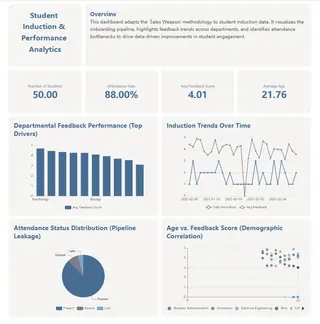
1. Student Orientation case
"Create a student induction dashboard with key metrics: Number of Students, Attendance Rate, and Avg Feedback Score. Compare departmental feedback performance and show induction trends over time, attendance status, and age vs. score correlation."
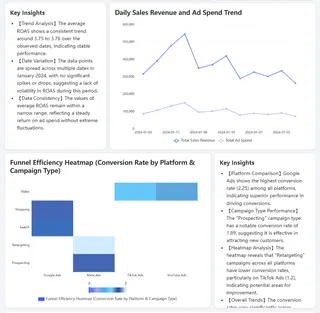
2. Marketing Operations case
"Create Ad performance dashboard. Tell me about the ROAS trends, which platforms are performing best, and how different campaign types compare. Include the daily revenue and spend chart."
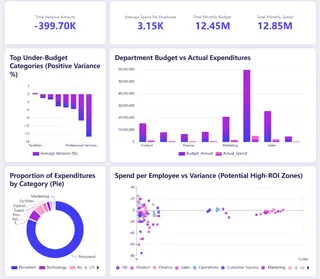
3. Financial case
"Show me the budget analysis: total variance, monthly spend vs. budget, average cost per employee, which categories are under budget, and how each department is doing.."
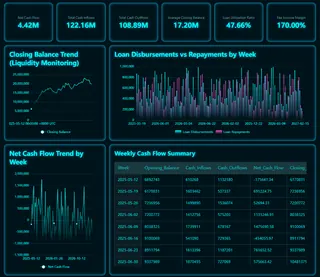
4. Inventory case
"Analyze our liquidity: track closing balance over time, compare weekly loan disbursements vs repayments, and show the net cash flow trend by week."
By providing these kinds of specific prompts, you enable the AI tool to generate a more customized, detailed, and valuable dashboard.
The Impact of Well-Defined Prompts on Decision Making
Using well-crafted prompts helps AI dashboard generators provide you with data-driven insights in minutes. With the right prompts, you can:
- Uncover Hidden Trends: Detailed, specific prompts help the AI identify patterns that might be missed by traditional analysis methods.
- Make Better Business Decisions: Actionable insights allow you to make informed decisions based on data, not assumptions.
- Save Time: A precise prompt means the AI can deliver the exact insights you need without requiring manual intervention or further adjustments.
Conclusion: Master the Art of Prompt Crafting for Better AI Dashboards
The key to unlocking the full potential of AI dashboard generators lies in mastering the art of prompt crafting. By learning how to create specific, detailed, and context-rich prompts, you empower your AI tool to provide the most relevant, actionable insights. Whether you're tracking sales, analyzing customer behavior, or reviewing financial performance, the more thoughtful your prompt, the better the results.
And if you're looking for a tool that's quick to use, easy to understand, and professionally designed, Excelmatic is a perfect choice. Its intuitive, conversational interface makes it easy to generate dashboards without needing to master complex software.
Ready to start crafting your own prompts and getting quick, actionable insights?
Try Excelmatic today and experience how simple it can be to turn your raw data into meaningful, visual reports in minutes!
Frequently Asked Questions (FAQ)
Q: What is an AI Dashboard Generator?
A: An AI Dashboard Generator is a tool that automatically turns raw data into visual dashboards using AI, helping businesses generate actionable insights quickly and easily without coding.
Q: Why are prompts important for AI Dashboard Generators?
A: Crafting clear and specific prompts is key for getting accurate, relevant results. A well-structured prompt allows the AI to understand your needs, ensuring the generated dashboard provides meaningful insights that align with your business objectives.
Q: How can I craft effective prompts for AI Dashboard Generators?
A: To create effective prompts:
- Be specific about the data you need (e.g., "Show sales data for Q4 2025 by region").
- Specify metrics and dimensions (e.g., "Compare sales, average order value, and items sold per region").
- Ask for comparative analysis and time-based context (e.g., "Compare Q1 2025 sales with Q1 2024").
Q: How do AI Dashboard Generators save businesses time?
A: AI dashboard generators significantly reduce the time spent on manual data wrangling and report preparation. With well-crafted prompts, the AI can generate dashboards in minutes, providing actionable insights without the need for manual adjustments.
Q: Why is Excelmatic a good choice for AI Dashboard Generation?
A: Excelmatic is designed for users who need a quick, easy, and professional AI dashboard tool. It's user-friendly, requiring no learning curve, and allows you to create interactive dashboards with simple, conversational prompts. It's ideal for teams looking for a fast, low-risk solution.