How AI-Based Excel Can Save You Hours of Work

Microsoft Excel is a powerful tool, but manual tasks like data entry, analysis, and formula management can be time-consuming and error-prone. This is where AI-Based Excel solutions like Excelmatic come in—bringing automation, accuracy, and efficiency to spreadsheet management.

The Problem with Traditional Excel

Despite its advanced features, Excel still relies heavily on manual work:

  • ❌ Repetitive data entry wastes time
  • ❌ Manual calculations increase the risk of errors
  • ❌ Data analysis requires advanced skills

How AI-Based Excel Transforms Your Workflow

AI-powered tools like Excelmatic integrate seamlessly with Excel, offering:

  • ✅ Automated Data Entry – AI extracts, organizes, and updates data effortlessly.
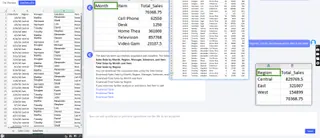
analysis

  • ✅ Smart Formula Recommendations – No more struggling with complex functions.
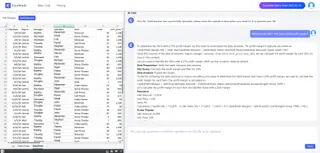
analysis

  • ✅ Instant Data Insights – AI generates reports and charts in seconds.

analysis

  • ✅ Error Reduction – AI helps detect and correct formula errors.
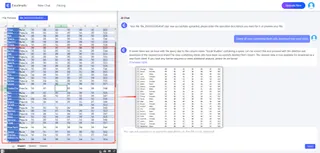
analysis

Who Can Benefit from AI-Based Excel?

  • 💼 Business professionals – Automate reports and financial analysis
  • 📊 Data analysts – Generate insights with AI-powered calculations
  • 📈 Entrepreneurs – Simplify inventory and sales tracking
  • 🧑‍💻 Anyone working with Excel – Save time and boost efficiency

Conclusion

With AI-Based Excel solutions like Excelmatic , you can eliminate tedious manual tasks, improve accuracy, and focus on strategic decision-making. If you’re still spending hours on spreadsheets, it’s time to embrace AI and transform the way you work with Excel!


Ditch Complex Formulas – Get Insights Instantly

No VBA or function memorization needed. Tell Excelmatic what you need in plain English, and let AI handle data processing, analysis, and chart creation

Try Excelmatic Free Now

Recommended Posts

Save Hours with These 4 ChatGPT + Excel Tips (and How Excelmatic Does It in One Sentence)
Excel Tips

Save Hours with These 4 ChatGPT + Excel Tips (and How Excelmatic Does It in One Sentence)

Discover how to use ChatGPT to write Excel formulas—and how Excelmatic takes it further by automating the entire process with natural language. Say goodbye to templates and hello to smart spreadsheets.

Sally
Chat Excel Simplify Excel with Just a Chat.
Excel Tips

Chat Excel Simplify Excel with Just a Chat.

with Excelmatic, you can now simplify your Excel tasks just by chatting in natural language!.

Sally
Lazy No More: Let AI Instantly Analyze Your Excel Data for You
Excel Tips

Lazy No More: Let AI Instantly Analyze Your Excel Data for You

Can you analyze Excel data without using formulas or charts? With Excelmatic, yes — just upload your sheet and ask. AI handles the rest.

Sally
How to Analyze User Purchase Paths Using Excel AI
Excel Tips

How to Analyze User Purchase Paths Using Excel AI

Understand how users convert using Excel AI tools. Analyze session trends, traffic source performance, and user behavior without complex formulas.

Sally
A Pro's Guide to Compressing Excel Files for Peak Performance
Excel Tips

A Pro's Guide to Compressing Excel Files for Peak Performance

Is your Excel file slow, bloated, or crashing? This guide walks you through proven manual methods like compressing images and cleaning data, and introduces a game-changing AI approach to instantly optimize your spreadsheets for you.

Ruby
A Smarter Way to Clean and Transform Excel Data :5 Proven Methods
Excel Tips

A Smarter Way to Clean and Transform Excel Data :5 Proven Methods

Struggling with messy Excel data? This guide covers everything from manual cleaning and Python scripts to Excelmatic's revolutionary AI method. Handle data formatting, calculations, and analysis with ease. Find the fastest, most reliable way for your needs.

Ruby