Key takeaways:
- Predictive vs Prescriptive Analytics: predictive forecasts what will happen; prescriptive recommends what to do about it.
- Predictive outputs: probabilities, forecasts, and risk scores built with ML and time‑series methods.
- Prescriptive outputs: optimized actions, schedules, or policies produced by optimization, simulation, or RL — often using predictive inputs.
- Key differences: purpose (inform vs decide), actionability, required inputs (business objectives/constraints), skill sets, and evaluation metrics (accuracy vs business impact).
- When to use: choose predictive for forecasting, monitoring, and signal validation; choose prescriptive for constrained, repeatable decisions that need optimization or automation.
- Tools like Excelmatic speed pilots by bringing prediction and actionable recommendations into spreadsheet workflows.
In the wave of digital transformation, companies increasingly rely on data and analytics to stay competitive, understand markets, and optimize operations. Rapid advances in artificial intelligence are accelerating the evolution of analytics capabilities, and two key branches — predictive analytics and prescriptive analytics — are becoming central to intelligent decision-making. Although these two approaches are often discussed together, they differ fundamentally in purpose, function, and use cases. This article will systematically explain the similarities and differences between them and show how smart tools like Excelmatic can help apply both methods in a coordinated way.
What are predictive analytics and prescriptive analytics?
Predictive analytics is an approach that uses historical data and statistical models to make probabilistic forecasts about future events or trends. It answers the question "what is likely to happen?" and helps organizations anticipate direction in uncertain environments.
Prescriptive analytics goes further: beyond predicting possible outcomes, it takes business objectives, constraints, and available resources into account and generates concrete action recommendations. It answers the question "what should we do?" and aims to recommend the best course of action from multiple feasible options.
How Predictive Analytics and Prescriptive Analytics Work?
Although their end goals differ, predictive and prescriptive analytics share a common data science workflow. Both start with data and rely on models — that's their most fundamental similarity.
First, data is the shared starting point.
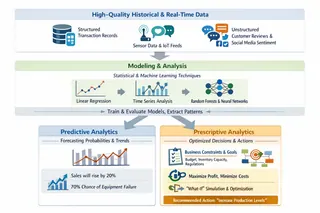
Whether you're forecasting tomorrow's product sales or planning next month's optimal supply routes, analysis must be built on high-quality historical and current data. That data can include structured transaction records, real-time sensor readings, and unstructured sources like customer reviews or social media sentiment.
Second, modeling is the shared core.
Once the data is prepared, the next step is to build, train, and evaluate models. Whether using classic statistical techniques (such as linear regression or time-series analysis) or more complex machine learning algorithms (like random forests or neural networks), the goal is to extract reliable patterns and relationships from historical data.
The fundamental divide lies in the final step of the process: the output and the decision loop.
Predictive analytics is largely complete once it provides a probability or trend forecast. Prescriptive analytics goes further, taking that forecast and feeding it, together with business constraints (budget, inventory capacity, regulations) and objectives (maximize profit, minimize cost), into optimization and simulation engines. By computing "if...then..." scenarios, it produces not "what will happen" but "what should be done."
Core Differences: Predictive vs Prescriptive Analytics
| Dimension | Predictive Analytics | Prescriptive Analytics |
|---|---|---|
| Core Question | What will happen? | What should we do? |
| Focus | Forecast future probabilities from historical data | Recommend optimal actions based on forecasts and constraints |
| Output | Probabilities, trend charts, risk scores | Actionable recommendations and optimized plans |
| Decision Role | Informs decisions | Guides/Automates decisions |
| Key Tech | Statistical modeling, machine learning | Optimization algorithms, simulation |
| Key Inputs | Historical data | Business goals, constraints, action options |
| Nature | Forward-looking insight | Action-oriented guidance |
To make the distinction between these "twin siblings" clearer, let's look at an illustrative example: imagine an online retailer.
Predictive analytics might identify that customers who buy diapers have a high probability of purchasing baby formula within the next month. Its insight would be: "Customer group A has a 65% chance of buying formula in the next 30 days."
Prescriptive analytics takes that insight further. It combines the forecast with current formula inventory levels, storage costs, the budget and margin for different promotion options, and possible shipping choices. Through optimization, it might recommend: "Send a personalized 'diapers + formula bundle at 20% off' coupon to customer group A within 24 hours and ship from the local warehouse. This is expected to increase cross-sales by 20% while reducing per-item logistics cost."
When to Use Predictive Analytics vs Prescriptive Analytics
Understanding the difference lets you choose the right approach for specific business scenarios.
Predictive Analytics
Scenarios where predictive analytics should be prioritized typically focus on risk signaling, trend detection, and demand sensing:
- Predictive maintenance: An operations team analyzes historical server CPU usage to forecast resource bottlenecks in the coming days and scale up in advance to avoid outages.
- Sales and demand forecasting: Retailers use years of past sales data to predict demand by product category for the next quarter, informing procurement budgets.
- Credit and risk scoring: Financial institutions model past borrower behavior to estimate default probabilities and make lending decisions.
- Customer churn warning: Telecom companies analyze call, data, and support interaction patterns to identify customer segments at high risk of leaving.
Prescriptive Analytics
Scenarios that require prescriptive analytics involve complex decisions where an optimal solution must be found under multiple constraints:
- Dynamic pricing and revenue management: Airlines adjust fares in real time based on forecasted demand, competitor pricing, and remaining seats to maximize total revenue.
- Personalized medical treatment plans: In pharmacological services, the system not only predicts how a drug might perform for a patient (prediction) but also combines genetic data, liver/kidney function, and drug interaction constraints to recommend the specific drug, dose, and timing (prescription).
- Supply chain network optimization: Given customer delivery deadlines, decide which warehouse should fulfill an order and which carrier to use to minimize total transportation and storage cost.
- Marketing resource allocation: With a fixed marketing budget, determine how to allocate spend across channels (social, search, email) and craft personalized messages to maximize return on investment.
In short, when your question is "If things continue as they are, what will happen?" use predictive analytics. When it becomes "Given constraints, what should I do to get the best result?" prescriptive analytics is the answer.
Implementing Predictive Analytics and Prescriptive Analytics with Excelmatic
Turning theory into practice requires powerful tools. Excelmatic is an AI-enabled modern analytics platform that, with intuitive interactions and strong intelligence, significantly lowers the barrier to performing both predictive and prescriptive analytics.
1. Step one: unified data preparation and upload
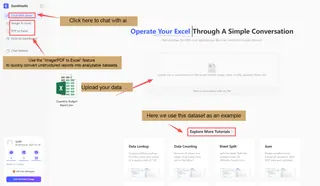
Whatever analysis you plan, it starts with clean, structured data. You can upload .xlsx or .csv files directly into Excelmatic, or use its built-in image/PDF-to-Excel feature to quickly convert unstructured reports into analyzable datasets. This establishes the common data foundation for downstream work.
2. Step two: start intelligent analysis by describing your needs in natural language
This is Excelmatic's key advantage. You don't need to write complex cod — simply describe your analysis goal in the dialog box.
For predictive analysis: enter instructions like "Based on daily/monthly order data from January to November of this year, forecast the overall sales trend for the next three months, and provide separate predictions by product category and customer region. Identify the fastest-growing products and regions, and explain the rationale behind the forecast" The AI will infer your intent, automatically select suitable time-series or regression models, and generate forecast charts and narrative interpretation.
For prescriptive analysis: provide more complex, constraint-driven instructions, for example, "Assuming we have a promotional budget of $100000 next month, which needs to be allocated to four regions (East China, South China, North China, Western) with the goal of maximizing total sales. Please provide the optimal budget allocation plan based on the historical sales performance, growth potential, and product category contribution of each region." The AI will invoke optimization algorithms, simulate different allocation scenarios, and provide a recommended plan.
3. Step three: review, refine, and simulate decision scenarios
You can keep asking follow-up questions to refine the analysis, request different visualizations, or place the results on a dashboard for clearer visualization.
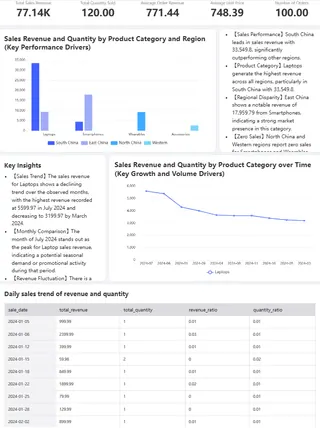
4. Step four: generate an actionable insight report
When the analysis is complete, Excelmatic can generate a summary report with key forecast charts and concrete action recommendations in one click. That report is ready to share with your team, turning data insight into clear decision rationale and a list of actionable tasks — closing the loop from analysis to action.
Through these steps, Excelmatic blends the insights of predictive analytics with the decision-making power of prescriptive analytics into a smooth workflow, enabling business users to perform advanced analysis without needing to be data scientists.
Conclusion: The Future of Predictive and Prescriptive Analytics
Predictive analytics tells us "which way the wind is blowing"; prescriptive analytics guides us on "how to set the sails." They are not substitutes but complementary, progressive tools for intelligent decision-making. In a data-driven world, companies that master both will not only lead in insight but also gain an advantage in execution.
Excelmatic is designed to bring these two capabilities together, helping organizations see further and act more confidently in uncertain environments. Whether you start with prediction, end with prescription, or run both in parallel, it can inject intelligent power into your decision system.
Embrace prediction, make prescription your practice, and let data become your real decision engine.
Make analytics smarter and decisions more precise — start with Excelmatic.
Frequently Asked Questions (FAQ)
Q: Which should my company invest in first: predictive or prescriptive analytics?
A: Typically, predictive analytics is the foundational step. It's difficult to prescribe optimal actions if you cannot reliably forecast outcomes. Start by building accurate predictive models for key business metrics (e.g., demand, churn). Once these are stable, you can layer on prescriptive optimization to act on those forecasts effectively.
Q: Can predictive and prescriptive analytics work together in a single project?
A: Absolutely, and this is often the most powerful approach. A common pipeline is: 1) Predictive models forecast future scenarios. 2) These forecasts become input data for a prescriptive model. 3) The prescriptive model, considering business rules and constraints, recommends the best action.
Q: What's the next evolution beyond prescriptive analytics?
A: The emerging frontier is adaptive or autonomous analytics. While prescriptive analytics recommends actions, adaptive systems can self-learn and automatically implement decisions within predefined guardrails, creating a closed-loop optimization system. This is closely linked to developments in Reinforcement Learning.