Key takeaways:
- Modern reports need to be strategic compasses, not just historical records. Their purpose is to explain the "why" and drive action.
- Traditional processes are slow, lack insight, and produce static documents. This creates bottlenecks for timely business decisions.
- AI tools like Excelmatic change the game by using natural language. You state what you need, and the AI handles the complex execution.
- A 5-step AI workflow can turn weeks of work into an interactive session. It enables rapid analysis from question to root cause.
- You can also generate a dynamic dashboard for ongoing insight. This turns financial data into a continuous decision-support tool.
It's 11 p.m. You finish checking the last batch of numbers and click save on an 80‑page PPT. This annual financial report, the result of a year's work, will be handed to management tomorrow. Then a question pops up: two months from now, when someone needs to quickly validate a decision, who will reopen this ocean of figures? Is this report a filed "historical summary," or a "strategic compass" that can point the way forward?
If you want the latter, we have to rethink what an annual financial report really is.
What a True Annual Finance Report Actually Delivers
A valuable annual financial report does far more than list the three main statements (income statement, balance sheet, cash flow). It's a complete narrative of the company's year of business activity, written in financial terms.
That means it must answer more than "how much did we earn and spend." It must explain:
Why did we make this much money? Which product lines, which regions, or which customer segments drove the unexpected growth?
Were the expenditures wise? Did that large R&D investment turn into measurable technical barriers or product advantages? Did higher marketing spend deliver healthier long‑term retention?
Is our financial structure healthy enough to support the future? Can cash flow back next year's expansion plans? Is asset efficiency improving or deteriorating?
When a report links business drivers to the numbers, it moves from an accounting document to a decision cornerstone for management.
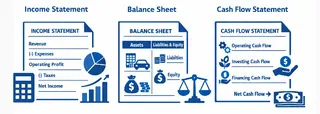
The Shortcomings of Traditional Financial Analysis Reports
Many companies spend huge effort on annual reporting with little payoff. The problems usually are:
- Time‑consuming and quickly stale: Teams spend weeks extracting, reconciling, and pasting data from different systems. By the time the report comes out, it reflects the past and can't guide current business.
- Data dumping without insight: Reports are filled with tables of numbers but lack clear conclusions and trend interpretations. Readers must draw their own inferences, and finance and business teams often see things differently.
- Static and isolated, with no way to probe: A PDF or PPT is static. When a board member asks, "What exactly caused the spike in G&A this quarter?" you can't click the number and drill into the details on the spot.
Is there a way to systematically fix these issues? Yes — by using AI to rebuild the data‑analysis "production line." The new generation of tools is no longer just charting software; it's an intelligent assistant that understands your business intent. Next, I'll recommend a capable AI data assistant.
Building a Smarter Annual Finance Report with AI
Excelmatic is an AI‑driven Excel data analysis and visualization tool that simplifies traditional tedious tasks (like writing formulas or creating charts) into natural‑language conversations. Its core idea is to move you from "how to do it" to "what you want." Describe the business goal, and the AI handles the technical work.
The table below clearly shows its core capabilities. Together, these features address the core pain points of financial reporting: long lead times, error risk, and inflexibility.
| Area | Core Ability | Example Command |
|---|---|---|
| Smart Analysis | Auto-sorts, filters, groups, creates summaries. | "Show sales by region and calculate expense ratio." |
| Charts | Creates bar, line, pie charts from your words. | "Plot revenue trend and overlay profit margin." |
| Data & Formulas | Writes formulas, cleans and merges data for you. | "Find IDs in Sales but not in Employee list." |
| Interactive Q&A | Answers follow-up questions to dig deeper. | "Now show only regions where ratio > 15%." |
Your 5-Step AI Workflow for the Annual Finance Report
Let's use a consumer goods company example to see the shift from "traditional" to "Excelmatic":
Traditional process: Finance asks IT for data → wait 2-3 days to get it → manually merge in Excel, write formulas, create pivot tables → find anomalies and request more work, taking a week and delaying decisions.
Excelmatic process:
- Upload: Directly upload sales, expense, and other data tables to Excelmatic.
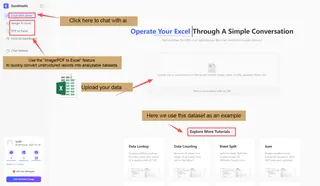
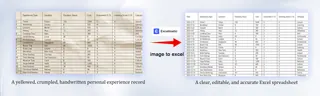
You can also convert the paper version of the table in hand into an Excel spreadsheet, which can be analyzed together with other data.
- Ask: Type into the chat: "What is the revenue trend by region for each quarter in 2025."
- Deepen: The AI immediately generates the analysis tables and charts. You then ask: "What are the total unit sales and customer count trends by region for each quarter in 2025"
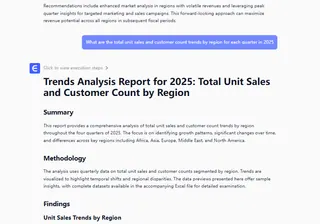
Excelmatic will still generate a detailed report for you, each of which includes key information such as overview and methodology.
Decide: Excelmatic helps identify likely root causes and provides prescriptive analyses and suggested actions.
Visualize: You can ask the AI to create specific chart types for clearer presentation.
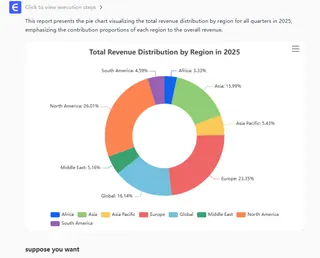
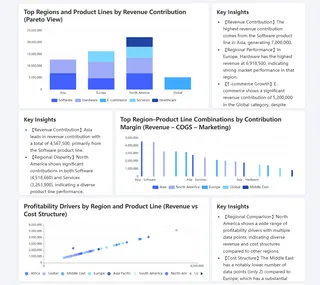
- Consolidate: You can combine data, analysis, and charts into a data dashboard that integrates multiple visualizations.For example, the following is the dashboard I generated based on the data source just now.
From Annual Finance Report to Annual Insight Engine
The true value of an annual financial report lies not in its thickness but in its impact on decisions. An ideal report should be dynamic, interactive, and action‑driving. It should no longer be a heavy document shelved after a meeting; it should be an intelligent workspace that continuously delivers insight and supports fast decisions.
Hand off your annual report work to Excelmatic. It's more than "faster Excel." It's a data partner that understands your business language and executes complex analyses instantly. It lets finance teams:
Ask analysis like asking a question: Directly pose business queries and skip the tedious formulas and steps.
Dig into root causes like a conversation: Drill down in meetings, layer by layer, from symptom to core issue.
Build the narrative like assembling a puzzle: Integrate analyses and conclusions in real time into interactive dashboards that let the data tell the story.
It's time to change. Rather than repeating a weeks‑long, quickly stale linear process year after year, try a smarter approach on your next analysis.
Open excelmatic and start this year's annual financial analysis now.
Frequently Asked Questions (FAQ)
Q: What's the difference between a traditional report and a dynamic dashboard?
A: A traditional report is a static summary of the past; a dynamic dashboard is an interactive tool for ongoing analysis and decision-making.
Q: What key aspects can an annual financial analysis report cover?
A: It can analyze profitability, cost structure, cash flow health, budget variance, and departmental or regional performance.
Q: What common analytical methods can be applied?
A: Methods include trend analysis, variance analysis, ratio analysis (like liquidity and profitability ratios), and benchmarking against past periods or targets.
Q: What are the main ways to visualize these findings?
A: Key visuals include trend lines for performance, bar/column charts for comparisons, pie/donut charts for composition, and KPI dashboard for key metrics.