Key takeaways:
Predictive analytics shifts decisions from hindsight to foresight by using historical data to forecast likely future outcomes.
Four core types: classification (yes/no or categorical decisions), regression (continuous numeric estimates), time series (temporal trends and seasonality), and clustering (unsupervised grouping for discovery).
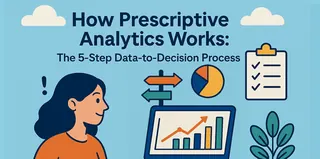
Implementation follows a clear path: define the business problem, collect and preprocess data, develop and validate models, deploy and integrate systems, and monitor and update continuously.
Tools like Excelmatic can make predictive analytics accessible to non-experts by enabling natural-language driven forecasting and quick visualizations directly from spreadsheets.
In the past, business decisions were mainly based on analyzing events that had already happened. Today, companies want not only to understand "what happened" but also to anticipate "what will happen." At the core of this shift is predictive analytics.
Predictive analytics builds models from historical data, identifies patterns and trends, and makes probabilistic judgments about future outcomes. It significantly reduces uncertainty in decision-making, shifting business insight from hindsight to foresight.
Different business problems require different types of predictive analytics. Understanding their core categories is the first step in choosing the right technical path.
4 Types of predictive analytics every business needs
1. Classification prediction: making "yes-or-no" judgments
When a business question requires a clear decision, classification prediction is used. Its goal is to assign data points to predefined categories. The most common case is binary classification, such as "approve" or "reject." More complex multiclass classification can segment customers into multiple levels like "high, medium, low" risk.
Typical use cases include:
- Financial risk control: automatically approving loan applications and detecting fraudulent transactions in real time.
- Customer management: predicting whether a customer is at risk of churning and segmenting risk levels.
- Medical diagnosis: assisting in identifying disease types based on patient indicators.
- Quality control: automatically determining whether products meet standards on the production line.
Implementing classification requires sufficient, well-labeled historical data. When evaluating models, choose metrics that align with business goals; for example, in fraud detection we typically prioritize finding as many suspicious transactions as possible (high recall).
2. Regression prediction: estimating "specific numeric values"
If classification answers "whether," regression answers "how much." It predicts a continuous numerical outcome by modeling the mathematical relationships between variables.
It is commonly used for business problems that require concrete numerical estimates:
- Sales forecasting: estimating product sales for the next quarter.
- Price valuation: predicting a property's market price based on its features.
- Equipment maintenance: predicting the remaining useful life of machine components.
- Performance management: predicting employees' next-stage performance scores based on multiple data points.
Regression analysis helps us understand how different factors influence the outcome. The quality of a regression model is mainly judged by the average error between predicted and actual values.
3. Time series analysis: forecasting metrics that change over time
For time-ordered data such as daily sales or monthly user counts, specialized methods are needed. Time series analysis focuses on extracting patterns in data over time, including long-term trends, seasonal fluctuations, and cyclical cycles.
It directly serves time-driven business needs:
- Supply chain management: forecasting product demand for the coming months to plan inventory.
- Energy sector: predicting regional electricity load to ensure stable supply.
- Business planning: forecasting website traffic or revenue trends to prepare strategies in advance.
- Financial markets: analyzing patterns in stock prices or trading volumes.
Working with time series data requires some degree of stationarity, or techniques to make the data stationary. Models like ARIMA and Prophet can effectively capture and predict complex temporal patterns.
4. Clustering analysis: discovering "unknown groups"
Clustering itself does not directly perform prediction but is an important supporting tool. Its purpose is to automatically group data points based on similarity without predefined answers, revealing unknown structures and patterns.
Its core value lies in exploration and discovery:
- Market segmentation: grouping customers with different characteristics and behavior patterns.
- Product recommendation: uncovering relationships between products by analyzing purchase records.
- Anomaly detection: identifying the small number of data points with abnormal behavior patterns within large datasets.
- Information organization: grouping large volumes of text or users by topic or interest.
Clustering results need to be interpreted in the context of business knowledge. These newly discovered groups and patterns are often used as input features that can significantly improve the performance of subsequent classification or regression models.
Combined applications and implementation path
Real business problems often require a combination of techniques. For example, in a dynamic pricing system you might first use time series analysis to forecast demand changes, then use regression to identify the key factors influencing price, and finally use a classification model to estimate the probability that customers will accept a price change.
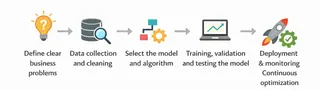
Successfully implementing predictive analytics typically follows a clear path: start with precisely defining the business problem, then go through data collection and processing, model development and validation, system deployment and integration, and finally establish continuous monitoring and updating mechanisms. Along the way, companies must address common challenges such as data quality, model overfitting, and changes in the business environment, which requires close collaboration between business units and data teams.
Predictive analytics in practice: quickly forecasting next quarter's expenses with Excelmatic
How do you turn theory into action quickly? Let's use the "Quarterly Budget Report" data as an example. The spreadsheet contains budgeted and actual spending by department and category for January through March. As the finance lead, you need a more accurate cash-flow forecast for Q2 (April--June).
Traditional methods may require complex data processing and modeling, but with Excelmatic (a conversational Excel AI), the process becomes extremely straightforward. You simply give natural-language instructions to drive the predictive analysis.
Your instruction could be:
Based on our historical 'Actual_Spend' data from January to March, use a time series analysis method to forecast monthly actual spending for April, May, and June for each department and each 'Category', and provide trend charts.

Excelmatic will automatically execute the following analysis steps for you:
1. Data understanding and preprocessing:
Automatically identify "Month" as the time-series key column and "Department" and "Category" as grouping dimensions
2. Model selection and fitting:
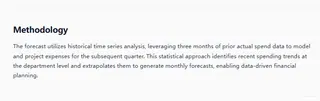
Intelligently choose an appropriate time-series forecasting model based on data characteristics (e.g., monthly frequency and differences across departments and categories)
3. Generate forecasts:
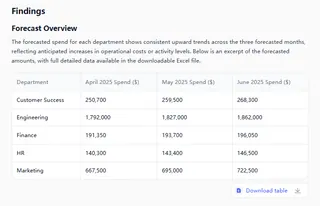
Output clear forecast tables for the next three months, showing predicted values and potential ranges of variation.
4. Visualization:
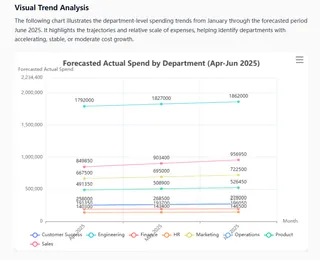
Automatically create combined charts, using different colors or line styles to distinguish trends and seasonality at a glance.
The following is the entire dynamic process of analysis
Conclusion: making prediction accessible
We have outlined the four core types of predictive analytics: classification for categorical judgments, regression for numeric estimates, time series analysis for temporal patterns, and clustering for exploring unknown structures. Each type shares the same goal: turning data into reliable insights about the future to drive more proactive, precise decisions.
However, theory proves its value only in application. In a fast-paced business environment, companies need solutions that can be deployed quickly and directly empower the business. That's exactly what Excelmatic provides — it packages professional predictive analytics into simple conversational commands.
You don't need to get bogged down in complex code or algorithms; just tell Excelmatic your goal like you would ask a question. Excelmatic will quickly generate analysis results and clear charts through the conversation, letting deep insights immediately serve your next decision.
Make predictive analytics no longer the domain of a few experts, but an everyday tool for every business decision-maker.
Start with the spreadsheet in your hands. Use Excelmatic to converse with the future and gain the foresight to act first.
Frequently Asked Questions (FAQ)
Q: How do I choose which type of predictive analytics to use?
A: Match the question to the output you need. Use classification for categorical decisions, regression for numeric estimates, time series for metrics measured over time, and clustering to discover hidden groups. If unsure, start by framing the business objective and the target variable type.
Q: How do I handle missing or messy data before modeling?
A: Impute missing values (mean/median, forward fill for time series, or model-based imputation), remove or flag outliers, standardize units, and encode categorical variables. Always log transformations and keep original data for auditing.
Q: When should I combine multiple methods?
A: Combine when a single method cannot capture all aspects — for example, use time series to project demand, regression to map demand to price sensitivity, and classification to estimate customer response. Ensembles and hybrid pipelines often yield better business results.
Q: What minimum data do I need to build reliable models?
A: There is no single rule, but aim for representative historical records, clear labels for supervised tasks, and enough temporal coverage for time series to reveal seasonality (typically several cycles). More features and diversity improve robustness; if data is limited, use simpler models and validate carefully.