Key takeaways:
- Strategic Definition: An HR Dashboard is a centralized, visual analytics platform for talent strategy decisions,
- Core Value: Its power lies in helping HR teams "see the truth" and "anticipate problems," shifting from reactive to proactive management.
- Four Essential Boards: The article details how to build and use four critical dashboards: Recruitment Retrospect, Resignation Risk Alert, Performance Fairness Check, and Training ROI.
- Modern Implementation: Solutions like Excelmatic demonstrate that building these dashboards can be fast and intuitive, using natural language without complex coding.
Drucker once said, "If you can't measure it, you can't manage it." Yet today, many HR teams still operate on gut feeling.
When a tech company used data to discover that middle-management decision cycles were 40% slower than the industry average and then optimized its structure, many HR teams were still making calls based on last month's Excel reports. That lag in data has a steep price — a bad hire can set a project back months, and losing a key employee can cost as much as 1.5 times their annual salary.
Data doesn't lie, but it needs to be heard correctly. Modern HR doesn't need static reports; it needs a decision partner that can converse in real time. Welcome to the data-driven era — where the best decisions come from precise insight into the organization's pulse, not just years of experience.
The HR Dashboard is the window that makes this insight possible.
What is an HR Dashboard?
The core definition of an HR Dashboard is: a centralized, visual HR data analytics platform used to support an organization's talent strategy decisions. By integrating data from multiple sources, it turns complex HR information into actionable business insights.
The real value lies at the strategic level. Unlike traditional statistical reports, a dashboard with real-time updates and interactive analysis lets leaders quickly spot trends, surface problems, and validate the impact of decisions. For example, it can help answer questions like: "Is our headcount aligned with business growth?" or "What factors are affecting retention of critical talent?"
In essence, an HR Dashboard elevates HR data from operational records to strategic assets, making talent decisions more scientific, forward-looking, and precise.
Why every HR team needs an HR Dashboard
Is its core value simply time savings? Of course that's part of it. But the deeper value comes in two ways:
First, seeing the truth. Heard that "engineering gets the highest pay" rumor in your team? A dashboard can immediately show you the real pay distribution. Want to know if a new training program actually helped? Put training completion next to subsequent performance changes and let the data speak for itself.
Second, anticipating problems. Dashboards can trigger alerts. When a department's monthly turnover exceeds a preset threshold, it flags it in red. This shifts HR from reactive firefighting to proactive management, transforming "personnel" into a true strategic HR partner.
Key Metrics to Track in Your HR Dashboard
An effective dashboard should make the most important signals visible first. Which ones matter depends on your role and business stage, but these core metrics often reveal the organization's health:
| Metric type | Typical metrics | What it tells you | Why it matters |
|---|---|---|---|
| Talent flow | Time-to-fill, channel conversion rates, voluntary turnover | Efficiency and quality of talent inflow/outflow; team stability | Directly affects business continuity and hiring costs |
| Team health | Critical-role coverage, employee satisfaction trends | Risks in team structure and employees' real feelings | Prevents talent gaps and boosts organizational vitality |
| Workforce productivity | Revenue per employee, HR cost ratio | Relationship between people investment and business output | Quantifies HR's contribution and optimizes resource allocation |
| Growth & development | Training coverage, internal promotion rate, high-potential attrition | Organizational learning capacity and speed of talent growth | Ensures sustainable talent pipeline for the future |
These metrics aren't isolated numbers. When shown together on a dashboard, you see the whole story — for example, whether increased training investment truly drives performance gains and reduces turnover.
4 HR Dashboard Scenarios That Drive Actionable Insights
How do these metrics actually help make decisions? A good HR Dashboard usually supports these key decision scenarios:
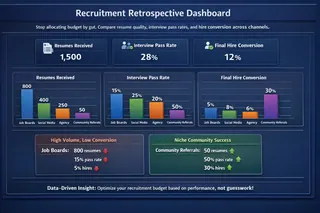
1. Recruitment retrospective board:
Stop allocating budget by gut. This board clearly compares resume quality, interview pass rates, and final hire conversion across channels. You may find that some channels generate large resume volumes but low conversions, while niche community referrals deliver higher success rates. That gives you solid data to guide your next recruitment budget.
2. Resignation risk alert board:
Act before an employee hands in a resignation. This board analyzes performance trends, sick leave frequency, tenure, even project involvement across dimensions to calculate a resignation risk score. When a critical engineer's risk score keeps rising, the system warns you early so HR or managers can intervene and possibly retain the person.
3. Performance fairness check board:
Ensure evaluation fairness. This board cross-analyzes performance results by department, gender, age, and other dimensions. You can instantly see if a department's ratings are consistently low, or if promotion speed differs between genders at the same performance level. These insights help you spot bias in appraisal processes and safeguard a fair culture.
4. Training ROI board:
Prove the value of learning and development. This board links training participation with later performance improvements, promotion velocity, and even project contributions. It answers the tough question: "What did our training spend actually achieve?" That not only improves course design but also gives L&D a stronger voice.
How to Build an HR Dashboard From Scratch | 3 Practical Approaches
There are usually three paths: build from scratch (expensive, slow), buy a standard SaaS product (may not fit unique workflows), or use a flexible analytics platform like Excelmatic.
The first two often require complex implementation and ongoing IT support. The ideal third option should let you get started quickly and grow freely with your business needs.
How Excelmatic Simplifies HR Dashboard Creation
This is precisely why we built Excelmatic. We understand HR's deeper need isn't a set of fixed [charts](LANG/blog/how-ai-charts-transform-gantt-chart-creation/); it's the ability to answer new business questions independently and quickly.
With Excelmatic, you don't need to learn complex programming. It's intuitive: connect your data, then describe your request in natural language. For example, ask: "Build a resignation risk dashboard and find salespeople in the top 30% performance who have recently increased absenteeism."
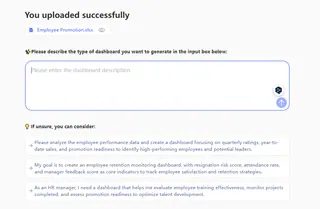
The AIunderstands your intent, automatically links performance, attendance, and other data, and generates an interactive dashboard in seconds — with high-risk employees highlighted. Want to see those employees grouped by tenure? Just add "group by tenure," and the view updates instantly.
The change is fundamental: you go from "I need to wait for an analyst to produce a report" to "I am the analyst." Your analysis speed finally keeps up with business questions.
If you want to learn more about how to generate dashboards for Excelmatic, you can click here for further reading.
HR Dashboard Summary: Transform Data into Strategic Decisions
At the end of the day, an HR Dashboard isn't about showcasing technology — it's about empowering decisions. It frees HR professionals from tedious data wrangling and gives time back to high-value activities: talent insight, strategic planning, and employee engagement.
In a fast-changing business environment, managing by intuition and lagging reports is risky. You need a tool that lets you sense your organization's pulse in real time, test hypotheses with data, and act fast.
Start now — you don't have to wait. Pick the most urgent problem at hand, whether optimizing recruitment channels or reducing attrition in a critical team, and use Excelmatic to quickly build a dedicated dashboard. See what the data will tell you. Let it turn silent numbers into clear signals that drive your organization forward.
Click here to start building your first HR Dashboard with Excelmatic and see how your work changes when the data finally speaks.