Key takeaways:
- Prescriptive Analytics Commands: 10 copy‑paste Excel AI prompts that produce actionable prescriptions.
- Follows the full logic chain: diagnose → root cause → prescribe → impact assessment.
- Includes templates for anomalies, bottlenecks, cost, conversion, churn, inventory, pricing, marketing, and overall performance.
- Shows how to chain templates in Excelmatic: upload data, diagnose, deep‑dive, plan, and monitor.
- Leverages classic frameworks (funnel, cohort, RFM, Pareto) to ensure data‑backed recommendations.
Facing a mountain of sales reports and a roller-coaster performance curve, a marketing director in a late-night office rubs his temples in exhaustion. He knows the answers are hidden in the data, but he doesn't know how to make the data speak.
Data has never been more accessible — nor more confusing. We have vast amounts of information, yet we often find ourselves in the awkward position of "knowing where the problem is but not how to fix it."
Descriptive analytics tells us "what happened," diagnostic analytics tells us "why it happened," but the business really needs to know "what to do next": this is the core value of prescriptive analytics.
From diagnosis to treatment: the evolution of prescriptive analytics
Prescriptive analytics represents the highest stage in the evolution of data analysis. If descriptive analytics is the "check-up report" and diagnostic analytics is the "cause analysis," then prescriptive analytics is the "treatment plan" prescribed by an expert.
Traditional data analysis often stops at identifying problems and explaining causes. We see conversion rates drop and know which step is failing, but we don't know which specific actions will effectively improve it. Prescriptive analytics fills this crucial gap.
By combining business rules, constraints, and optimization algorithms, it not only tells you where the problem lies but also provides concrete, actionable recommendations. With AI advancing rapidly today, our tools can finally assist not just with analysis but with decision-making.
Truly valuable data analysis doesn't produce more charts — it reduces decision uncertainty. Prescriptive analytics is the key path to achieving that.
Ten ready-to-use templates to make data speak "solutions"
Based on classic business analysis frameworks, I've put together ten plug-and-play prescriptive analytics AI instruction templates. Each template follows the logical chain "problem diagnosis → root cause analysis → action recommendations," ensuring that prescriptions are evidence-based.
1. Outlier and volatility prescription:
When a key metric shows unexpected volatility: analyze anomalies in [target metric], diagnose root causes, and provide concrete corrective or optimization recommendations.
For example: "Analyze why the 'order cancellation rate' spiked in the past week — is it due to specific products, channels, or user segments? Please provide concrete steps to reduce cancellations."
2. Bottleneck identification and clearance prescription:
When process efficiency is low: identify the key bottlenecks in [process/stage], quantify their impact, and recommend feasible ways to clear the bottleneck or improve efficiency.
For example: "Identify the time bottlenecks across the end-to-end flow from order placement to delivery, analyze delay durations at each stage, and propose concrete measures to shorten overall delivery time."
3. Cost structure optimization prescription:
When you need to improve return on investment: analyze [cost structure], identify budget overruns or unusually high expenses, and propose targeted cost control or reduction plans.
For example: "Analyze this quarter's marketing cost breakdown, find the three channels with the lowest ROI, and propose a budget reallocation plan."
4. Conversion funnel improvement prescription:
When user churn is severe: diagnose the most leakage-prone stage of the [conversion funnel], analyze why users drop off, and propose concrete strategies to improve conversion at each step.
For example: "Diagnose why users are dropping off between 'add to cart → complete payment' on the website — is it pricing, process friction, or trust issues? Please provide three immediately testable optimization strategies."
5. Customer churn recovery prescription:
When customer churn accelerates: identify characteristics of high-risk churn segments, analyze drivers of churn, and design a tiered recovery or retention intervention plan.
For example: "Identify high-value customers likely to churn in the next 30 days, analyze their common behavioral traits, and design targeted email, coupon, or customer-service outreach strategies to win them back."
6. Inventory health optimization prescription:
When inventory turnover suffers: assess current inventory health, diagnose problematic stock, and propose clearance, promotion, or procurement adjustment suggestions.
For example: "Analyze current inventory, list slow-moving SKUs with shelf life over 180 days, and propose specific actions such as 'discount promotion,' 'bundle sales,' or 'return/clearance' based on category and cost."
7. Resource allocation optimization prescription:
When resource deployment is underperforming: evaluate current resource allocation effectiveness based on [performance metrics], and recommend reallocating resources from low-efficiency areas to high-efficiency ones.
For example: "Based on the past six months' 'sales per capita' and 'customer growth rate' for each sales team, analyze the efficiency of the company's sales staffing and suggest team size adjustments or regional reassignments."
8. Pricing strategy optimization prescription:
When price competitiveness is lacking: combine cost, market demand, and competitor pricing to analyze current pricing of [product/service], and provide recommendations for price adjustments or differentiated pricing.
For example: "Considering product cost, historical price elasticity, and competitor price comparisons, evaluate whether Product A's current pricing is appropriate and suggest an optimal price range or promotional pricing strategy."
9. Marketing campaign attribution prescription:
When you need to optimize marketing spend: attribute core contributors and waste points for the [marketing campaign], and propose concrete optimizations for future similar campaigns.
For example: "Attribute the growth sources for the '618' promotion — how much came from new customers vs. repeat purchases? Which advertising keywords contributed the most? Based on this, recommend budget allocation and strategy optimizations for 'Double 11'."
10. Comprehensive performance improvement prescription:
When you need to boost a business unit's overall performance: comprehensively evaluate [business unit]'s [core KPIs], identify strengths and weaknesses, and propose an improvement plan that includes quick wins and long-term changes.
For example: "Comprehensively evaluate Shanghai branch's 'revenue,' 'margin,' and 'customer satisfaction,' compare it to other branches, diagnose its key shortfalls, and propose a quarter-by-quarter action plan for improvement."
Core framework: the analytical logic chain of prescriptive analytics
These templates work because they embed a complete analytical logic chain: problem identification → root cause analysis → solution generation → expected impact assessment.
Take the conversion improvement prescription as an example.
The full thought process should be: first determine which conversion step has the most severe leakage (problem identification), then analyze the common traits and behavioral paths of users who drop off (root cause analysis), next design optimization plans based on successful examples and best practices (solution generation), and finally estimate the expected impact and required resources of implementing the plan (impact assessment).
Good [prescriptive analysis](/blog/a-practical-guide-to-predictive-and-prescriptive-analytics /) must be built on reliable analytical frameworks. Classic business analysis frameworks — funnel analysis, cohort analysis, RFM, Pareto analysis, etc. — provide the theoretical basis for prescriptions, ensuring recommendations are not speculative but data-supported inferences.
When collaborating with AI, we can explicitly ask it to use specific analytical frameworks: "Use funnel analysis to identify the step with the highest drop-off from browsing to purchase, then use cohort analysis to compare retention differences across channels, and finally provide optimization recommendations based on these analyses."
Such instructions guide the AI to perform logical, in-depth analyses rather than merely listing surface-level observations.
Practical application: issue your first data "prescription" with Excelmatic
Now we leave theory and enter practice. You'll see how the ten instruction templates discussed earlier can be chained together in an AI tool like Excelmatic to form a powerful diagnostic-and-treatment workflow that addresses a complex problem like "declining e-commerce platform profits."
1. Step 1: Upload data and initial diagnosis
Firstly, upload your prepared Excel file in Excelmatic, which includes quarterly reports on department and category budget execution from January to March.
Next, enter your first command in the dialog box:
Analyze the budget execution status of the company as a whole and by month in the first quarter. Identify the departments or categories with the largest overall and monthly budget variances, and present key findings through charts, such as the comparison between actual monthly expenditures and the budget.
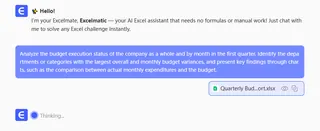
AI will generate a diagnostic report within seconds, which not only uses text to indicate which departments/categories have the most severe overspending or savings, but also automatically creates visual charts such as monthly actual expenditure vs. budget line comparison charts and bar charts of department deviation percentages, giving you a clear understanding of budget execution issues.
2. Step 2: Deep investigation
After the initial diagnosis, you can probe deeper like a consulting expert, following the AI's leads. This is where template combinations shine.
Based on the Step 1 findings, issue a "cost optimization prescription."
Deeply analyze the budget and actual expenditure details of the engineering department for each month in the first quarter. Based on the 'Headcount' data, analyze whether its' Spend_Per_Employee 'is abnormal and explore the main driving factors that lead to variance.
AI will display the relationship between the monthly budget, actual expenditure, and personnel of the department through a combination of bar charts, and may generate a trend chart of per capita expenditure, accurately identifying whether the problem is caused by rising per capita costs, unplanned recruitment, or other reasons.
3. Step 3: Generate a comprehensive treatment plan
Based on the precise diagnosis above, instruct the AI to create a comprehensive treatment plan. For example, issue an "overall performance improvement prescription":
Based on the above analysis, develop a comprehensive improvement plan to optimize the execution of the second quarter budget and control costs. The plan should include: 1 Specific control measures for identified overspending departments/categories; 2. Experience summary and promotion suggestions for departments with significant budget savings; 3. Set core cost control targets and monthly monitoring nodes for the second quarter.
Excelmatic can synthesize the analysis into a clear action outline with concrete tasks, responsible departments (inferred from data labels), and expected outcomes.
4. Step 4: Build a dynamic monitoring dashboard
After issuing the prescription, you need to track its effectiveness. In Excelmatic, you can easily turn the entire analysis into a dynamic monitoring dashboard.
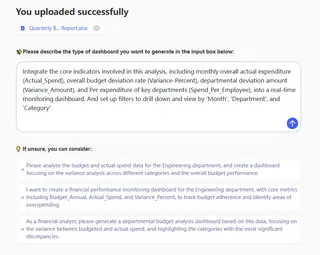
Just enter the instruction:
Integrate the core indicators involved in this analysis, including monthly overall actual expenditure (Actual_Spend), overall budget deviation rate (Variance-Percent), departmental deviation amount (Variance_Amount), and Per Capita expenditure of key departments (Spend_Per_Employee), into a real-time monitoring dashboard. And set up filters to drill down and view by 'Month', 'Department', and 'Category'.
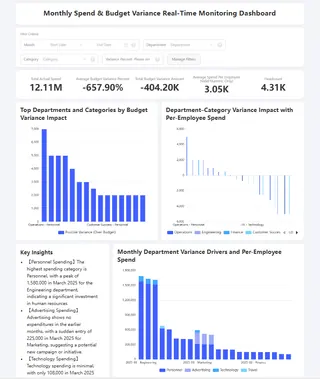
The AI will instantly generate a professional dashboard containing KPI cards, trend charts, and interactive filters. This dashboard can be shared with finance or department heads for monthly tracking of budget execution status. After the new month data of Q2 is updated, simply replace or expand the data source, and the dashboard can be refreshed with one click, achieving a complete closed-loop from diagnosis, treatment to re examination.
Conclusion: from "data insight" to "business action," all it takes is a conversation with AI
We've explored the value of prescriptive analytics, ten ready-to-use templates, and the analysis frameworks behind them. But all these theories and methods ultimately need a simple, direct entry point to turn your business intuition into charts, conclusions, and actionable plans in an instant.
Excelmatic is that ideal entry point. It fundamentally changes how we interact with data:
- It makes professional analysis accessible: no need to memorize complex formulas or menu paths. Just talk to it like you would a senior data analyst and type any of the "prescription instructions" discussed in Chapters 2 and 3.
- It realizes true "analysis-as-decision": from the moment you upload data and issue an instruction, a complete decision loop — "diagnose → investigate → plan → monitor" — is automatically triggered. No more hopping between tools and reports; everything happens in a single conversational flow.
- It turns static reports into dynamic simulations: the generated dashboard is not the end of analysis but the starting point for continuous optimization and monitoring. You can query, tweak parameters, and keep analysis aligned with fast-changing business needs.
Back to our opening scene: the marketing director poring over reports late at night now has a new option. He doesn't have to guess at the mysteries in the data alone. He just opens Excelmatic, types a single instruction, and within minutes receives a data-backed, chart-supported, step-by-step action plan.
The best time to start is now. Open Excelmatic and begin with the one business metric that matters most to you.
Frequently Asked Questions (FAQ)
Q: What exactly are "Prescriptive Analytics Commands?"
A: They are ready-made AI prompts you paste into Excel/Excelmatic to move from diagnosis to concrete action — diagnose issues, find root causes, recommend fixes, and estimate impact.
Q: How customizable are the templates?
A: Highly. Each template accepts parameters (metric, timeframe, segment). Tweak prompts to specify cohorts, channels, constraints, or business rules for tailored prescriptions.
Q: Are there limitations I should be aware of?
A: Yes — garbage in, garbage out; AI may miss causal nuances; external factors (seasonality, supply issues) need explicit inclusion; human judgment remains essential.